
Utility Meter Reading: From Uncertainty to Clarity
Reading utility meters with low vision should be a two-minute household task. Instead, it can turn into a tiny courtroom drama where glare, awkward angles, and one suspicious digit make you doubt your own eyes.
That is the real friction here. Not just blurry numbers, but the exhausting gap between seeing something and trusting that you saw it correctly. Digital electric meters and analog water meters fail in different ways, and guessing your way through either one can quietly create bad logs, missed leak clues, or a bill dispute you never needed.
This guide helps you read utility meters more reliably with less strain, whether the display is digital or analog, whether the problem is contrast, dial confusion, or the shiny little betrayal of outdoor glare. The goal is not perfect vision. It is a repeatable method that makes the task safer, calmer, and easier to verify.
It is built around practical low-vision habits, phone-camera workarounds, lighting control, and the small routine changes that reduce expensive mistakes. Because this usually is not an eyesight-only problem.
- • It is often an angle problem.
- • A glare problem.
- • A sequence problem.
And once you solve the right problem first, the meter stops feeling like a riddle and starts behaving like what it should have been all along: ordinary maintenance.
Table of Contents
Fast Answer: Reading utility meters with low vision gets easier when you stop treating every meter like the same visual problem. Digital and analog meters fail in different ways. Glare, distance, contrast, dial layout, and awkward meter placement all change what works. The best approach is usually a mix of lighting control, camera positioning, magnification, and a repeatable checking routine that reduces guessing.
Reading Utility Meters Low Vision Starts With the Real Problem, Not the Meter Type
Is the hard part glare, tiny numbers, dial confusion, awkward placement, or all four?
People often say, “I just need a stronger magnifier,” when the real problem is a crowded little orchestra of issues playing at once. The glass face throws glare. The meter is mounted too low. The numbers are technically visible but not stable. Or the dials make sense only if your eyes can hold three pieces of information at once without dropping one on the floor.
That matters because the right fix depends on the actual failure point. If the trouble is contrast, brighter light alone may do very little. If the trouble is angle, leaning closer may make the display worse. If the trouble is sequencing, magnification can enlarge the confusion instead of solving it.
I have seen this with ordinary household tasks again and again. A problem that looked like “bad vision” turned out to be “bad viewing geometry.” The meter was fine. My posture was not. My flashlight was doing a theatrical spotlight impression and washing out the number I needed most.
Why “I can see it up close” is not the same as “I can read it accurately”
Low-vision reading is not only about visibility. It is about capture, interpretation, and confidence. You may be able to move close enough to see a number, but still lose accuracy because you are balancing, twisting, squinting, or rushing. That is not failure. That is a poor reading environment.
Many meter errors happen in the gap between “I saw something” and “I am sure that is what I saw.” The safest routine narrows that gap. It slows the sequence down and gives your brain fewer jobs at once.
The goal is not just visibility, but repeatable confidence
The real win is not reading the meter correctly once. It is being able to repeat the same method next week or next month with very little drama. Think of this less as a heroic visual performance and more as a kitchen recipe. Same bowl. Same spoon. Same order. Less room for chaos.
- Contrast problems need different fixes than sequencing problems
- Bad angle often mimics bad eyesight
- Confidence comes from routine, not willpower
Apply in 60 seconds: The next time you check a meter, name the single hardest part first: glare, digits, dials, or access.
Digital vs Analog First: They Look Similar From Far Away, but They Fail Differently
Digital meters usually create contrast and glare problems
Digital displays often seem easier because they offer one neat row of numbers. In practice, they can be slippery. Some screens darken at an angle. Others reflect the sky, your shirt, or the flashlight beam like a small, stubborn mirror. Smart electric meters can also cycle through screens, which adds a timing problem on top of a visibility problem.
The U.S. Energy Information Administration explains that many utilities now use electronic smart meters rather than older mechanical systems. In plain household terms, that means a lot of readers are no longer dealing with a single static display. They are dealing with a screen that may update, rotate, or present information in more than one format.
Analog meters usually create interpretation and sequencing problems
Analog meters play a different trick. The visual target may be larger, but the meaning is less immediate. You do not just read. You interpret. Dials may turn in alternating directions. A pointer hovering between two numbers can make your confidence evaporate in half a second. Suddenly you are not reading a value. You are negotiating with uncertainty.
This is where some people get betrayed by familiarity. They assume they know how analog meters work because they have seen clocks, stove knobs, and old gauges all their lives. But utility dials are their own species. Friendly-looking. Slightly treacherous.
Why the same magnifier can help one meter and confuse another
A handheld magnifier might work beautifully on a static number line but become awkward with multiple analog dials. Enlarging one dial too much can make it harder to keep track of the others. By contrast, phone zoom can let you capture the full meter first and sort it out afterward, which is often far less stressful.
| Meter type | Usually hardest part | Best first move | Time trade-off |
|---|---|---|---|
| Digital electric meter | Glare, contrast, screen cycling | Use phone camera and adjust angle before zooming | Fast once the angle is right |
| Analog water meter | Dial order, directional confusion | Take a still photo and read it slowly after | Slower, but more accurate |
Neutral next step: Identify whether your household meter challenge is mainly digital-screen trouble or analog-dial trouble before changing tools.
Before You Read Anything: Build a Safer Meter-Checking Setup
Start with footing, posture, and reach before chasing better vision tools
This is the unglamorous truth that saves people from preventable errors: if the position is bad, the reading will usually be bad too. A meter in a narrow side yard, a basement corner, or a ground box near wet grass does not just test sight. It tests balance, reach, neck comfort, and patience.
Do not build a routine around a pose that feels like yoga designed by a locksmith. If you have to lean, crouch, and brace yourself with one hand while using the other to hold a phone and flashlight, accuracy will almost certainly suffer.
Why outdoor boxes, basements, and side-yard placements change the reading strategy
Placement shapes method. Outdoor water meters often collect dirt, condensation, leaf litter, or bright reflected daylight. Basement utility areas bring dimness, clutter, and awkward ceiling lighting. Side-yard electric meters can have the perfect storm of shadow plus reflective cover plus inconvenient body angle.
In one house, I once checked a meter at noon because I assumed more daylight would help. It was spectacularly wrong. The sun turned the cover into a polished little insult. I came back later with the same eyes, same phone, same meter, and a different angle. It felt like someone had swapped in a better display.
A small flashlight, a phone camera, and a pause beat rushing every time
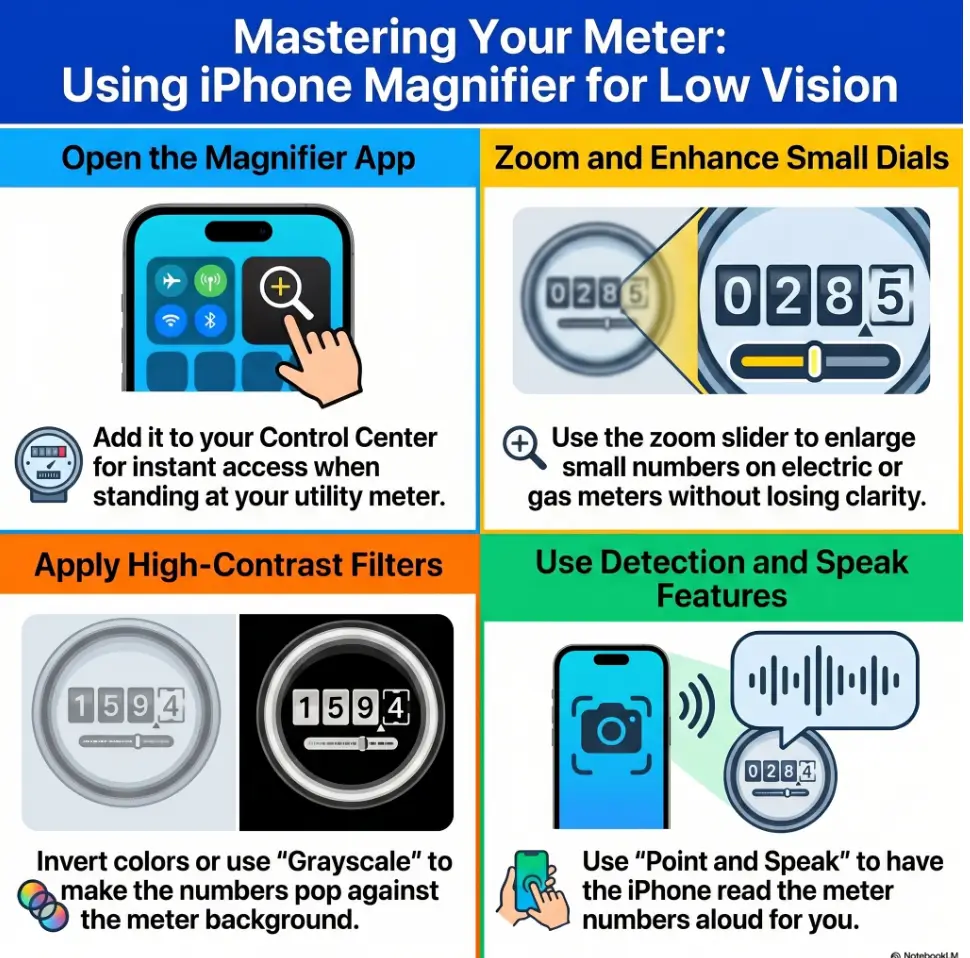
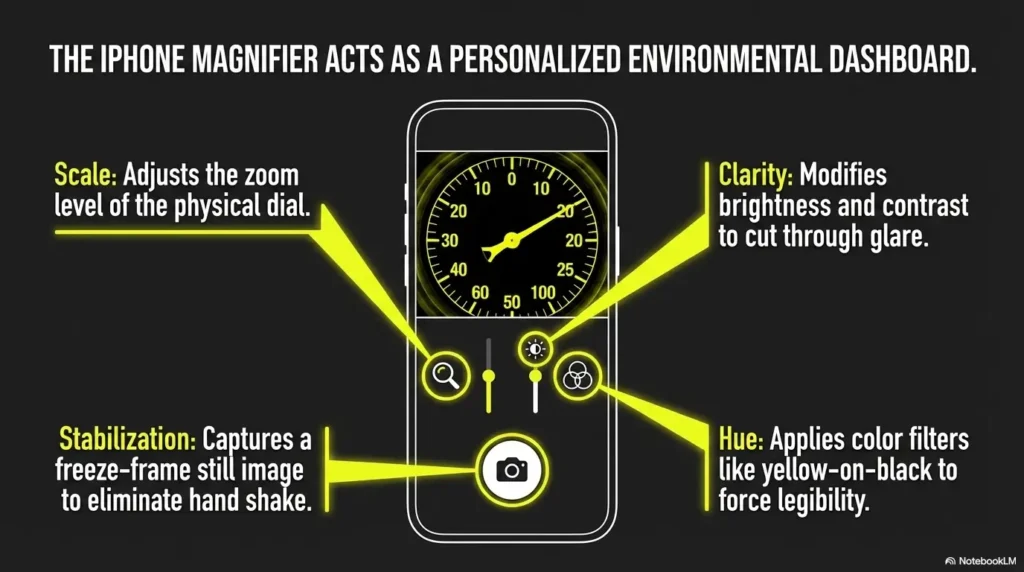
You do not need a drawer full of gear. A compact flashlight, a phone with a decent camera, and a simple note method solve a surprising amount of trouble. Apple’s accessibility guidance notes that the iPhone Magnifier app can zoom in on nearby objects and text. For many low-vision users, that turns the phone into the first-line tool rather than the backup plan, especially if you already use shortcuts like Back Tap to open Magnifier more quickly.
The most useful “tool,” though, is the pause between looking and recording. That pause is where you catch the almost-right reading before it becomes a billing headache.
Show me the nerdy details
When posture is unstable, the visual system has to work harder because image capture becomes less consistent. Even slight body sway changes glare angle, focus, and framing. That is why a still photo often outperforms direct viewing for meter reading. It removes motion from the equation and lets you inspect details after the physical effort is over.
Digital Meter Reading: When the Numbers Are There but Still Refuse to Behave
How backlit screens, sun washout, and reflection distort otherwise simple displays
Digital meters can be maddening because they promise clarity. A row of numbers should be straightforward. Then the real world barges in. Sunlight flattens the contrast. The glass reflects your face. The display darkens when you stand off-center. What looked like an 8 becomes a 3 with the confidence of a stage magician.
This is why “just get closer” often fails. Nearness changes your angle. Angle changes legibility. Suddenly the fix makes the problem worse.
When zooming with a phone works better than leaning closer
A phone camera lets you separate capture from interpretation. That is the whole game. Hold the phone where the screen looks clearest, not where your face can get nearest. Then zoom, freeze, and review. Many readers discover that they can read the photo far more reliably on the phone screen than they can read the actual meter in place. If your screen feels too glaring while you do this, it may also help to tune the display using Reduce White Point versus Night Shift for glare-sensitive eyes.
Try this sequence:
- Stand where you feel stable first.
- Move the phone until glare drops, even if that means holding it slightly off-center.
- Take 2 or 3 photos instead of trusting one.
- Read the clearest image after you step back.
Let’s be honest… some digital screens are technically visible and still practically unreadable
This is where people can be unfair to themselves. A display may be visible in the strictest sense, yet still not readable in a usable, repeatable way. That is not the same thing. If you can make out the digits only during a two-second sweet spot while crouched at a crooked angle, you do not have a reliable method. You have a lucky accident.
Reliable reading means a method you can repeat on a rushed Tuesday, in imperfect light, without needing a small miracle.
- Angle controls contrast
- Photos reduce time pressure
- Two extra shots beat one uncertain guess
Apply in 60 seconds: On your next check, take three photos from slightly different angles before recording any number.
Analog Meter Reading: When the Dials Turn Into a Puzzle
Why dial direction changes make low-vision reading harder than people expect
Analog meters rarely fail because the markings are tiny alone. They fail because they ask your eyes and memory to cooperate under pressure. One dial turns clockwise. The next turns counterclockwise. Your brain says, “Surely that cannot be necessary,” and the meter says, “Watch me.”
The problem multiplies if the pointer sits between two numbers. You now have to remember the reading rule while also tracking sequence across several dials. That is a lot of cognitive traffic for a task people often treat as simple.
How to track the dials without losing your place mid-read
The calmest method is usually this:
- Capture the entire meter in a still photo.
- Start from the leftmost dial or the order recommended by your utility.
- Read one dial at a time, saying it out loud or writing it down immediately.
- Use a finger on the phone screen to mark where you are, so your eyes do not drift.
That little finger-on-screen trick sounds almost comically low-tech, and it works. Sometimes accessibility is not fancy. Sometimes it is just refusing to let your place wander off like a distracted cat.
The hidden problem is not eyesight alone. It is visual memory under pressure
Low vision can turn analog reading into a memory problem because you have to hold one dial’s meaning while decoding the next. If you glance away, shift posture, or get interrupted, the whole thing can unravel. That is why still photos are so powerful. They give you a stable target and let you rebuild the sequence at your own pace.
Eligibility checklist: Is a still-photo method likely to help your analog meter reading?
- Yes if you lose your place between dials.
- Yes if crouching near the meter makes you rush.
- Yes if glare changes when you move your head.
- No if the meter face is physically blocked or damaged beyond visibility.
Neutral next step: Test one still photo and compare it against your usual live reading method before changing anything else.
Camera First, Eyes Second: Why a Phone Often Becomes the Best Accessibility Tool
When to use the live camera view instead of trying to read the meter directly
There is a quiet freedom in admitting that the phone may simply be the better pair of eyes. For many low-vision readers, the live camera view offers a bigger, brighter, more controllable image than the actual meter. You can adjust distance without moving your body much. You can zoom without bending closer. You can freeze the moment before it slips away.
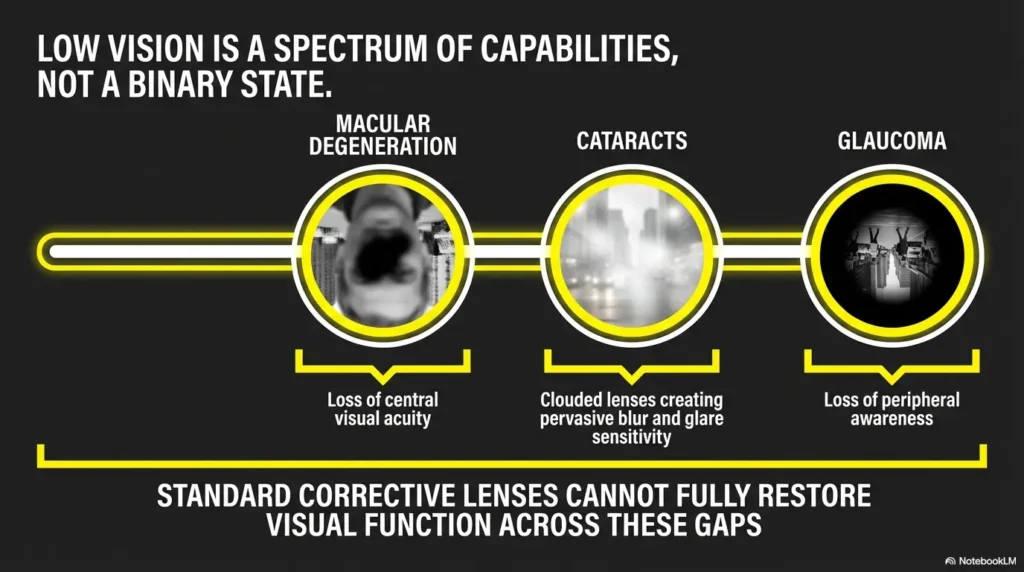
The National Eye Institute describes low vision as reduced sight that makes everyday activities harder and is not fixed by ordinary glasses, contacts, medicine, or surgery. Meter reading fits squarely inside that reality. It is an everyday task, not a dramatic emergency, and yet it can be stubbornly exhausting without adaptive technique.
How to position the phone to reduce shadow, tilt, and number distortion
A few small habits matter more than expensive accessories:
- Keep the phone lens as parallel to the meter face as possible.
- Let the camera, not your body, do the approaching.
- Shift a few inches left or right before adding more zoom.
- Use the phone’s exposure adjustment if the display looks washed out.
I learned this the slightly embarrassing way, after taking six useless photos from the “obvious” angle and one perfect photo from an angle that felt silly. The silly angle won. Utility meters do not care about dignity. If scanning text and documents is already part of your routine, you may find some of the same habits useful here, especially the framing and contrast tricks in iPhone scan settings for low vision.
Why still photos can be better than real-time viewing for analog dials
Real-time viewing is useful for finding the meter and framing it. Still photos are better for slow interpretation. They let you pinch-zoom, crop, brighten, and compare without the physical hassle of staying in position. If you are checking usage for leak monitoring or bill sanity checks, saved photos also create a paper trail without paper, much like a simple low-vision filing system helps other household records stay usable.
Mini calculator: How often should you log a meter if you are watching for a problem?
If you suspect a leak or sudden usage spike, try this simple rule: days to monitor = 3 to 7, and checks per day = 1 to 2. That produces 3 to 14 data points, which is often enough to spot a strange pattern without turning your week into a surveillance documentary.
Neutral next step: Pick the smallest monitoring plan you can actually finish, then stick to it.
Glare Is the Thief Here: Fix the Light Before You Blame Your Eyes
Move the light source off-axis instead of aiming it straight at the meter
Glare steals detail with remarkable efficiency. The natural impulse is to shine light straight at the thing you want to see. That often backfires. Better results usually come from moving the flashlight off-axis so the reflection bounces away from your viewing angle instead of into it. If your flashlight itself feels harsh, the same principle behind making an iPhone flashlight less harsh can help you think more carefully about intensity and angle here too.
Think of it like trying to read through a window at night. If the lamp is pointed right back at you, the glass wins. If the light shifts, the actual scene reappears.
Why midday sun can make digital displays worse, not better
Brighter conditions are not automatically clearer conditions. Outdoor meter covers, glass faces, and smooth screens can become hostile at noon. Morning or late-afternoon checks sometimes produce more usable contrast, even though the overall light is lower.
This surprises people because it feels backward. But clear reading depends on light direction and surface behavior, not raw brightness alone.
Here’s what no one tells you… brighter is not always clearer
Low-vision troubleshooting often starts with “add more light.” That is sometimes correct and sometimes gloriously wrong. What you usually need is better light control. A softer flashlight from the side. Your own body blocking a reflection. A small tilt of the phone. A one-step move to the left. Tiny adjustments, huge payoff. Readers who deal with glare elsewhere in the house may notice familiar patterns from articles on how to read glossy mail without glare or window film for glare.
Infographic: A 4-step low-vision utility meter routine
1
Stabilize
Check footing, posture, and reach before reading.
2
Control glare
Shift angle or move light off-axis before zooming.
3
Capture first
Use live view or 2 to 3 still photos.
4
Verify
Compare with your last reading before logging.
- Move light off-axis
- Try a different time of day outdoors
- Adjust position before increasing magnification
Apply in 60 seconds: Test one flashlight angle from the side instead of straight-on.
Who This Is For, and Who It May Not Be Enough For
Best for readers with low vision who can use a phone, magnifier, or lighting adjustment
This approach works best for people who can safely access the meter and use at least one adaptive aid such as a phone camera, built-in Magnifier, handheld magnifier, or controlled flashlight. It is especially helpful if your main problem is clarity, sequencing, or glare, rather than a physically inaccessible meter.
Useful for caregivers helping with household bill tracking and meter checks
Caregivers often mean well and accidentally make the process noisier. They talk while the reader is concentrating. They offer rapid-fire numbers. They move the light at the wrong moment. A calmer role is better: hold steady, confirm sequence, record what was agreed, and compare against the previous reading afterward.
The best caregiver help feels less like takeover and more like scaffolding.
Not enough when the meter is physically unsafe to access or consistently unreadable even with tools
If the meter is in a dangerous location, under a damaged cover, near electrical hazards, or impossible to reach without awkward strain, this stops being a reading problem and becomes an access problem. That is the point where you may need a utility-company accommodation conversation, professional assistance, or a safer alternative way to monitor usage. No household task deserves a fall, a pulled back, or a foolish risk.
Commercial entities worth knowing: your local water utility, your electric utility, the National Eye Institute, and Apple’s accessibility tools may all play a role in making this task easier and safer.
Common Mistakes: The Tiny Habits That Create Big Reading Errors
Reading too fast and trusting the first number you think you saw
The human brain loves closure. It wants the number to be done before the eyes are actually sure. That is why the first reading often feels emotionally persuasive even when it is slightly wrong. Slow it down. Take the extra ten seconds. Ten seconds is cheaper than an hour of doubt later.
Standing at the wrong angle and mistaking reflection for the display
This is especially common with outdoor digital meters. You think you are seeing the screen; you are partly seeing the sky. Or your own shirt. Or a patch of bright fence. Once you notice this, you cannot unsee it. The meter had been honest. The reflection was the liar.
Mixing up analog dial sequence because the meter “looked familiar”
Familiarity breeds carelessness here. People rush because the meter resembles something they think they already understand. Analog meters punish that assumption. Read the sequence deliberately every time.
Forgetting to compare the new reading with the last one for a basic sanity check
A quick comparison will not catch every issue, but it catches a surprising number. If the new reading looks wildly out of step with recent history, pause before panicking. It may be real. It may also be a clipped digit, wrong dial, or bad photo.
Quote-prep list: What to gather before you call a utility company about a suspicious reading
- Date and time of your latest reading
- One or two clear photos of the meter
- Your last 2 to 3 readings
- Any known leak, appliance change, vacancy, or unusual usage event
Neutral next step: Save these details in one note so you do not have to reconstruct the story later.
Don’t Do This: Low-Vision Workarounds That Quietly Backfire
Do not force a close, awkward position that turns reading into a balance problem
If your reading method requires physical strain, it is not a good method. A number is not worth a wobble, slip, or sharp twist in the back. The body keeps score, even when the meter does not.
Do not depend on memory alone after stepping away from the meter
This is one of the sneakiest traps. You think, “I will remember it for five seconds.” Then the cover drops, the phone screen goes dark, someone talks to you, or you simply lose the sequence. Record it immediately or take the photo first.
Do not assume every utility company uses the same display logic
Some displays cycle. Some water meters prioritize one set of digits and de-emphasize another. Some analog instructions vary. Treat each meter as its own instrument until you know otherwise.
Show me the nerdy details
The reason memory fails so easily here is that utility readings often combine perceptual uncertainty with brief retention. You are not just remembering digits. You are remembering digits you were only partly sure about in the first place. Externalizing the reading into a photo or note reduces both error sources at once.
When the Reading Looks Wrong: How to Check Yourself Before Panicking About a Bill
Compare with your prior reading instead of reacting to one strange number
A surprising reading deserves attention, not immediate panic. Start by comparing it to your last recorded value. Does the jump look possible given your household routine? Guests, outdoor watering, HVAC changes, a leak, or a new appliance can all shift usage. So can a simple reading mistake.
Distinguish a genuine usage spike from a misread dial or clipped digit
There is a particular kind of anxiety that comes from a number that looks too high. It can feel like standing in a hallway after hearing a strange sound at night. Before your mind writes a horror novel, check the basic suspects: wrong dial order, digit cut off by glare, screen cycling, or old photo mistaken for new.
Why a second photo often solves what a second look does not
A second live look can repeat the same mistake. A second photo from a slightly different angle often reveals what the first one hid. That tiny shift in perspective can turn a dubious 8 into a clearly humble 3.
- Compare against the last reading
- Retake the photo from a different angle
- Look for one likely error source before assuming a major problem
Apply in 60 seconds: Create a single note on your phone labeled “Utility Readings” with date, number, and photo.
Water vs Electric Meters: Same Chore, Different Clues
Water meters often involve awkward placement, dirt, covers, and outdoor glare
Water meters are frequently the more physically annoying of the pair. They may live under covers, near the ground, outside in bright light, or in spots that invite dirt and shadows. The challenge is often environmental before it is visual.
If you are checking for a suspected leak, consistency matters more than theatrical effort. Same time of day if possible. Same viewing method. Same note format. Pattern is what helps you here.
Electric meters often involve screen cycling, reflections, or dial interpretation
Electric meters tend to be easier to access but trickier in display behavior. A smart meter may rotate through data. An older analog meter may require more interpretation. Either way, the best clue is not “Which utility is this?” but “What visual behavior is it showing right now?”
Why your reading routine should match the utility, not just your vision needs
Your eyes matter, of course. But the meter’s behavior matters just as much. A water meter might need a better flashlight plan. An electric meter might need a better angle and photo routine. One universal routine sounds efficient. In practice, two small specialized routines often work better. And if household tracking is already easier when you use a dedicated system, the same logic behind a low-vision grocery list system applies here too: structure reduces friction.
| Tier | What changes | Best use case |
|---|---|---|
| Tier 1 | Direct look only | Clear indoor meter, low glare |
| Tier 2 | Direct look + flashlight angle change | Mild contrast trouble |
| Tier 3 | Live phone camera view | Digital screen or moderate glare |
| Tier 4 | Still photo + zoom review | Analog dials or unstable posture |
| Tier 5 | Photo + helper + documented log | Recurring uncertainty or suspected billing issue |
Neutral next step: Place your own meter routine at the lowest tier that gives you reliable results. More complexity is not always better.
Short Story: A reader once described checking her outdoor water meter as “trying to read a secret through a shiny trapdoor.” That phrase stayed with me because it was exactly right. She had been blaming her eyes, buying stronger magnification, and leaning closer each month. What finally worked was almost embarrassingly simple.
She changed the time of day, used her phone instead of direct viewing, took two photos rather than one, and logged the reading before closing the cover. Her new routine took maybe one extra minute. But the emotional difference was huge. She stopped second-guessing herself after every check. The meter did not become beautiful. It became manageable. And that is usually the real victory with accessibility: not perfection, just steadier ground under your feet.
Next Step: Make One Meter Easy Before You Try to Solve Them All
Pick the meter you check most often and test one repeatable setup this week
If you try to optimize every utility task at once, you will end up with a bag of half-tested ideas and no dependable habit. Start with the meter you actually use most often or the one that creates the most stress. Build one method that feels boringly dependable. Boring is good here. Boring means the routine is working.
Create a simple note template for date, reading, and photo
Your template can be almost laughably small:
- Date
- Time
- Meter type
- Reading
- Photo attached
That is enough. You do not need a grand system. You need a system that survives ordinary life. Some readers also find it useful to pair the note with a low-vision calendar system for appointments and reminders so the checks happen on a rhythm rather than by accident.
Accuracy grows faster when the routine gets simpler, not more elaborate
This brings us back to the hook. The problem is not that utility meters are impossible. It is that they often punish improvisation. Once you reduce the task to a few dependable moves, the stress falls away. One stable stance. One camera method. One note habit. Suddenly the job stops feeling like a test and starts feeling like maintenance.
- Start with one meter
- Use one reading method consistently
- Log the result immediately
Apply in 60 seconds: Make a phone note now with headings for date, utility, reading, and photo.
For broader support on low vision and everyday task adaptation, the National Eye Institute offers patient-friendly guidance on low vision, and Apple’s accessibility pages can help if your phone is part of your reading system. If lighting is part of the battle in other rooms too, you may also appreciate guidance on reading lamp position for central vision loss.
FAQ
How can a person with low vision read a digital electric meter more clearly?
The easiest improvement is often to use a phone camera instead of relying on direct viewing. Stand where you feel stable, reduce glare by changing angle first, then zoom or take 2 to 3 photos. Read the clearest image after stepping back.
What is the easiest way to read an analog water meter with low vision?
For many people, it is easier to take a still photo and read the dials slowly on the phone screen. This reduces body strain and lets you keep your place across the dial sequence.
Is it better to use a flashlight or a phone camera for utility meter reading?
Usually both, but in different roles. The flashlight helps control visibility. The phone camera helps capture and verify. If you must choose one, the phone often offers more flexibility because it can magnify, freeze, and store the image.
Why do utility meter numbers look clear in person but wrong in photos, or the reverse?
Angle, glare, exposure, and surface reflection can change how digits appear. A meter can look readable in direct view but lose detail in a photo, or look confusing in person and become clearer once the phone adjusts exposure and lets you zoom.
How do I reduce glare on an outdoor water meter cover or glass face?
Try checking at a different time of day, move your light source off-axis instead of straight on, and shift your viewing angle slightly left or right before adding more magnification.
What should I do if I cannot tell whether an analog dial has passed a number?
Take a still photo, zoom in, and review the neighboring dials carefully. If you are still unsure, take a second photo from a slightly different angle and compare before recording the number.
Can I rely on my utility company app instead of reading the meter myself?
Sometimes, but not always. Utility apps can be helpful for trend tracking and billing review, but they may not replace a manual reading if you are checking for a leak, verifying a suspicious bill, or comparing a current value in real time.
How often should I record meter readings if I am trying to catch a leak or usage spike?
A modest plan is often enough. One or two checks a day for 3 to 7 days usually gives enough data to notice a pattern without creating burnout.
What if the meter is placed somewhere physically difficult or unsafe to access?
Do not force the task. If access is unsafe, treat it as an access problem, not a reading problem. Contact the utility, ask about accommodations or service options, or get practical help.
How can caregivers help without making the process more confusing?
The best help is steady and simple: hold the light, keep the phone stable, repeat numbers only when asked, and record the agreed reading right away. Avoid talking over the reading process.
When a utility meter becomes hard to read, the frustration can feel larger than the object itself. A small number, a small cover, a small task, and suddenly your whole confidence gets dragged into it. The answer is rarely brute force. It is method. Make one meter easy within the next 15 minutes: choose the one you check most often, take two photos from different angles, compare them, and save a note with the date and reading. That single pilot step closes the loop. What felt slippery becomes trackable. What felt personal becomes practical.
Last reviewed: 2026-04.