
Real-World Communication vs.
Simple Sound Amplification
AirPods Conversation Boost can be genuinely useful for seniors with low vision and hearing loss, but only in the way a good reading lamp is useful: it helps in the right conditions, and becomes maddening in the wrong ones. The trouble is that most families test it in a calm five-minute demo, then expect it to carry a full day of real conversation.
That is where people get stuck. The older adult may hear more sound, yet still miss words at the pharmacy counter, tire quickly during family visits, or need help every time the settings drift. Suddenly the problem is not just hearing support. It is setup friction, speech clarity, listening fatigue, ear comfort, and whether the whole routine can survive an ordinary Tuesday.
Keep guessing, and you can waste money on a sleek workaround that never becomes dependable.
This guide helps you figure out whether AirPods Conversation Boost is a practical fit, where it works best, where it disappoints, and how to set it up more safely for real-world use. It also shows when a simpler assistive device, OTC hearing aid, or formal hearing evaluation may be the smarter move.
The advice here is grounded in the realities that matter most: face-to-face speech, accessibility settings, room noise, caregiver support, and repeatable daily use.
Let’s make this easier to judge before hype does the deciding for you.
Fast Answer: AirPods Conversation Boost can help some seniors with low vision and mild-to-moderate hearing difficulty hear a person speaking in front of them more clearly, especially in quiet or semi-noisy settings. It is not a cure, not a full substitute for prescribed hearing care, and not ideal for every kind of hearing loss. The best results usually come from careful setup, accessibility tweaks, and realistic expectations about where it works well and where it does not.
Table of Contents
Why Conversation Boost Feels Promising, but Not Always Simple
What Conversation Boost is actually trying to do in everyday life
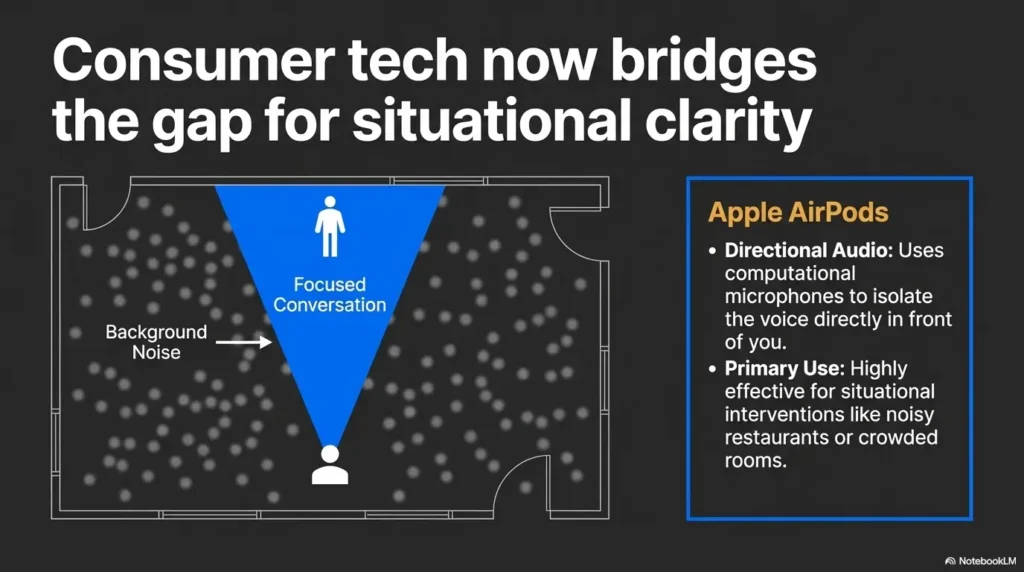
At its best, Conversation Boost is trying to solve a very ordinary heartbreak: you are sitting across from someone you care about, their mouth is moving, and the meaning arrives late, blurred, or not at all. Apple’s support guidance describes the feature as a way to focus on the person speaking in front of you while using compatible AirPods hearing settings. That sounds tidy. Real conversation is not tidy. Chairs scrape. Someone starts rinsing dishes. A television murmurs from the next room like a stubborn ghost.
So the appeal is obvious. Instead of merely making the world louder, the feature is meant to make front-facing speech easier to catch. For some users, that can be the difference between participating and pretending.
Why dual-sensory users often need more than “turn it on”
For a senior with low vision, hearing support is rarely a single-switch problem. Many people quietly lean on visual cues without even realizing it: lip movement, facial expression, posture, hand gestures, who in the room is looking toward whom. When vision is reduced, the listening task gets heavier. That means a speech-enhancing feature may help, but it may not remove the whole burden.
A family often discovers this the hard way. The sound seems “better,” yet the older adult still looks drained after twenty minutes. Nothing is technically broken. The communication load is just still too high.
The hidden question behind the feature: clearer speech, or just louder sound?
This is the question buyers skip because excitement tends to sprint ahead of nuance. Louder is not the same as clearer. Older adults with age-related hearing difficulty often struggle especially with understanding words, particularly in noise. The National Institute on Deafness and Other Communication Disorders explains that background noise can make speech harder to follow, and that quieter seating and face-to-face positioning matter more than many people think. That is why a feature can seem wonderful in a calm living room and suddenly ordinary at a busy restaurant.
- Test clarity, not just volume.
- Judge the feature in everyday rooms, not silence alone.
- Expect dual-sensory fatigue to shape the result.
Apply in 60 seconds: Ask one question during testing: “Did the words become easier to understand, or just easier to hear?”
Eligibility checklist
- Uses an iPhone comfortably, at least for basic calls and settings: Yes / No
- Can tolerate earbuds in the ear for 20 to 30 minutes: Yes / No
- Main complaint is face-to-face speech, not only TV volume: Yes / No
- Can charge and store small devices consistently, with help if needed: Yes / No
Neutral next step: If you answered “No” to two or more lines, test usability first before buying around the feature.
Who This Is For, and Who May End Up Frustrated
Best fit: seniors with low vision who need easier face-to-face conversation support
The strongest fit is usually an older adult who already uses an iPhone, can manage AirPods with some consistency, and mainly wants help during person-to-person conversation. Think kitchen-table talk, the pharmacy counter, a family visit, or a doctor’s front desk. Not glamorous. Just the places where missed words become missed information.
A scene many caregivers know: Dad hears enough to keep nodding, but not enough to track details. Mom can still follow if the speaker faces her and the room is calm, but once two voices overlap, the thread snaps. In cases like these, Conversation Boost may be worth a careful trial.
Better in mild-to-moderate hearing difficulty than in every hearing profile
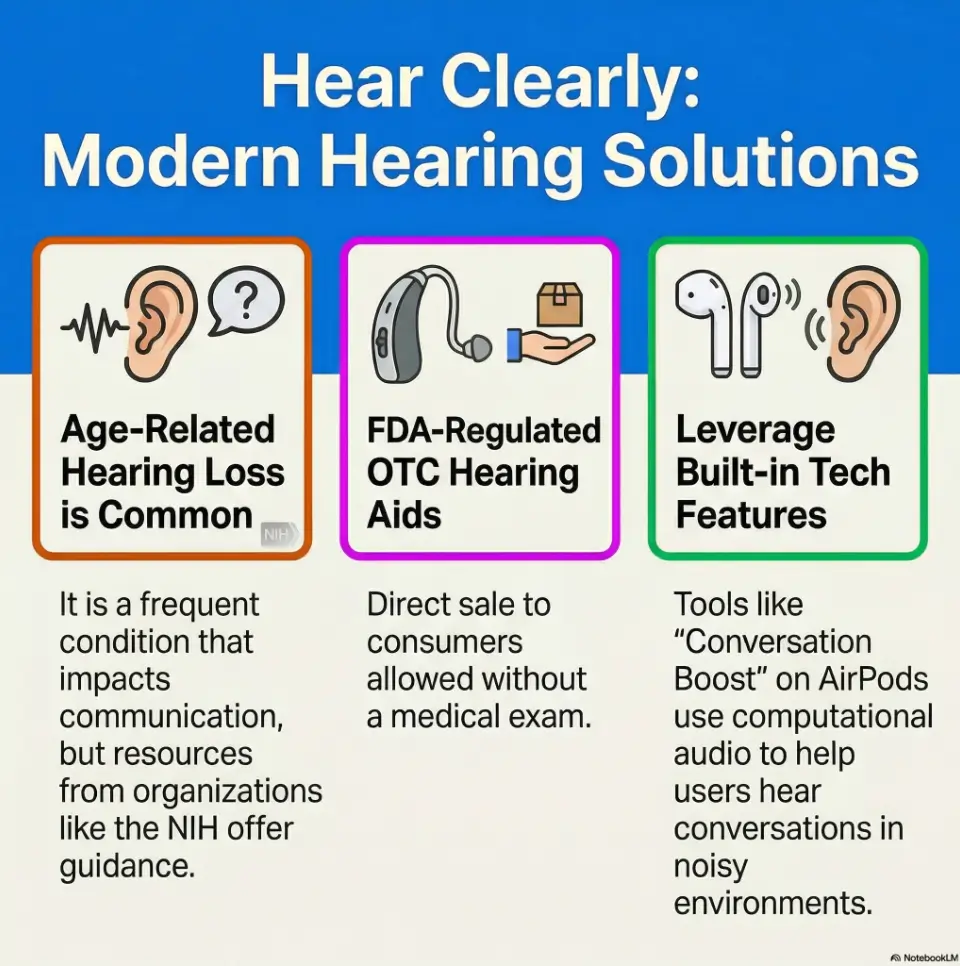
This matters. The FDA’s guidance on over-the-counter hearing devices draws a clear line around adults with perceived mild to moderate hearing loss. That does not mean every person in that range will love AirPods, and it definitely does not mean stronger hearing needs disappear because consumer tech has gotten clever. It means the likely success zone is modest, not universal.
If someone has more severe difficulty, one-sided symptoms, sudden changes, significant distortion, or trouble in nearly every environment, a consumer audio feature may feel like placing a paper umbrella over a thunderstorm.
Not a great fit when dexterity, battery routines, or ear comfort are already a struggle
There is a category of failure that has nothing to do with acoustics. Tiny case. Tiny stems. Tiny charging habits. Tiny frustrations that collect like lint in a pocket. For someone with arthritis, tremor, reduced finger sensation, or low confidence with small electronics, the daily routine may collapse before the sound question is even settled.
Ear comfort also matters more than people admit. Some older adults dislike in-ear wear immediately. Others tolerate it for ten minutes, then spend the next twenty tugging at the fit and losing concentration. A device that interrupts the conversation is not helping the conversation.
When a simpler assistive device may be the better answer
Sometimes the better answer is less elegant and more dependable. A pocket amplifier, a TV-specific listening system, a landline-compatible amplified phone, prescription hearing care, or a simpler OTC hearing aid may fit daily life better. Beauty is overrated when reliability is what actually gets Grandma through the pharmacy line.
Decision card: When AirPods Conversation Boost vs a simpler device
| Choose this | Usually makes sense when |
|---|---|
| AirPods Conversation Boost | The user already likes iPhone tools, wants support mainly for face-to-face talk, and can manage charging. |
| Simpler assistive option | The user dislikes earbuds, struggles with setup, or needs dependable amplification with less mode-switching. |
Neutral next step: Decide based on daily routine, not brand prestige.
Setup Friction Starts Before the First Conversation
The iPhone settings that matter more for low-vision users
Before anyone judges the sound, make the phone itself friendlier. Bigger text, stronger contrast, magnification, spoken screen support, and a predictable Control Center layout matter because they reduce the cognitive toll of every adjustment. Apple’s accessibility guidance for iPhone includes text-size controls, display tweaks, Zoom, VoiceOver, and spoken content features. These are not decorative extras. They are the runway lights.
One family member often rushes straight to pairing AirPods, only to discover later that the older adult cannot reliably find the hearing controls again. That is like installing a fancy lock and leaving the key in another building.
How larger text, VoiceOver, magnification, and guided setup reduce the barrier
Set up with the older adult present, not as a back-room surprise. Increase text size. Turn on bold text if helpful. Consider Zoom or Magnifier for those who benefit from enlarged interface details. If the user already relies on spoken feedback, VoiceOver or spoken content can reduce the panic of “Where did the setting go?” A shortcut such as using Back Tap to open Magnifier more quickly can also make low-vision workflow feel less slippery.
Guided repetition matters too. Run the same sequence three times. Open Control Center. Tap the hearing control. Toggle the needed setting. Repeat. Repetition turns mystery into muscle memory.
Why “paired successfully” does not mean “ready to use”
Pairing is the opening bell, not the finish line. The sound may be technically live while the workflow remains unusable. The AirPods might connect to the wrong device. The volume may be too hot. Transparency mode may be on, but the desired adjustment may still be buried. The user may not know how to switch back when the room changes. A successful Bluetooth handshake is not the same thing as an accessible routine.
Here’s what no one tells you… the setup burden can matter more than the sound quality
In many homes, setup burden decides the fate of the product long before acoustic performance does. A system that requires a helpful daughter to visit every Thursday is not really independent support. It is an arrangement. Sometimes that is fine. Sometimes it quietly fails within two weeks.
My favorite rule here is boring and therefore magnificent: if the user cannot recover from one common mistake alone, the setup is not finished yet.
Show me the nerdy details
Apple’s current support materials place Conversation Boost within its broader hearing-related AirPods settings and note that hearing adjustments can also be accessed through Control Center. That matters because discoverability often determines repeat use more than the audio algorithm itself.
What Conversation Boost Helps in Real Rooms, Not Marketing Rooms
One-on-one table talk
This is where the feature has its best chance to shine. One person. In front. Not shouting from the sink. Not narrating while turned toward the refrigerator. A direct conversational setup gives the feature something workable to emphasize.
In a quiet dining room, many users describe the difference not as a miracle but as a clearing. The speaker feels slightly more “there.” The edges of the sentence arrive with less blur. For some seniors, that modest improvement is enough to reduce the exhausting game of constant guessing.
Medical check-ins and front-desk conversations
This is another meaningful use case because details matter. Appointment times. Medication names. Billing questions. Instructions about what happens next. If a feature helps a senior catch information at the front desk with less embarrassment, that is not a small win. That is dignity doing practical work.
Still, counters can be acoustically cruel. Hard surfaces bounce sound around. Plexiglass can muffle. Staff may speak quickly. The feature can help, but it cannot civilize a chaotic acoustic habitat all by itself. In those moments, it also helps to back up spoken information with a simple wallet-card emergency information system or a one-page medication list that reduces how much must be caught by ear alone.
Car rides, family visits, and television-overlap moments
These are mixed environments. A quiet car with one passenger may work surprisingly well. A family den with overlapping voices and a television narrating somebody else’s emergency? Less charming. Older adults often say, “I could hear more, but I still could not sort it.” That distinction matters. Access to sound is not the same as access to meaning.
Why distance, background clatter, and speaker direction change everything
Distance is the silent saboteur. The farther the talker, the less impressive the result tends to feel. Speaker direction matters too. If the person drifts off-axis or starts talking while walking away, the benefit often drops. The NIDCD and National Institute on Aging both emphasize common-sense communication habits like facing the listener and reducing background noise. Those simple habits are not old-fashioned. They are still undefeated.
- Best fit: one speaker, short distance, moderate room noise.
- Mixed fit: car rides and counters.
- Weak fit: overlapping voices, TV noise, restaurant roar.
Apply in 60 seconds: During testing, move the speaker 3 feet closer and turn off the TV. If clarity jumps, the room is part of the problem.
The Dual-Sensory Catch: Hearing Better Does Not Automatically Mean Easier Communication
Why low vision changes how seniors compensate for missed words
When hearing slips, many people compensate visually. They watch mouths. They infer from expression. They use small gestures and context to patch missing pieces. Low vision weakens those repair strategies. So even when audio improves a little, the overall communication task may remain stubbornly hard.
This is why a family can feel baffled. “But she says it sounds better.” Yes. And she may still miss the sentence because the missing visual scaffolding did not magically return.
When lip-reading support is reduced or inconsistent
Not everyone consciously lip-reads, but many people rely on visual speech cues without naming it. Add masks, dim lighting, glare, or contrast problems and the whole system wobbles. Conversation Boost may reduce one burden while the visual burden stays put. That is still progress, just not the cinematic breakthrough people sometimes expect. Sometimes the fix is partly acoustic and partly environmental, such as improving reading-lamp positioning for central vision loss or reducing harsh reflective light with simple TV glare reduction adjustments in conversation-heavy rooms.
Why fatigue rises faster when both listening and visual interpretation are working overtime
Dual-sensory fatigue is real, and it has a peculiar rhythm. Morning may go fairly well. By late afternoon, speech seems thinner, patience shorter, confidence shakier. This is one reason that a first demo can mislead. A ten-minute test at noon does not tell you what happens during a full day of errands, medication questions, family chatter, and the thousand papercuts of ordinary life.
Let’s be honest… “a little better” may still feel exhausting by dinner
That sentence sounds pessimistic, but it is actually useful. For some seniors, “a little better” is enough. For others, the remaining effort still costs too much energy. The goal is not to win an argument about whether the feature works. The goal is to find out whether the improvement is worth the energy bill.
Infographic: What changes when low vision and hearing loss overlap
Hearing loss only
Speech is softer or less distinct.
Visual cues may still fill the gaps.
Typical result: harder listening, but some recovery through context and faces.
Low vision only
Faces, gestures, and room navigation may be harder.
Audio may still carry the conversation.
Typical result: more effort reading the room, but words may remain clear.
Both together
Speech is harder to catch.
Visual repair tools are reduced.
Typical result: faster fatigue, more missed details, less confidence.
Bottom line: A hearing feature can help, but it may not erase the extra effort created by combined sensory loss.
Mini calculator: Is the benefit worth the effort?
Rate each from 1 to 5 after a test:
- Speech clarity improvement
- Ease of setup and switching
- End-of-day fatigue
If clarity is 4 or 5 but setup and fatigue are both 1 or 2, the system may be technically helpful but practically unsustainable.
Neutral next step: Retest in a simpler routine before spending more money.
Common Mistakes That Make the Feature Feel Worse Than It Is
Turning up settings without testing speech clarity first
People get impatient. They want a stronger effect, so everything gets turned up. Then the sound becomes harsher, stranger, or simply tiring. Apple’s current hearing-feature guidance even notes that it can take time to adjust and that small changes over time are better than large ones all at once. That advice is not bureaucratic wallpaper. It is practical wisdom.
Test one change at a time. Keep the room stable. Use the same speaker. Ask the same short questions. Otherwise you are comparing weather, mood, volume, and acoustics all at once.
Using it in chaotic noise and assuming the product failed
A crowded restaurant is a seductive test because it feels “real.” It is also a terrible first test. If the first trial happens in a room full of clatter, the buyer may conclude the feature is useless when the truth is merely narrower: it helps in some environments, not all. That still matters.
Skipping accessibility setup for vision needs
This one is painfully common. The AirPods get the red-carpet treatment. The iPhone accessibility settings get ignored. Then the senior cannot get back to the hearing controls without help. The sound may be fine. The system is not. It helps to prepare the phone first with a more usable screen and scanning routine, much like the workflow in iPhone scan settings for low vision or receipt reading settings that make spoken details easier to catch.
Expecting it to behave like prescription hearing technology
Consumer tech and formal hearing care overlap, but they are not identical lanes. If a person needs individualized evaluation, fit, or more dependable performance across harder listening situations, expecting a lifestyle device to perform like dedicated clinical support can set everyone up for disappointment.
Handing the device to an older parent without building a repeatable routine
The “surprise gift” impulse is sweet and often doomed. A tool used on the edge of frustration becomes a drawer resident with alarming speed. Build a ritual instead: where the case lives, when it charges, how to confirm connection, what to tap in Control Center, when to remove it, what to do if one side does not connect.
Don’t Do This: The Most Common Buying and Setup Errors
Do not buy based only on a general AirPods recommendation list
Recommendation lists are often written for broad audiences. Older adults with low vision and hearing loss are not a broad audience. They are a layered use case. A list that says “best earbuds for seniors” may ignore dexterity, cognitive load, charging visibility, stigma, ear fatigue, and caregiver support. That is not a minor omission. That is the plot.
Do not ignore ear fit, battery habits, or charging visibility
If the case is hard to open, the indicator lights are hard to interpret, or the charging routine already feels slippery, pause there. Many device failures begin in the choreography, not the circuitry.
Do not assume every senior wants in-ear wear for long periods
Some people never acclimate to in-ear devices. Others can manage short sessions but not hours. If the wearer keeps pulling one bud out to “rest” the ear, the conversation support becomes intermittent by design.
Do not treat embarrassment or resistance as “noncompliance”
That word turns a human situation into a spreadsheet. Sometimes resistance means discomfort. Sometimes it means the steps feel humiliating. Sometimes it means the older adult hates needing help with something that looks easy in younger hands. A little dignity goes a long way here. So does letting the person define the goal in their own words.
Quote-prep list: What to gather before comparing options
- Main problem: one-on-one talk, TV, phone calls, restaurants, or all of the above
- Can the user handle earbuds and charging alone, with some help, or not at all
- Current iPhone comfort level
- Typical rooms where misunderstandings happen
- Any sudden, one-sided, painful, or dizzy symptoms
Neutral next step: Bring these notes into any product comparison so you evaluate the right problem.
The Real-Life Tradeoff: Helpful Feature or Daily Hassle?
Convenience wins when the senior already uses an iPhone confidently
When the older adult already trusts the iPhone, knows where basic settings live, and is not rattled by Bluetooth, AirPods have a real advantage. They sit inside an ecosystem the user already inhabits. That familiarity can reduce the intimidation tax.
I have seen families make the opposite mistake too: they focus entirely on the sound feature while ignoring the ecosystem fit. If someone dislikes their phone already, adding another layer of device dependency can feel like being assigned homework by a household object.
Friction wins when charging, pairing, and switching modes become a daily puzzle
Some products fail not because they are bad, but because they ask for too many tiny decisions. Is it charged? Is it connected? Is it in the right mode? Why did audio route there? Why is only one side active? Why did the phone update and move the controls? If the device requires daily detective work, the goodwill burns off fast.
The overlooked variable: who will help maintain the system after setup day?
This question deserves more attention than it gets. If the system only works because one tech-savvy relative is available, then the device is not just a device. It is a relationship-dependent service. That can be perfectly acceptable. It just should be named honestly before money is spent.
A practical rule: any tool for an older adult should be judged in the same harsh light you would use for a kettle or reading lamp. Can it be used on a tired Tuesday, not only on a cheerful Saturday demo?
Show me the nerdy details
Consumer hearing features live inside a wider support chain: device fit, phone accessibility, charging behavior, user confidence, and room acoustics. That is why a feature with respectable technology can still underperform in real homes. The bottleneck is often workflow, not signal processing alone.
Which Situations Work Best, and Which Ones Fool Buyers
Quiet home conversations
This is the fairest test bed. Two people. Limited background noise. Good lighting. Speaker directly in front. Here, the feature has the best chance to show its actual value.
Restaurant noise and family gatherings
These settings fool buyers because they are emotionally important and acoustically terrible. People want the device to rescue Thanksgiving, brunch, and birthdays. Sometimes it helps a little. Often it cannot untangle ten voices, clinking dishes, and music with the grace of a stage magician. That is not dishonor. It is physics being rude.
Telehealth, phone calls, and hybrid hearing situations
Be careful not to assume one success generalizes to all audio situations. Face-to-face support is not the same problem as phone calls, TV listening, or hybrid digital conversations. Someone may find AirPods useful during one kind of interaction and still need a different tool for another. For some households, pairing speech support with hands-free texting for low vision creates a more dependable communication backup than trying to force one device to do everything.
Why “works sometimes” is not the same as “works dependably”
Intermittent success can still be worthwhile, but only if expectations match it. If the family needs a dependable daily tool for appointments, medication instructions, and essential communication, inconsistency becomes more than an annoyance. It becomes risk.
Here’s what no one tells you… inconsistency is often what breaks trust, not absolute failure
Many users can forgive a tool that clearly does not fit. What they struggle with is a device that works beautifully on Tuesday, oddly on Wednesday, and not at all when the stakes are high. Reliability builds trust. Unpredictability dissolves it like sugar in hot tea.
How to Evaluate It Without Guessing
A simple 3-room test: kitchen, living room, and outside errand stop
Do not evaluate by vibes. Evaluate by pattern. Test in three places that reflect actual life:
- Kitchen: modest household noise, close conversation, hard surfaces.
- Living room: seated talk, optional TV off then on.
- Outside errand stop: pharmacy counter, clinic desk, or quiet shop interaction.
Use the same short set of questions in each space. Keep the speaker distance similar. Test once in the morning and once later in the day if fatigue is part of the picture.
What to track: speech clarity, fatigue, frustration, and independence
Write down four things after each trial:
- Could they understand the words better?
- Did they feel less tired or more tired?
- Could they switch or recover settings without help?
- Would they choose to use it again tomorrow?
This last question is gold. A tool can score well on sound and still fail the “Would you willingly use it again?” test.
The caregiver checklist that reveals whether the tool is truly usable
Caregivers should watch for the invisible friction points: Does the user hesitate before touching the phone? Do they confuse the case orientation? Do they remove one AirPod whenever the room changes? Do they become more dependent on the helper over time rather than less? It can help to log those patterns alongside a low-vision appointment calendar system or a printable medication tracker so communication misses and daily fatigue become visible instead of anecdotal.
Why one good demo is not enough to make the decision
One good demo can be a charming liar. Novelty, patience, and ideal conditions flatter new devices. The better rule is three days, multiple rooms, and one mildly stressful real-world task. That is enough to reveal whether the feature is support or theater.
Short Story: A daughter once tested a speech-support device with her father in the calmest room in the house, right after lunch, with the curtains open and the television silent. He smiled. He said it sounded “pretty good.” The family nearly declared victory on the spot. The next day they tried it at the pharmacy counter, where questions about refill timing and dosage moved too quickly through glass and noise.
He missed enough details to nod through confusion. Instead of giving up, they ran a more honest trial. They simplified the phone layout, practiced the hearing controls three times, turned off the car radio before important talk, and asked staff to face him when speaking. A week later, the verdict was more modest and more useful: not a miracle, not useless, but genuinely helpful in certain moments that mattered. That kind of answer may be less romantic, but it is far better for real life.
- Test in three rooms.
- Track fatigue and independence, not sound alone.
- Require repeat success before deciding.
Apply in 60 seconds: Create a notes page with four ratings: clarity, fatigue, frustration, and independence.
When Conversation Boost Is Not Enough
Signs the issue is bigger than a settings problem
If speech remains hard to understand even in quiet rooms, if the user cannot follow conversation despite facing the speaker, or if misunderstanding creates safety problems, the issue may be larger than a consumer-feature tuning problem. Sound support should not become a procrastination strategy for care that is clearly needed.
When hearing difficulty may need formal evaluation
The FDA and hearing-health organizations repeatedly point people back to proper evaluation when symptoms suggest more than mild or moderate everyday difficulty. That is especially important if the problem feels asymmetric, sudden, painful, or rapidly worsening. Families already watching for broader changes may also want to review warning signs of senior vision changes so hearing frustration is not mistaken for a single isolated problem when the picture is more layered.
When visual strain is the real barrier in conversation, not only sound
Sometimes families assume hearing is the whole story because missed words are the visible symptom. But low vision may be magnifying the communication problem by reducing facial cue access, increasing navigation stress, and draining attention. In those cases, improving lighting, contrast, seating position, and visual accessibility may help almost as much as any audio feature.
When combined sensory loss changes the support plan entirely
Combined sensory loss can alter the entire strategy. Instead of asking, “What gadget should we buy?” the better question becomes, “What communication system gives this person the most clarity with the least strain?” That system may involve device support, quieter routines, written reinforcement, better lighting, professional care, and a family agreement to speak more directly.
When to Seek Help
Sudden hearing changes, dizziness, pain, or one-sided symptoms
Do not treat sudden change like a settings inconvenience. Sudden hearing loss, pain, dizziness, ear fullness, or one-sided symptoms deserve prompt medical attention. That is not the moment for a heroic amount of troubleshooting over coffee.
Repeated misunderstandings in medical or safety-related conversations
If missed words are affecting medication instructions, appointment details, financial understanding, or home safety, the stakes have changed. A consumer audio feature may still be part of the solution, but it should not be the only plan on the table.
Signs of withdrawal, isolation, or rising communication fatigue
Hearing difficulty in older adults is not only about the ear. It can shrink social life, confidence, and mood. Organizations focused on aging have long connected hearing loss and isolation risk in older adults. If a person begins withdrawing from gatherings, avoiding calls, or looking defeated after ordinary conversation, that deserves attention with more tenderness and seriousness than “He just doesn’t like technology.”
When an audiologist, low-vision specialist, or occupational therapist may help more than another gadget
Sometimes the best next move is a team, not another purchase. An audiologist can help sort hearing needs. A low-vision specialist can identify visual barriers that are quietly sabotaging communication. An occupational therapist may help with device routines, dexterity workarounds, or home-setup adaptations. Tech can be helpful. Tech can also become a delay tactic wearing a very sleek hat. If the visual side of the problem remains under-addressed, a guide on when to see a low-vision specialist or practical advice on helping a spouse with vision loss may be just as useful as another product comparison.
FAQ
Does AirPods Conversation Boost work like hearing aids?
No. It may help some people in certain face-to-face situations, but it is not the same as individualized hearing care or a universally appropriate replacement for hearing aids. The right comparison is not “Is it magic?” but “Does it meaningfully improve speech clarity in the situations that matter most?”
Can seniors with low vision set it up independently?
Some can, especially if they already use an iPhone confidently and the phone’s accessibility settings are adjusted first. Others will need guided setup or ongoing support. Independence is possible for some users, but it should be tested, not assumed.
Is Conversation Boost good for dementia or cognitive decline?
It is not a dementia tool. For someone with cognitive decline, a device can sometimes help if it reduces effort and confusion, but it can also add routine complexity. In those situations, simplicity, consistency, and caregiver support matter even more than audio features.
Will it help in restaurants or crowded family gatherings?
Sometimes a little, often less than buyers hope. Noisy multi-speaker environments are difficult for many people with hearing loss, and they are especially demanding when low vision reduces visual compensation. Treat those rooms as advanced tests, not the baseline promise.
What kind of hearing loss is it least helpful for?
It is least reassuring as a do-it-yourself answer when symptoms are sudden, one-sided, painful, rapidly worsening, or severe enough that speech remains hard to understand even in quiet direct conversation. Those patterns deserve professional evaluation.
Can caregivers make the setup easier without taking over completely?
Yes. The best approach is collaborative setup: simplify the iPhone interface, practice the same steps repeatedly, write down a tiny routine, and let the older adult perform each action. The goal is support without accidental dependency.
Are AirPods comfortable enough for older adults to wear every day?
For some people, yes. For others, no. Ear comfort is personal and non-negotiable. A device that sounds helpful but feels irritating often loses the war in the first week.
What if the senior hears sound better but still misses words?
That can happen when the issue is not volume alone. Clarity, background noise, visual cue access, fatigue, and processing load all affect comprehension. Better sound is good. Easier communication is the actual finish line.
Next Step
Test Conversation Boost in one quiet room and one noisy room, then decide based on speech clarity and fatigue, not on the first impression alone
If you do one useful thing in the next 15 minutes, make it this: set up a tiny two-room test. Try one calm room and one mildly noisy room. Use the same speaker. Ask the same questions. Rate clarity, fatigue, frustration, and independence. Then stop. Do not let a glossy demo, a family argument, or a general recommendation list decide for you.
The quiet truth at the center of this whole topic is simple. AirPods Conversation Boost may help. For the right senior, in the right rooms, with the right setup, it can soften the daily abrasion of missed words. But for dual-sensory users, usefulness lives in the details: the phone interface, the charging habit, the room acoustics, the tolerance for earbuds, the ability to recover from mistakes, and the energy cost by evening. That is the curiosity loop from the beginning, now closed. The question was never merely whether the feature works. The question was whether it works usefully.
Choose the system that the older adult can actually live with on an ordinary Tuesday. That answer is rarely the flashiest one, but it is the one most likely to keep conversations open.
Last reviewed: 2026-04.