

The One-Page Clarity System
The fastest way to lose 7 minutes of an appointment is to “reconstruct” your own meds from memory, bottle photos, and three half-synced portals. The cure isn’t another app. It’s a one-page medication and eye history sheet that makes your story legible in the first minute, even when you’re tired, stressed, or juggling multiple specialists.
The Modern Pain: Med lists drift, doses change, and critical eye details like OD/OS or injection intervals vanish exactly when they matter most. Stop guessing and stop paying in delays, repeat calls, and avoidable confusion.
This guide provides a 10-minute monthly system to build a clean, scan-friendly page including:
- • Medication reconciliation basics
- • Allergies and documented reactions
- • OTCs, vitamins, and supplements
- • A durable eye procedures timeline
“I’ve watched this one page turn 20 minutes of circular intake into two clarifiers and a real conversation.”
NO HERO MEMORY. NO PRETTY CHAOS. JUST DURABLE CLARITY.
Table of Contents
Why This One Page Changes the Visit in Minute 1
The first 60 seconds: what clinicians scan first
Most visits begin with triage-level pattern matching. A clinician wants a fast snapshot: current medications, allergies, major diagnoses, recent procedures, active symptoms, and what changed since last visit. If that information is scattered across memory, bottle photos, and portal tabs, the first minutes disappear into reconstruction. If it is on one page, decision quality improves early, before the exam even starts.
I once sat with a caregiver who said, “We always answer the same questions for 20 minutes.” We condensed everything to one sheet. At the next visit, the nurse scanned it, asked two clarifiers, and moved on in under 4 minutes. Nothing magical happened. The data simply arrived in the right order.
The hidden cost of “I think I take a blue pill”
Color-based memory sounds harmless until two similarly colored tablets have opposite implications for timing, side effects, or procedure planning. Small omissions can trigger repeated calls, delayed authorizations, and confusing back-and-forth between ophthalmology, primary care, and pharmacy. The administrative burden lands on patients and families who are already tired, especially when polypharmacy and vision problems are part of the picture.
- Repeated medication reconciliation calls can multiply after each specialist visit.
- Unclear allergy history can lead to avoidable caution delays.
- Unknown “recently stopped” meds can muddy side-effect interpretation.
Let’s be honest… memory fails under stress, not because you’re careless
Health visits are high-friction environments. You are parking, checking in, watching time, and worrying about outcomes. Cognitive bandwidth shrinks. A one-page sheet is not a “nice-to-have organizer.” It is a stress-proofing tool. Think of it as a runway lighting system for your own medical story: it does not fly the plane, but it makes safe landing much easier.
- Clinicians can triage faster with structured facts.
- Patients avoid repeated memory tests under stress.
- Caregivers get a shared reference that travels across clinics.
Apply in 60 seconds: Open a note and write three headers now: Current Meds, Allergies, Eye History.
Start Here: What a Complete One-Page Sheet Must Include
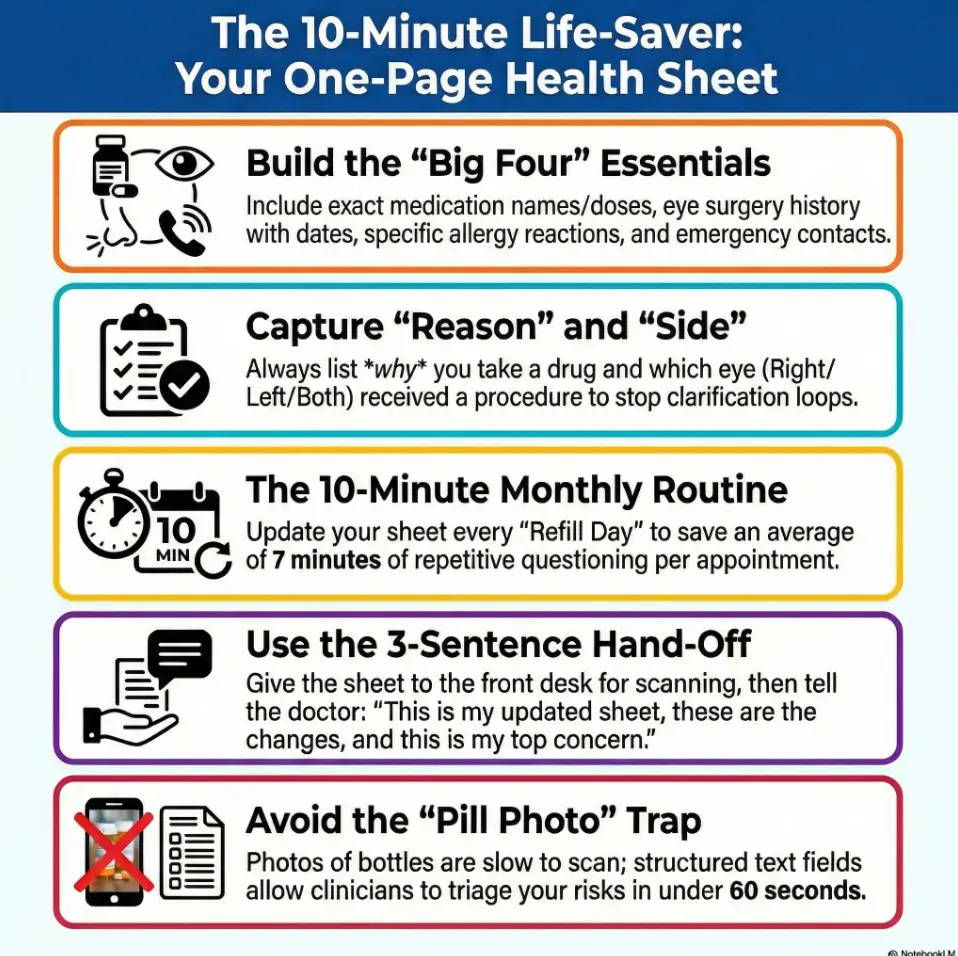
Medication list essentials (name, dose, frequency, reason)
Each medication line should answer five questions at a glance:
- Exact name (generic preferred, brand optional)
- Dose (mg, mcg, units, %, or drop strength)
- Frequency (daily, twice daily, bedtime, as needed)
- Reason (blood pressure, glucose, glaucoma, pain, sleep)
- Status (current, recently stopped, or as-needed)
When I switched my own checklist from “name + dose only” to all five fields, follow-up calls dropped sharply. The reason field mattered more than expected because it quickly clarified whether a medication was eye-related, systemic, or temporary. This is also why a good one-pager pairs well with practical strategies for low vision medication management.
Eye history essentials (diagnoses, surgeries, injections, laser dates)
Eye care decisions depend on history details that can be forgotten over years: cataract surgery timing, glaucoma diagnosis, retinal procedures, injection intervals, and prior laser treatments. Include laterality where possible, such as right eye, left eye, or both. That single detail can prevent long clarifying detours.
Allergy and reaction fields (drug + what happened)
“No allergies” often hides real-world reactions that were dismissed as minor years ago. Distinguish:
- True allergy (rash, swelling, breathing issues)
- Intolerance (nausea, dizziness, headache)
- Unknown/unsure (record uncertainty honestly)
Document what happened, not just a label. “Penicillin, rash in teens” is more actionable than “allergic maybe.”
OTC, supplements, and “as needed” meds that still matter
Over-the-counter products, herbal supplements, sleep aids, decongestants, pain relievers, and eye drops can influence risk discussions. Include them. Clinicians in large systems often follow medication reconciliation standards and will ask anyway. Putting these items on the sheet reduces omissions and repeat questioning, including situations where medication-related dry eye or blood pressure medication dizziness and blurry vision are part of the symptom story.
- Include current, PRN, and recently stopped items.
- Add reason and reaction notes, not just names.
- Record eye procedures with side (OD/OS/both) when known.
Apply in 60 seconds: Add one line for each supplement or OTC product you took in the past 30 days.
Show me the nerdy details
Medication reconciliation quality improves when data fields are standardized and constrained. Free-text-only lists create ambiguity during triage. A compact structure with fixed fields improves retrieval speed and reduces interpretation variance among front-desk, nurse, and clinician workflows.
Don’t Guess Dates: Build a Timeline That Survives Real Life
“Approximate date” format that still helps clinicians
You do not need perfect dates to be useful. Use a practical convention:
- Exact: YYYY-MM-DD when known
- Approximate: YYYY-MM (or “Spring 2022”)
- Relative: “about 3 months ago” only if exact date unavailable
Approximate but honest is better than fabricated precision. This is one of those quiet trust signals clinicians notice immediately.
Procedure timeline: cataract, glaucoma, retinal events
Procedure lines should be minimal and clear. Example format:
- 2023-09 | Cataract surgery | Left eye | No complications noted
- 2024-02 | Laser procedure | Right eye | Follow-up in 6 weeks
- 2025-05 | Intravitreal injection started | Both eyes alternating
A caregiver I worked with kept old discharge papers in a kitchen drawer “for someday.” We converted them into six timeline lines. At the next second-opinion visit, the specialist said that timeline alone saved significant reconstruction time.
Symptom timeline: onset, frequency, triggers, relief factors
Symptoms are often where confusion blooms. Keep a four-part structure:
- Onset: when it started
- Frequency: daily, weekly, intermittent
- Triggers: screen time, nighttime driving, missed dose
- Relief: rest, drops, hydration, darkness
Avoid dramatic language. Prefer specifics. “Blurred vision in evenings, 3–4 nights/week, improves after rest” gives more value than “vision weird sometimes.” If mornings are the pattern, it can help to note that directly, especially in cases like waking up with blurry vision.

Red-Flag Interactions You Can Catch Before Check-In
Steroids, antihistamines, and pressure-sensitive eye conditions
Some medication classes trigger important discussions in eye care contexts. The point is not self-diagnosis. The point is preventing blind spots in communication. If you use steroids or sedating nighttime cold/allergy products, list them clearly with timing and dose so clinicians can assess relevance in context, including well-known issues like steroid-related glaucoma risk.
Blood thinners, bleeding risk, and procedure planning
For procedures, blood thinners often require coordinated planning rather than solo changes. Write the prescribing clinician and indication next to the drug. This helps specialists coordinate safely without improvising from memory in a rushed room.
Diabetes, blood pressure meds, and retinal care coordination
Retinal care can overlap with systemic disease management. Recording diabetes and blood pressure regimens in the same one-page sheet supports cross-specialty coherence. It also reduces the “three portals, four med lists” mismatch that families regularly face.
Here’s what no one tells you… supplements can alter risk conversations too
Supplements are frequently omitted because they feel “natural” or secondary. Yet clinicians often need that full picture for interpretation and planning. Include fish oil, herbal products, sleep formulas, and any recurring OTC pain medicine. Your sheet should reflect reality, not aspiration. If you have narrow-angle glaucoma risk or are a glaucoma suspect, this is also the moment to be explicit about OTC choices, especially guidance like OTC medications to avoid with narrow angle.
- List blood thinners with indication and prescriber.
- Include steroids, antihistamines, and supplements.
- Never change medication plans without clinician guidance.
Apply in 60 seconds: Add “Prescriber + Why” next to each high-impact medication.
Who This Is For / Not For
Best for: seniors, caregivers, polypharmacy patients, multi-clinic care
This system is built for complexity. If you or someone you support takes multiple medications, sees multiple specialists, or manages recurring eye follow-ups, a single-page handoff will likely produce immediate benefits. It helps families who alternate appointment duty and need continuity across changing staff.
Useful for: first-time ophthalmology consults and second opinions
First visits and second opinions often start from incomplete context. A clean sheet shortens warm-up time and allows deeper questions sooner. One family told me their first specialist visit felt less like “retelling a decade” and more like “actually discussing options.” That is exactly the goal.
Not enough for: acute vision loss, severe eye pain, sudden neurologic symptoms
A well-organized sheet improves communication. It does not triage emergencies. If urgent symptoms occur, use emergency pathways immediately. Bring the sheet if possible, but do not delay care to update paperwork.
Not a replacement for: clinician assessment or emergency triage
Think of the sheet as a decision accelerator, not a decision maker. It supports safer care conversations and reduces avoidable delays, but it cannot substitute examination, testing, or urgent escalation decisions.
Common Mistakes That Quietly Derail Good Care
Mistake #1: Bringing photos of pill bottles only
Photos help, but they are slow to scan and often incomplete for dose changes. If that is all you have, it is still better than nothing. But convert photos into structured lines before the next visit. If labels are hard to read, consider solutions like large print prescription labels so the “data capture” step becomes less fragile.
Mistake #2: Leaving out recently stopped medications
Recently stopped items often explain current symptoms, rebound effects, or side-effect resolution. Add a “Stopped in last 90 days” mini-section with date and reason.
Mistake #3: Recording “no allergies” after minor prior reactions
Minor reactions still matter in risk planning. Document what happened, even when uncertain. Honest uncertainty is safer than confident omission.
Mistake #4: Ignoring non-eye meds before eye appointments
Eye care does not happen in a silo. Non-eye medications can influence procedure timing and interpretation. If it enters your body regularly, it belongs on the page.
- Convert bottle photos to text fields.
- Track recent stops and side effects.
- Treat non-eye meds as relevant by default.
Apply in 60 seconds: Create a “Stopped recently” section with at least one line, even if it says “none.”
Don’t Do This: Five Documentation Traps to Avoid
Copy-paste errors across years
Old lists travel like barnacles. One outdated dose can persist for years when copied forward. Add a visible “Last Updated” date at top right so stale sheets are obvious.
Mixing old and current doses on one line
Use one line per active dose. If changed, move old dose to “recently stopped/changed” with date. Mixed lines are a classic source of confusion.
Using brand nicknames instead of exact drug names
Nicknames are human. Clinics need precision. Use exact names and include brand in parentheses only when helpful.
Forgetting which eye (OD/OS/both) for procedures
Laterality errors create immediate clarification loops. Add a dedicated “Side” column and fill it every time.
No update date, no trust: stale sheets get ignored
Even a beautiful sheet loses trust if the timestamp is ancient. Think of date stamping as your credibility stamp.
Show me the nerdy details
In workflow terms, ambiguity creates branching logic. Branching logic burns time. Structured fields reduce branch count and improve first-pass completion during intake and reconciliation.
The 10-Minute Monthly Update Routine
Week 1 habit stack: refill day = sheet update day
Link your update to a recurring event you already do, such as refill pickup or pillbox setup. Habit stacking beats motivation. Monthly is enough for most people, with extra updates after any medication change or procedure.
Quick verification loop with pharmacy portal
Use a three-step loop:
- Open your current sheet.
- Compare against pharmacy or patient portal list.
- Mark differences immediately and date-stamp.
Time target: 10 minutes. If you spend 35 minutes polishing fonts, your system will die by month two. Keep it plain and durable.
Caregiver handoff protocol when multiple people attend visits
If siblings, partners, or aides rotate appointment duty, define ownership:
- Primary owner: updates master version
- Visit owner: prints and hands off
- Backup owner: verifies emergency contact and recent changes
A practical trick: add initials next to each monthly update so everyone knows who verified the sheet. If you also keep a symptom log, pairing the one-pager with a simple tracker like a printable symptom diary for seniors can make “what changed” easier to answer without guesswork.
Money Block: Eligibility Checklist (Yes/No)
- Do you take 5+ medications? Yes/No
- Do you see 2+ clinicians in different specialties? Yes/No
- Have you had any eye procedure in the last 3 years? Yes/No
- Has anyone ever said “bring an updated medication list”? Yes/No
Neutral action: If you answered “Yes” to any item, start the one-page sheet this week.
Appointment-Day Workflow: Print, Verify, Hand Off
What to hand front desk vs what to discuss with clinician
At check-in, hand the one-page sheet and ask if it can be scanned into your chart. During the clinician encounter, use the same sheet to guide a concise verbal summary. This two-step handoff prevents one common failure mode: staff receives information that never reaches the clinician in usable form.
3-sentence verbal summary to pair with your sheet
Use this script:
- “This is my current medication and eye history one-pager, updated on [date].”
- “The biggest changes since last visit are [X], [Y], and [Z].”
- “My top concern today is [single priority symptom or goal].”
This script turns a long story into an efficient briefing. It respects clinical time while still preserving your priorities.
How to use the sheet for telehealth visits
For telehealth, place the sheet beside your device and send a copy through the portal in advance if possible. Keep medication containers nearby for live verification if asked. Low drama, high clarity.
Money Block: Decision Card (When A vs B)
| Option | Use When | Time Trade-off |
|---|---|---|
| Phone app only | Single clinician, simple regimen | Fast at home, slower in clinic |
| One-page print + digital | Multiple specialists, changing meds | 10 min monthly, faster every visit |
Neutral action: Choose the format that reduces in-visit confusion for your context.
One-Page Template Blueprint You Can Copy Today
Section order for fastest scanning (top-to-bottom logic)
Use this exact order to match typical intake flow:
- Identity + date updated + emergency contact
- Current medications
- Allergies and reactions
- Eye diagnoses and history
- Procedures timeline
- Recent changes and current symptoms
That order gives high-value context first and details second.
Plain-language field labels that reduce confusion
Prefer labels your family can maintain without translation gymnastics:
- “What I take now” instead of “Active regimen”
- “Why I take it” instead of “Indication”
- “What happened” instead of “Adverse event phenotype”
When labels are human, updates actually happen. Fancy wording is a maintenance tax.
Versioning: date stamp, initials, and backup copy strategy
At the bottom, add:
- Last updated: YYYY-MM-DD
- Verified by: initials
- Backup location: cloud folder + printed copy location
I recommend one printed copy in a transparent folder and one digital copy in a shared family note. If two people can’t find it in 10 seconds, the system needs simplification.
Infographic: The 10-Minute One-Page Workflow
Refill day
10 minutes
Portal + pharmacy
Mark changes
1 paper copy
1 digital backup
Front desk scan
3-sentence summary
Outcome: fewer omissions, faster reconciliation, clearer clinician decisions.
Next Step: Do This in 15 Minutes Tonight
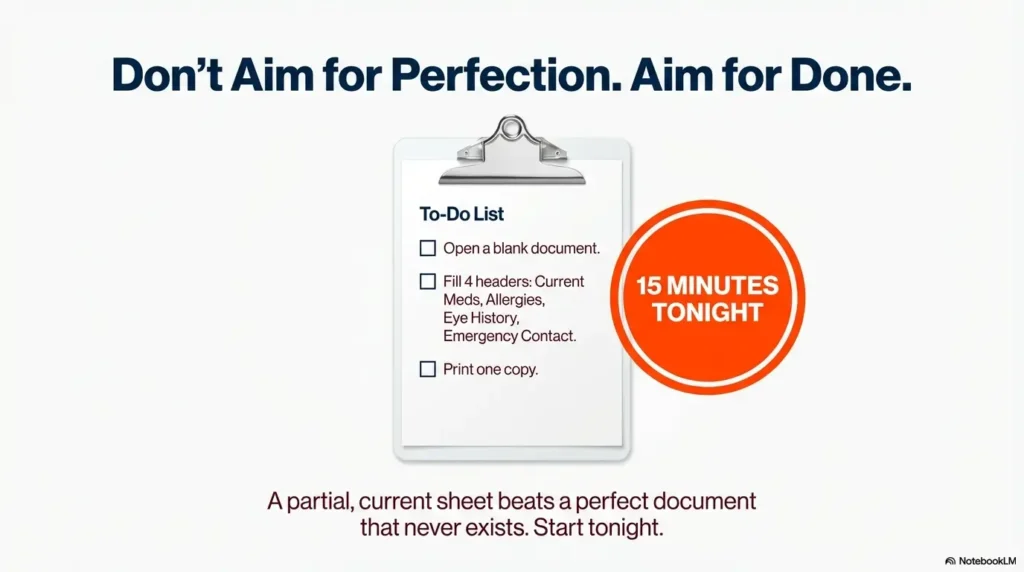
Open a blank page and fill four fields first: current meds, allergies, eye diagnoses, emergency contact
Start narrow. If you try to build the perfect lifelong document tonight, you’ll postpone it. Four fields give immediate value. A partial but current sheet beats a perfect document that never exists.
Print one copy, save one digital copy, set a monthly calendar reminder
Use a recurring reminder on the same day each month. Many families choose the first weekend morning. The ritual matters more than the exact date. Consistency makes the sheet trustworthy.
Bring it to your next appointment and ask staff to scan it into your chart
This step closes the loop. Your effort should become part of the care workflow, not a private note that never enters the system.
Money Block: Mini Calculator (Time Savings)
If a one-page sheet saves even 7 minutes per visit and you have 8 visits/year, that is 56 minutes/year recovered from repeated questioning alone.
Neutral action: Track your next two visits and compare check-in + reconciliation time before/after using the sheet.
When to Seek Help (Eye Symptoms That Need Urgent Attention)
Sudden vision loss, new “curtain” over vision, or flashes/floaters spike
These symptoms can signal urgent conditions and need prompt evaluation. Do not wait for routine scheduling when sudden change occurs.
Severe eye pain with nausea, vomiting, or halos around lights
This cluster can indicate an emergency scenario. Seek urgent care immediately.
New one-sided weakness, speech trouble, facial droop, or confusion
These neurologic signs require emergency response. Prioritize emergency care pathways first, documentation second.
Chemical exposure or eye trauma
Follow emergency protocols and seek immediate care. If safe and quick, bring your one-page sheet to support medication and allergy handoff.
Safety / Disclaimer: This guide is educational and organizational, not medical advice. A one-page sheet improves communication but does not diagnose, treat, or replace clinician judgment.
FAQ
Should I include vitamins and herbal supplements on my medication sheet?
Yes. Include vitamins, herbal products, sleep formulas, and any recurring OTC products. They can influence risk discussions and procedure planning.
How often should I update a medication and eye history sheet?
At minimum monthly, plus anytime a medication changes, a new symptom appears, or a procedure occurs.
Can I use the same one-page sheet for every specialist appointment?
Yes. One master sheet is usually best. You can add a small specialty-specific note section if needed, but keep the core layout consistent.
What if I don’t know exact surgery dates for eye procedures?
Use approximate dates honestly, such as month/year or season/year. Mark uncertain items clearly and refine later when records are available.
Is a phone medication app enough without a printed sheet?
Apps are useful, but printed or easily shareable one-page formats often work better during intake and handoff, especially across clinics and caregivers.
Should I list medications I stopped recently?
Yes. Include drugs stopped in the past 60 to 90 days with stop date and reason. This often helps interpret current symptoms and side-effect patterns.
How do caregivers maintain one sheet for multiple doctors?
Assign ownership roles, use date stamps and initials, and keep one master version with one printed copy for visits and one digital backup.
What should I do if medication instructions conflict between doctors?
Do not self-resolve conflicting instructions. Flag the conflict on your sheet and request coordinated clarification from the treating clinicians.
Do I need to include over-the-counter eye drops?
Yes. Include all eye drops, even non-prescription products, with frequency and reason.
How can I organize this if I take more than 15 medications?
Group medications by purpose or time of day, keep one line per active dose, and move discontinued items into a separate “recently stopped” section.
Conclusion
At the beginning, we opened with that familiar freeze-frame question: “Any medication changes?” The goal was never to become a human database. The goal was to stop losing critical minutes to avoidable uncertainty. A one-page medication and eye history sheet does exactly that. It converts stress into structure, repetition into clarity, and fragmented memory into usable care context.
Tonight, set a 15-minute timer. Fill four fields. Print one copy. Save one digital backup. Bring it to your next appointment and ask staff to scan it. That small action can change the quality of every future visit, quietly and repeatedly, like a good safety rail you only notice when it catches you.
Money Block: Quote-Prep List (for care coordination conversations)
- Latest one-page sheet with date stamp
- List of top 3 concerns for this visit
- Recent procedure reports or discharge notes
- Medication changes in last 90 days
- Primary caregiver contact information
Neutral action: Bring this packet to your next specialist visit for cleaner cross-team communication.
Last reviewed: 2026-02.