

Beyond the Approval: Solving the PA-to-Claim Mismatch
“PA approved” isn’t a payment promise—it’s a conditional record in a separate system. If your intravitreal injection claim was denied despite authorization, the payer’s matching logic likely failed to connect the dots due to a single quiet mismatch in data fields.
- Translate the denial into one of five mismatch buckets.
- Fix the specific field(s) that broke the PA-to-claim link.
- Resubmit, reconsider, or appeal with a tight proof pack.
Apply in 60 seconds: Pull the denial reason/remark codes and the PA approval letter and put them side-by-side. Circle what must match.
Main keyword: intravitreal injection claim denied after prior authorization
Table of Contents
Who this is for / not for
For: people dealing with “PA approved” + “claim denied”
- Retina practices (front desk, auth, billing, revenue cycle)
- ASC / hospital outpatient billing teams supporting injections
- Patients/caregivers facing unexpected balances after anti-VEGF injections for wet AMD
Not for: situations that need different playbooks
- No PA was obtained (you’ll need retro-authorization, medical necessity appeal, or contract escalation)
- Out-of-network disputes (network status can override PA logic)
- Suspected fraud/identity issues (requires compliance pathways and payer fraud units)
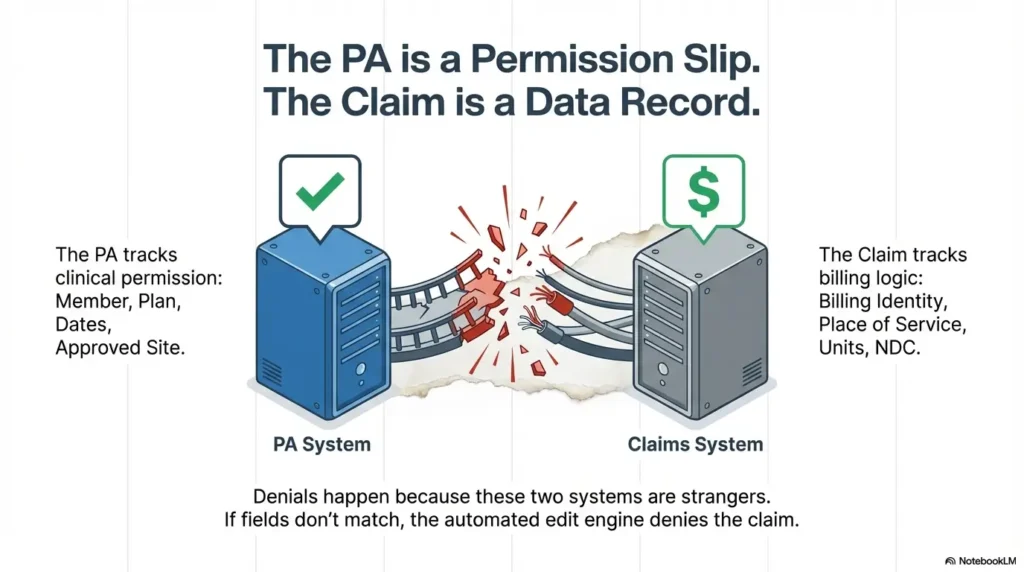
I’ll be blunt: “PA approved” is not a magic spell. It’s a conditional permission slip. And in many payer systems, it lives in a different database than claims editing. The work here is making those two databases recognize each other—like introducing two stubborn relatives at a wedding.
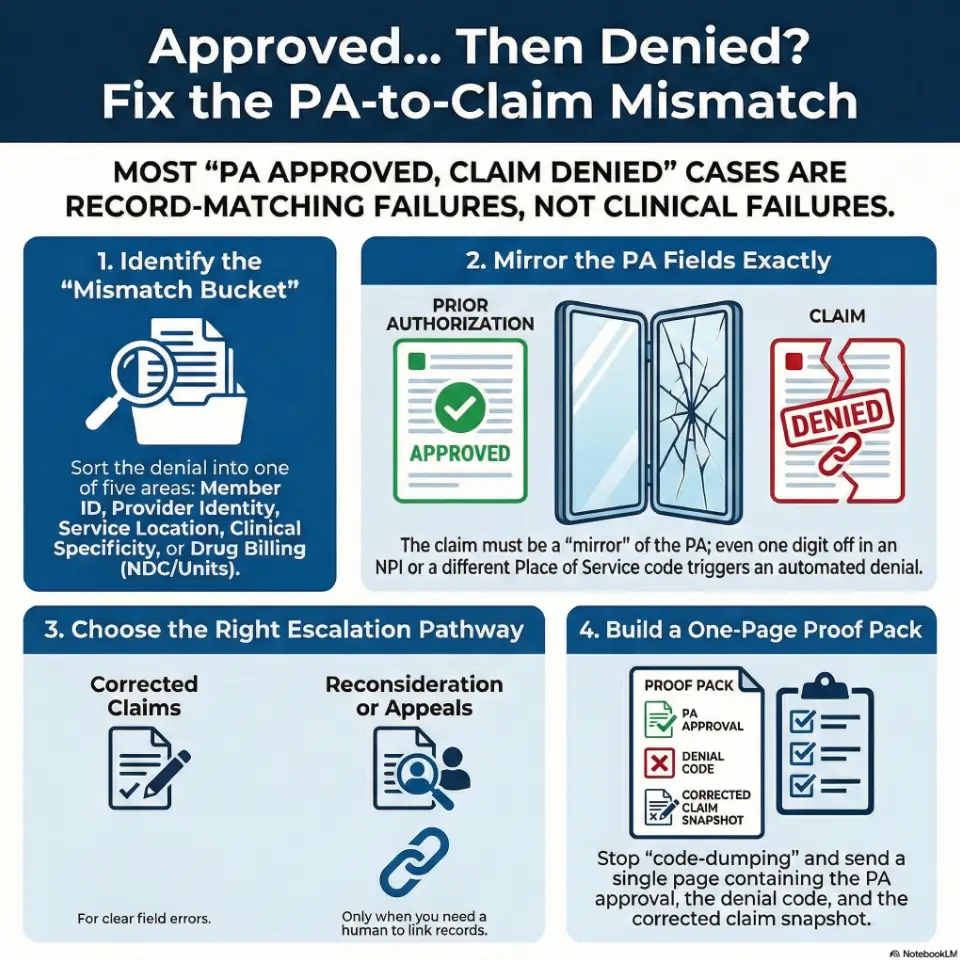
Approved… then denied: what actually changed?
The PA is not the claim (and payers treat them as separate records)
Prior authorization approves a service or drug under specific conditions. The claim is a separate record that must match those conditions closely enough to pass automated edits. That’s why you can see “approved” on an auth portal and still get a denial on the remittance advice—especially in Medicare Advantage wet AMD prior authorization workflows where plan-specific rules can be strict even when the portal says “approved.”
- Auth systems often track: member, plan, dates, approved site/provider, approved drug/service category.
- Claims systems adjudicate: billing/rendering identities, place of service, diagnosis, units/NDC logic, modifiers, and pricing rules.
Curiosity gap: which system is “right” when they conflict?
Most of the time, neither system is “right.” They’re just strict. Denials frequently come from automated edits, not humans. So if you respond with a heartfelt letter but don’t correct the field mismatch, the payer’s edit engine shrugs and denies again—politely, repeatedly, and without remorse.
Show me the nerdy details
Many denials are triggered by claim edits that compare the claim’s key fields (member, provider identifiers, place of service, service date window, and drug billing details) to the authorization record. If the matching logic fails, the denial can look “clinical” even when the break is administrative (e.g., wrong servicing location or missing NDC/units conventions).
- “Not authorized” often means the claim didn’t match the auth record.
- “Medical necessity” can be a mask for missing required fields or attachments.
- Fix the mismatch first; argue second.
Apply in 60 seconds: Ask: “Which field would make the claim look like a different service than the PA?”
Denial code translation: put it into one of 5 mismatch buckets
Don’t start with anger. Start with sorting. You want a clean translation step: denial message → bucket → fix path. Here are the five buckets that cover the vast majority of “approved then denied” injection claims.
Bucket 1 — Member/plan mismatch
- Wrong member ID, group number, or plan variant (common after plan changes or new cards).
- Coverage dates don’t line up with date of service.
- Coordination of benefits issues (primary/secondary payer order wrong).
Clinic-side tell: eligibility looked fine at check-in, but payer denies as “no coverage” or “member not found.”
Bucket 2 — Provider identity mismatch
- Billing vs rendering provider mismatch.
- Credentialing/taxonomy issues (payer doesn’t recognize the rendering provider at that location).
- Service location not linked to the contracted entity.
Human moment: I’ve watched a team spend two hours crafting a perfect appeal—then realize the claim used the hospital’s billing NPI while the PA was issued to the physician group. One digit can ruin your afternoon.
Bucket 3 — Location mismatch
- PA approved office, claim billed as outpatient hospital, ASC, or another site.
- Place of service code or facility billing type doesn’t match the approval.
Reality check: the visit may have happened in the “same building,” but payers see it as a different world.
Bucket 4 — Clinical mismatch (documentation still matters)
- Diagnosis specificity doesn’t match what the plan approved.
- Laterality expectations aren’t supported (left vs right vs bilateral).
- Frequency limits or step criteria aren’t clearly met in documentation submitted (this can get extra tricky when a plan uses step therapy rules for wet AMD).
Bucket 5 — Drug billing mismatch
- Units don’t match payer’s unit logic or conversion.
- NDC required but missing or inconsistent with the product administered.
- Drug line and procedure line aren’t aligned with how the payer adjudicates “buy-and-bill.”
Commercial payer footnote in plain English: some payers explicitly require NDC details on professional/facility claims for physician-administered drugs, and they may deny if the NDC doesn’t match the package used. (That requirement varies by payer and line of business.) If you’re dealing with a specific agent, it can help to cross-check how plans handle Medicare coverage and billing patterns for Eylea injections as a reference point for what “complete” documentation often looks like.
Money Block: Eligibility quick-check (binary, fast)
- Yes/No: Does the member ID on the claim match the current insurance card exactly?
- Yes/No: Is the date of service within active coverage dates?
- Yes/No: Does the PA letter list the same plan/product and the same servicing site?
Apply in 60 seconds: If any answer is “No,” fix that first—everything else is noise.
The “silent mismatch” checklist: fields that must match PA exactly
This is the part no one wants to do because it’s not glamorous. But it works. Think of it as a “PA-to-claim mirror.” If the PA says one thing and the claim says a slightly different thing, the payer’s software treats them as strangers.
Patient + plan fields
- Member ID (including suffixes), date of birth
- Plan/product name (especially for Medicare Advantage vs commercial variants)
- Effective dates and COB (primary/secondary)
Provider + location fields
- Billing NPI vs rendering NPI
- Tax ID/contracted entity alignment
- Service location details (and whether the payer recognizes that location under the contracted group)
Service details
- Date-of-service window and frequency limits (if the PA is time-bounded)
- Laterality expectations (when the plan’s criteria is eye-specific)
- Any required referral/order linkage (plan-dependent)
Drug details (if payer requires it)
- NDC, units, and unit of measure (payer-specific)
- Dose math and any required wastage reporting rules (when applicable)
- Occasional requests: invoice or lot/label support (rare, but it happens)
A practical frame: If you wouldn’t be shocked to see the payer say “that’s not what we approved,” then it’s probably a mismatch field. (And yes, this can show up even when the clinical pathway is straightforward—like a stable wet AMD injection schedule that suddenly gets derailed by one administrative field.)
Common mistakes: why resubmissions loop forever
Mistake 1 — Resubmitting the same claim hoping it hits a different person
If an automated edit fired once, it will fire again. Resubmitting without changing the mismatch is like refreshing a weather app and expecting the hurricane to apologize.
Mistake 2 — Appealing without the one page that matters
No denial letter, no PA reference, no clean claim snapshot—just narrative. Appeals teams don’t hate stories. They just can’t adjudicate stories.
Mistake 3 — Fixing the clinical note but not the claim fields
Beautiful chart notes don’t fix the rendering NPI mismatch. (I wish they did. I’d frame them.)
Mistake 4 — Treating “authorization number” like decoration
If your payer requires the authorization/reference number in a specific field or format, “we typed it somewhere” may not be enough. Some systems match on specific loops/segments or fields; mismatches can result in “auth not found.”
Money Block: Mini “deadline” calculator (timely filing reality check)
Mini calculator: How close are you to a timely filing wall?
Result: Enter numbers to estimate days remaining.
Neutral action: If you’re within 30 days of the limit, prioritize corrected claim submission and get confirmation of receipt.
Truthful anchor: Medicare generally requires claims be filed within 12 months of the date of service (with exceptions). Other payers vary—sometimes dramatically—so don’t assume you have time just because you have hope.
Don’t do this: the 7 fastest ways to trigger a second denial
- Submitting a “corrected claim” without clearly indicating what changed. If the payer can’t see the correction, the same edit triggers.
- Omitting the PA reference number (or placing it inconsistently) when the payer expects it for matching.
- Using the wrong pathway (adjustment vs reconsideration vs appeal). Different doors, different rules.
- Switching to generic diagnosis language when the PA approval was for a specific indication/laterality.
- Billing drug units that don’t match the payer’s unit logic. Even small unit misalignment can look like overbilling to an edit engine.
- Mixing provider identities across sites (office vs hospital outpatient) without rechecking what the PA approved.
- Waiting too long and hitting timely filing or appeal deadlines. Deadlines don’t care if the denial was “unfair.”
Operator thought: Every second denial is evidence that you fixed the wrong thing—or nothing at all.
Paperwork fixes that win: build a one-page “PA-to-Claim Proof Pack”
This is where you stop arguing and start showing. Your goal is a packet that a payer can adjudicate quickly—because it’s organized for their workflow, not yours.
Proof Pack page 1 (always)
- PA approval (reference number, effective dates, approved site/provider/entity, approved drug/service description)
- Denial explanation (denial reason + remark codes + payer letter/EOB snippet)
- Claim snapshot (only the key fields: member, dates, provider IDs, place of service, procedure/drug line basics)
Proof Pack page 2 (only if your bucket requires it)
- Chart note excerpt supporting diagnosis, laterality, and medical necessity criteria
- Drug support for unit/NDC disputes (label snippet, invoice snippet if required, dose math summary)
- Referral/order documentation if the plan requires it for that product line
Let’s be honest…
Most “medical necessity” denials are paper alignment denials wearing a clinical mask. That doesn’t mean medical necessity never matters. It means you should confirm the basics before you wage a documentation war.
Short Story: The Tuesday denial huddle (120–180 words) …
Short Story: A caregiver called a clinic at 9:03 a.m. because an EOB said the injection was “not authorized,” and the patient was convinced the next treatment would be canceled. The front desk swore the PA was approved. Billing swore it was billed correctly. Everyone was right—sort of.
The PA had been issued to the physician group for an office location, but the appointment was moved last-minute to a hospital outpatient department due to scheduling. The claim went out under a different billing entity and place of service. The payer’s system did what it was built to do: it denied the claim that didn’t match the PA record. The fix wasn’t dramatic. It was a corrected claim with the right entity and a one-page proof pack showing the PA details and the corrected fields. The “crisis” lasted 48 hours. The fear lasted longer. Paperwork has feelings now.
Coding alignment without code-dumping: what to sanity-check (and why)
You don’t need a code encyclopedia to win most of these. You need a sanity-check that connects the PA approval to the claim lines. Think “does this claim look like the thing the payer approved?”
Service line sanity-checks
- Procedure line matches the PA-approved service category and site expectations.
- Modifiers and units reflect how the payer adjudicates the service (this is payer-specific).
- Laterality is supported where expected (left/right/bilateral conventions vary by payer policy).
One commonly used procedural code for intravitreal injection in ophthalmology is CPT 67028 (intravitreal injection of a pharmacologic agent). The point isn’t to memorize the number. The point is to make sure what you billed aligns with what the PA approved—and how your payer expects it to be represented (which often ties back to how wet AMD treatment costs are structured under your coverage).
Drug line sanity-checks (buy-and-bill reality)
- Units match the payer’s unit logic (watch for “units per vial/syringe” assumptions).
- NDC requirements are met when the payer requires them on professional or facility claims.
- Drug line ties cleanly to the administered product (don’t mix packaging assumptions).
Here’s what no one tells you…
A PA can be “approved” for the drug name, but claims systems often pay based on how it’s encoded: the unit math, the required identifiers, and the exact claim fields that trigger reimbursement edits. When patients see a surprise balance, it often lands on top of the familiar cost stress of Part B coinsurance—so it can help to keep a separate resource handy on Medicare Part B copay assistance for wet AMD injections while you work the claim fix.
Show me the nerdy details
Some payer edits evaluate physician-administered drug claims by comparing the billed HCPCS drug line and its units against expected unit conversions and (when required) NDC identifiers. If NDC is required, mismatches between the submitted NDC and the actual package NDC can trigger denials even when a PA exists, because the claim fails a reimbursement policy rule rather than a medical necessity rule.
Money Block: “Quote-prep” list (what to gather before you compare payer answers)
- PA reference number + effective dates
- Claim control number (or payer ICN) + denial codes
- Drug details: product administered, units billed, and (if required) NDC from the package
Apply in 60 seconds: Put these three identifiers in the first sentence of every call, portal message, or appeal letter.
Escalation ladder: resubmit vs reconsideration vs appeal
Not every denial deserves a full appeal. Sometimes the fastest move is a clean corrected claim. Other times, you need a human to link the PA to the claim or override an automated edit. Here’s the ladder, with decision rules you can use without guessing.
When to resubmit (clean fix)
- You found a clear mismatch field (member ID, billing/rendering, place of service, missing required identifiers).
- You can correct the claim and submit it as a corrected claim/adjustment per payer pathway.
- You can document what changed in one sentence.
When to request reconsideration (payer-friendly middle step)
- The payer’s system shows the PA as approved, but the claim denies as “auth not found.”
- You need a human to link the auth record to the claim record.
- The denial appears to be a processing/edit issue rather than a true policy exclusion.
When to appeal (strongest packet)
- The denial persists after correction attempts.
- The payer asserts criteria were not met, and you have documentation that they were.
- You need a formal decision trail (especially when balances are escalating).
How to write the appeal like a machine would read it
- Line 1: Denial reason (exactly as written)
- Line 2: The PA reference number + approval details
- Line 3: Evidence that matches the denial reason (one paragraph, not a memoir)
- Line 4: Requested action (pay/adjust/reprocess)
Commercial entity signals (neutral, common in this space): You’ll see these workflows in systems from large payers like UnitedHealthcare, Aetna, Humana, and Blue Cross plans, plus third-party administrators. The names change. The matching logic doesn’t.
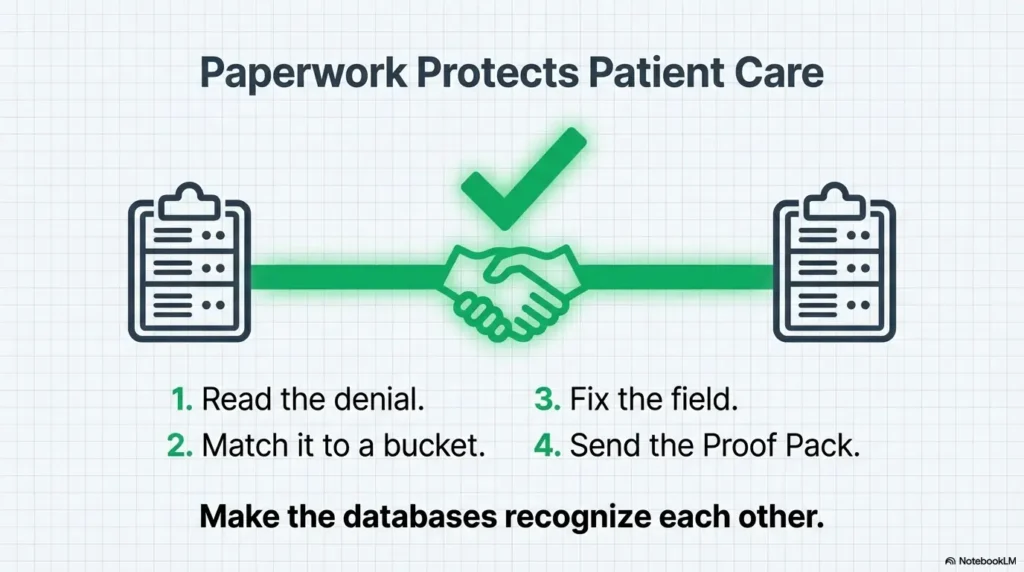
Infographic: PA-to-Claim Denial Fix Flow (fast visual)
Pull denial reason/remark codes + EOB letter.
Member / Provider / Location / Clinical / Drug billing.
Correct the exact mismatch that broke the link.
Resubmit → Reconsideration → Appeal (in that order when possible).
PA + denial + claim snapshot (+ targeted support only).
Accessibility note: This visual describes a 5-step flow from denial reading to proof pack submission.
When to seek help (patient safety + financial protection)
Seek clinical help urgently if treatment is being delayed
If symptoms are changing—new/worsening vision loss, severe pain, flashes/floaters, or concerning signs after an injection—contact a licensed clinician promptly. Don’t let billing friction quietly turn into a medical delay (especially if this is early in the journey, like a first anti-VEGF injection for wet AMD where timing and follow-up matter).
Seek billing/advocacy help if balances are escalating
- If you’re being billed as self-pay despite active coverage
- If collections notices arrive while an appeal is pending
- If you’re told “the PA was approved” but no one can produce the approval details in writing
A caregiver truth: The emotional load is real. I’ve seen families become expert coders against their will. You shouldn’t need a second career to get a claim processed—but while the system is the system, you deserve a workflow that protects your time and your nervous system (and if the fear is starting to shape care decisions, it can help to name it—see wet AMD injection anxiety in your 70s for language and coping anchors that don’t minimize the stress).
Money Block: Decision card (When A vs B)
Decision card: Corrected claim vs reconsideration vs appeal
- Clear field mismatch
- Fast turnaround likely
- Minimal documentation needed
- PA exists but “not found”
- Needs a human link/override
- Edit feels administrative
- Denial persists after fixes
- Criteria dispute
- You need a formal decision trail
Neutral action: Pick one pathway today and build the Proof Pack in parallel.
Next step: do one thing today (15 minutes)
Create a “PA-to-Claim Match Sheet” for the next injection visit
This is prevention disguised as paperwork. One page. Printed or saved. Used before the claim goes out.
- PA reference number
- Approved dates (start/end)
- Approved site of service
- Approved provider entity (billing group) and any rendering/provider constraints
- Approved drug/service description
- The exact claim fields that must mirror the PA
Small joke, serious point: Your Match Sheet is like a seatbelt. You don’t need it most days. On the day you do, you really do.
15-minute pilot: Take the last denied claim, map it to a bucket, then write a one-sentence “what changed” correction note. That becomes your template.
FAQ
Why would a claim deny if the prior authorization is approved?
Because the PA record and the claim record are often evaluated separately. If key fields don’t match—member, plan, approved site/provider entity, dates, or drug billing details—the payer’s automated edits can deny the claim even though the PA portal still shows “approved.”
Does PA guarantee payment for intravitreal injections?
No. A PA is a conditional authorization, not a promise of reimbursement. Payment can still be impacted by eligibility, network status, correct claim submission, plan limitations, and whether the billed claim matches the PA conditions.
What denial reasons most commonly happen after PA?
The most common patterns are: authorization not found (matching failure), place of service mismatch, billing/rendering provider mismatch, diagnosis specificity issues, and drug billing problems like units or required NDC details (payer-specific).
Which is faster: corrected claim or appeal?
A corrected claim is usually faster when the issue is a clear mismatch field. Appeals can take longer but are appropriate when the denial persists after correction or when the payer disputes medical necessity criteria and you have supporting documentation.
What documents should I include with an appeal for a denied injection claim?
Start with a one-page Proof Pack: the PA approval (with reference number and approved conditions), the denial explanation (EOB/remark codes), and a clean claim snapshot. Add only the supporting documentation needed for the specific bucket (e.g., chart note excerpt for diagnosis/laterality, drug label/NDC/unit math when relevant).
How do timely filing limits affect denials after PA?
If you miss timely filing, the payer can deny even a “valid” claim. Medicare generally requires claims be filed within 12 months of the date of service, while other payers can have shorter or different limits. If you’re near a deadline, prioritize getting a corrected claim on file and confirming receipt.
Can the clinic rebill under a different provider/location to match the PA?
Sometimes, but it must be compliant and reflect the true contracted entity and site of service. The safest approach is to align the claim with how the service was actually provided, then ensure that aligns with what the PA approved. If the visit site changed, you may need an updated authorization depending on the payer.
What if the drug units/NDC don’t match what the plan expects?
First, confirm whether the plan requires NDC on the claim and whether the submitted NDC matches the actual package used. Then check the unit conversion logic the payer expects. When needed, include a short unit math explanation and product identifier support in your Proof Pack.
Safety / Disclaimer (High-risk topic)
This content is general information, not medical, legal, or billing advice. Coverage rules vary by plan and state, and payer policies change. For urgent symptoms or care decisions, contact a licensed clinician. For claims, appeals, or reimbursement strategy, consult your clinic’s billing team, your plan, or a qualified reimbursement specialist.
Conclusion
Here’s the loop we opened at the top: which system is “right” when PA says yes and the claim says no? In practice, the claims system wins until you make the records match. The good news is that most of these denials are not mysteries—they’re mismatches. When you translate the denial into a bucket, fix the specific field, and submit a proof pack that’s readable in 60 seconds, you stop the cycle of “resubmit and pray.”
Your next 15 minutes: build a one-page Match Sheet for the next injection claim. If you do nothing else, do that. The point isn’t paperwork perfection. The point is protecting care continuity—and preventing the kind of surprise bill that makes people afraid to show up for treatment.
Last reviewed: 2026-01