

Vision comfort guide
Why Reading Glasses Stop Working
After a Few Months
One month, your readers feel like a tiny miracle. The menu sharpens. The medicine label stops looking like ant tracks. Your phone no longer requires the arm-stretching ritual of midlife. Then, a few months later, the same pair starts acting suspicious. The words blur, your forehead tightens, and the drugstore rack whispers, “Maybe go stronger.”
But reading glasses do not always “fail” in the way people imagine. Sometimes your near vision has changed. Sometimes the glasses were never quite right for both eyes. Sometimes your laptop, phone, lighting, dry eyes, and posture have quietly moved the target while your glasses stayed the same. The problem is less like a broken tool and more like using one house key for every door in the neighborhood.
This guide will help you troubleshoot before buying a stronger pair. You will learn why stronger readers can backfire, why screens create a middle-distance trap, when over-the-counter readers are reasonable, and when a real eye exam is the wiser, calmer move.
Buy smarter
Learn why the highest number on the rack may not be your best friend.
Test real life
Check your phone, book, laptop, and labels at the distances you actually use.
Know when to stop
Spot the symptoms that deserve professional attention instead of another cheap pair.
Small promise: by the end, “my readers stopped working” will become a specific, solvable pattern. 👓
Snapshot
This article is for adults whose reading glasses worked recently but now feel weak, awkward, blurry, or tiring. It helps you separate normal presbyopia, wrong task distance, screen strain, dry eye, fit issues, and possible prescription problems, so you can decide whether to retest your readers, change your setup, or book an eye exam.
Table of Contents
Safety First: When Blurry Vision Is Not a Shopping Problem
Reading glasses can be a perfectly reasonable tool for age-related near blur. They are sold everywhere because many people eventually need help bringing close print into focus.
Still, eyes are not a kitchen gadget. If vision changes suddenly, painfully, unevenly, or dramatically, the answer is not a stronger pair from the carousel near the pharmacy counter. The answer is medical guidance.
Safety note
This article is educational and cannot diagnose your eyes. Seek prompt medical care for sudden vision loss, eye pain, new flashes or floaters, a curtain-like shadow, double vision, injury, severe headache with vision changes, or a sudden change in one eye. If symptoms are persistent or worrying, book an eye exam rather than trying to solve everything with over-the-counter readers.
Who this guide is for
This guide is for the ordinary but deeply annoying reader problem: your +1.50 readers felt fine in March, but now your phone looks soft, receipts look foggy, and your laptop seems to require a new posture that resembles a question mark.
It is also for people who are not sure whether they need stronger reading glasses, weaker computer glasses, prescription readers, better lighting, dry eye care, or simply a more honest test of real-life distance.
Who should not wait
If your vision changed overnight, one eye is suddenly different, straight lines look distorted, or you have pain, flashes, floaters, or a shadow in your vision, do not treat this as a retail puzzle. Get medical help.
OTC readers are useful for magnification. They are not designed to evaluate cataracts, glaucoma, retinal problems, diabetes-related eye disease, eye pressure, medication effects, or neurological symptoms.
Key takeaway
If the problem is gradual, task-specific, and mostly about close work, troubleshooting readers makes sense. If the problem is sudden, painful, one-sided, distorted, or paired with other symptoms, stop shopping and seek care.
The Real Reason Your Readers “Quit”
Reading glasses may feel like they stopped working because presbyopia keeps changing your near-focus needs. Presbyopia is the age-related loss of focusing flexibility that usually becomes noticeable in the 40s. It does not mean your eyes are lazy. It means the internal focusing system no longer shifts as easily for close work.
Readers compensate for that change. They do not cure it. That is why a pair can work for a while and then become less satisfying as your tasks, habits, lighting, or eyes change.
Presbyopia keeps moving the goalpost
Think of near focus as a tiny camera adjustment inside the eye. When you are younger, that adjustment is quick and forgiving. You can look from a street sign to a text message and back again without noticing the machinery.
With presbyopia, the adjustment range narrows. Reading glasses add focusing help for close distances, but they do not restore the old flexibility. That is why you may need different strengths for different distances or a new prescription over time.
The frustrating part is that the change is often gradual enough to feel suspicious. You may think, “These glasses were fine last month.” They may have been. But the boundary between comfortable and annoying can be thin, especially after long screen days.
Your eyes may not be changing that fast
Not every bad reading day means your prescription jumped. Lighting, fatigue, dry eyes, glare, font size, contrast, and sleep can make the same pair feel different from one day to the next.
A glossy takeout menu in a dim restaurant can defeat glasses that work beautifully with a paperback under a bright lamp. A phone screen at midnight can feel blurrier than the same phone at noon. A long day of blinking less at a monitor can make the surface of the eye dry enough that print swims.
This is why the phrase “my reading glasses stopped working” needs a second question: stopped working where?
Reading distance is not one distance
A book, phone, laptop, sewing needle, pill bottle, recipe card, and desktop monitor do not sit at the same distance. Yet many people expect one pair of readers to handle them all.
That expectation is the tiny trapdoor under this whole problem. Readers are built around distance. A pair that feels crisp at 14 inches may feel too strong at 24 inches. A pair that works for your laptop may not help enough for a medicine label.
If your readers “quit” after a few months, the first suspect is not always your eyes. Sometimes it is the distance you are asking those readers to serve.
Stronger Is Not Always Smarter
The drugstore rack makes reading glasses look like a ladder. +1.00, +1.25, +1.50, +1.75, +2.00, and up. When one pair feels weak, it is tempting to climb.
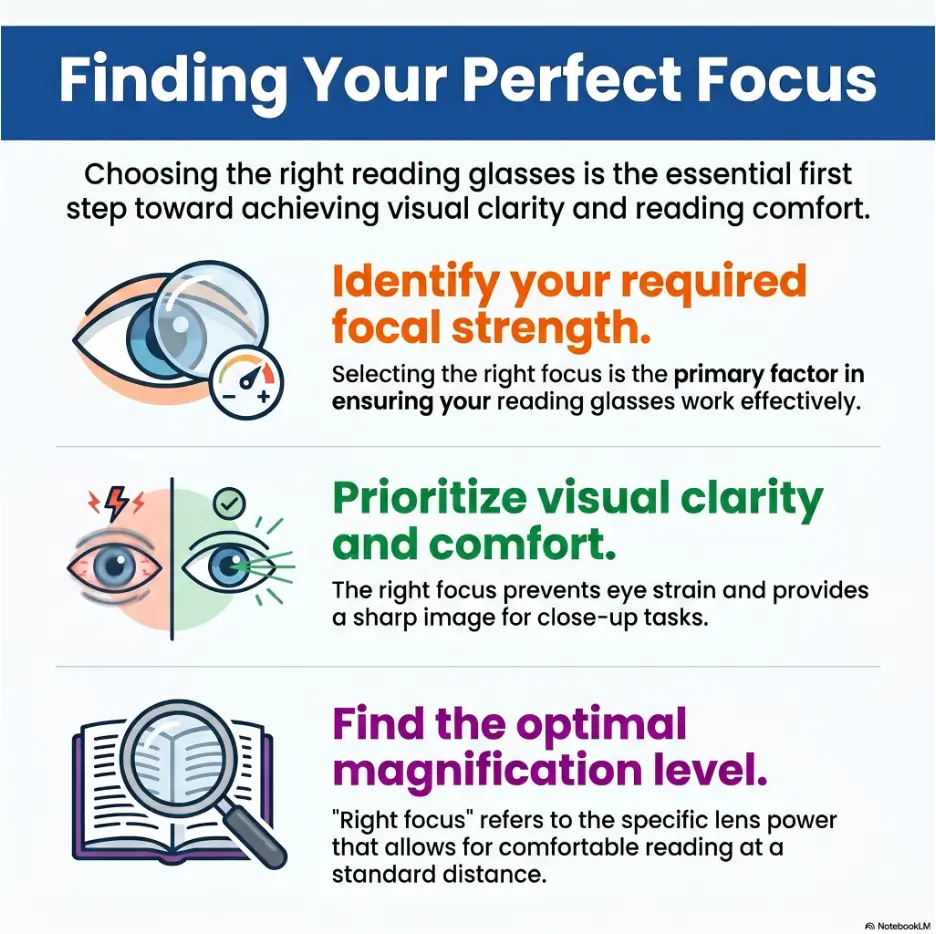
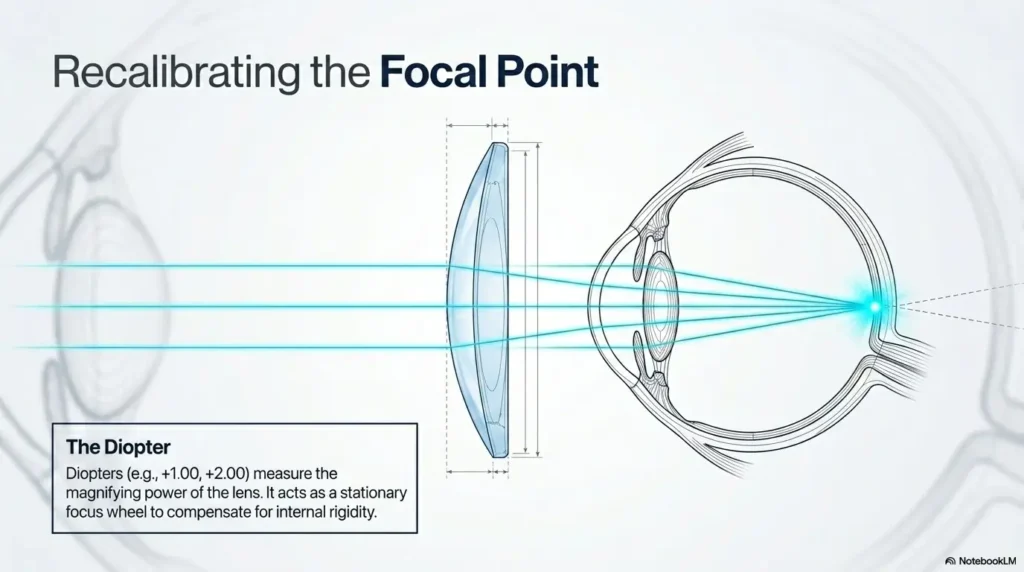
But diopter strength is not a volume knob. More power is not automatically more clarity. It simply shifts the distance where things look best.
Why jumping from +1.50 to +2.50 can backfire
A stronger reader may make tiny print pop when held very close. That quick “wow” moment can be misleading. The same pair may feel awful for laptop work, recipes on the counter, sheet music, crafts, or a desktop screen.
Here is the simple rule: stronger readers usually move your clearest viewing zone closer to your face. If you use them for something farther away, you may lean, squint, tilt your head, or feel strain creeping into your brow.
That is why someone can buy +2.50 readers, feel triumphant in the store, then hate them at the kitchen table. The glasses did not betray them. They were chosen for the wrong distance.
The “too strong” headache loop
Overpowered readers can create a loop. Tiny print looks sharper when held close, so you hold everything closer. Holding everything closer makes your neck and shoulders work harder. Your eyes and body start negotiating like tired diplomats.
The result may be headaches, brow ache, nausea, dizziness, watery eyes, or end-of-day blur. Many people then assume they need even stronger glasses. The loop tightens.
Comfort matters as much as sharpness. If a pair gives a sparkling five-second test but makes you miserable after ten minutes, it is not the right pair for daily life.
Don’t buy the biggest number on the rack
The safest casual strategy is usually to choose the lowest strength that lets you read comfortably at your real distance. Not the strongest. Not the pair that makes a cereal box look heroic from six inches away.
If you can read a normal book comfortably with +1.75 at your natural distance, jumping to +2.50 because it makes one tiny label sharper may cause more trouble than it solves.
Key takeaway
Choose readers for the distance you actually use, not the strongest number that makes tiny print look sharp for a few seconds. A reader can be optically “clear” and still be wrong for your body, screen, or task.
| If this happens | Possible meaning | What to try first |
|---|---|---|
| Tiny labels look better only when held very close | Strength may be too high for general use | Test a lower strength at normal reading distance |
| Laptop feels blurry with book readers | Computer distance may need different power | Try weaker readers or ask about computer glasses |
| Headaches appear after several minutes | Wrong strength, fit, pupil distance, or prescription issue | Stop using that pair and compare with another strength |
The Distance Problem Nobody Mentions
Most people shop for readers as if reading happens at one sacred distance. Real life laughs at that idea.
Your phone may sit 12 inches from your face when you are tired. A book may sit 15 inches away. A laptop may be 22 inches away. A desktop monitor may be 28 inches away. A recipe on the counter may be farther still.
Phone glasses are not laptop glasses
A pair that works for phone scrolling can feel too strong for a laptop. That is because laptops live in the awkward middle between close reading and distance vision.
If you wear strong readers at laptop distance, the screen may look soft unless you lean forward. Then your neck joins the conversation. Soon, what began as a vision problem becomes a posture problem with a side order of shoulder tension.
For many people, computer glasses or a slightly weaker reader works better for screens than the pair used for paperbacks. This is especially true for screen-heavy workers, freelancers, students, and anyone who spends hours hopping between phone, laptop, and desktop monitor.
Tiny print creates false urgency
Medicine labels, receipts, restaurant menus, product instructions, and low-contrast packaging can make anyone question their eyesight. Tiny print is a known villain wearing a respectable little font.
Do not judge your entire near-vision setup by the smallest print in your house. A pill bottle may need brighter light, a magnifier, a phone camera zoom, or a task-specific approach. It does not always mean your everyday readers are obsolete.
If medication labels are a recurring problem, it may help to build a safer label-reading routine rather than simply buying stronger readers. A related guide on large-print prescription labels can help if medication safety is part of your concern.
Let’s be honest: lighting cheats
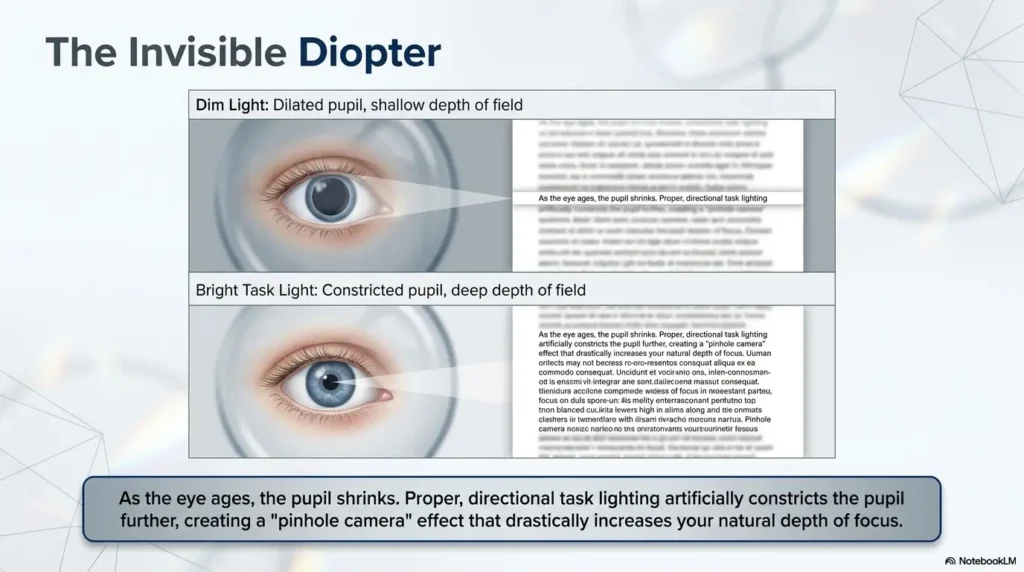
Store lighting is not real life. It is bright, even, and flattering to everything except your patience. You may test a pair under pharmacy lights, then use it at home under warm lamps, shadows, screen glare, or a kitchen bulb that has been dying since autumn.
Low light lowers contrast. Glare scatters detail. Fatigue reduces tolerance. The same glasses that feel fine at noon may feel weak at 9 p.m. because your visual system has been carrying the whole day like a tote bag full of bricks.
Mini checklist: test the distance before blaming the glasses
- Hold your phone where you naturally use it, not where you think you should use it.
- Place a book at your normal reading distance and read for five minutes.
- Sit at your laptop without leaning forward and check whether the screen stays clear.
- Try a medicine label with a bright lamp before changing reader strength.
- Notice whether blur appears only at night, only on screens, or only with tiny print.
OTC Readers Have a Built-In Blind Spot
Over-the-counter readers are convenient, affordable, and often helpful. But they are built for the average case. Human eyes, being tiny biological troublemakers, are not always average.
Drugstore readers usually put the same power in both lenses. They do not correct astigmatism. They do not account for every pupil distance. They do not measure how your two eyes work together. For simple presbyopia, that may be fine. For more complex vision, it may be a compromise with nice hinges.
Same power in both lenses may not match your eyes
Many people have different prescriptions in each eye. One eye may need more correction for near work. One eye may have more astigmatism. One eye may be doing more of the reading labor while the other quietly coasts.
OTC readers cannot customize that. If your eyes are similar, the mismatch may be small enough to ignore. If your eyes differ more, same-power readers can feel fine for a quick store test but tiring during real use.
This is one reason people say, “They worked at first, but now they give me headaches.” The first test measured sharpness. Daily life revealed comfort.
Pupil distance can matter more than expected
Pupil distance is the space between the centers of your pupils. Glasses work best when the optical centers of the lenses line up properly with your eyes. When they do not, your eyes may work harder to fuse the image.
For many casual readers, this is not a major issue. But if your pupil distance is unusually narrow or wide, or if the frames sit crooked, OTC readers may cause strain, blur, or even double vision. This is especially noticeable during longer reading sessions.
Astigmatism does not disappear at the pharmacy
Astigmatism can make vision look smeared, shadowed, stretched, or uneven. OTC readers add magnification, but they do not correct astigmatism. If astigmatism is part of your prescription, readers may help somewhat while still leaving the page oddly imperfect.
That imperfect feeling can become more obvious when you are tired, reading small print, or working under poor lighting. The pair may not be “wearing out.” It may simply be revealing what it never corrected.
Common Mistakes That Make Readers Feel Useless
Sometimes the glasses are wrong. Sometimes the setup is wrong. Sometimes the problem is a little committee of both, meeting behind your forehead with tiny clipboards.
Before buying another pair, check the habits that make readers seem worse than they are.
Mistake 1: Using one pair for every task
One pair may not cover phone scrolling, laptop work, recipes, crafts, bedtime reading, and pill labels equally well. That does not mean you need a drawer full of glasses arranged like rare spoons. It means you may need to match the tool to the task.
For example, a person who reads novels in bed and works at a laptop during the day may need one strength for close paper reading and a weaker option for the laptop. Another person may need prescription progressive lenses or dedicated computer glasses.
If you are helping an older parent set up a reading station, this is where comfort becomes practical. You might pair the right readers with a bright lamp, a labeled case, and a consistent location. For a more senior-focused setup, see this guide to a reading glasses setup for seniors.
Mistake 2: Testing readers with one eye closed
Closing one eye in the store can tell you whether a lens makes print sharper for that eye. It does not tell you whether both eyes are comfortable together.
Real reading is a team sport. Both eyes need to aim, focus, and combine the image. If one eye is clearer than the other, or the lens centers do not line up well, a quick one-eye test may miss the problem.
Mistake 3: Ignoring glare, dryness, and screen fatigue
Digital eye strain can create blur, burning, tearing, dryness, and headaches. When people stare at screens, they often blink less fully and less often. The tear film becomes unstable, and print may blur in waves.
Stronger readers will not fix a dry surface. They may even make the problem feel worse if they encourage you to stare more intensely at close work.
If glare is part of the issue, setup changes can help. You may benefit from an anti-glare screen protector, a better lamp angle, larger font size, or screen brightness that matches the room instead of shouting at it.
Mistake 4: Waiting too long for a real eye exam
Readers are not a substitute for eye health checks. They can make near print clearer, but they cannot tell you whether your eyes are healthy or whether cataracts, dry eye, diabetes-related changes, medication effects, or uncorrected astigmatism are contributing.
If you keep increasing strength every few months, cannot find a comfortable pair, or notice uneven blur, headaches, or double vision, an exam can answer what the rack cannot.
Key takeaway
Readers should make life easier, not create a daily negotiation with your forehead. If comfort fails across multiple strengths, especially with headaches or uneven vision, it is time for a professional check.
Show me the nerdy details
A reading-glasses strength is measured in diopters. A plus lens helps focus light for near tasks. As the plus number increases, the clearest working distance generally moves closer. That is why a stronger reader can sharpen very close print while making a laptop blurrier. The lens is not simply “better.” It is tuned for a different distance.
OTC readers also assume both eyes need the same near power and that the optical centers are close enough for your face. Prescription readers can account for different powers in each eye, astigmatism, pupil distance, and other details. This is why two people can buy the same +2.00 pair and have completely different experiences.
The Screen Trap: When Reading Glasses Meet Modern Work
Presbyopia was annoying enough when the main task was reading a book. Modern life added phones, tablets, laptops, desktop monitors, smartwatches, car dashboards, tiny app icons, and receipts printed in gray ink apparently invented by a ghost.
Reading glasses now have to survive a day of shifting distances. That is why they may feel inconsistent even when your eyes are stable.
Your monitor lives in the awkward middle
A desktop monitor often sits too far away for regular readers and too close for distance vision. This middle zone is where many people feel stuck.
If your readers are strong enough for a paperback, they may make the monitor blurry unless you pull it closer. If you remove the readers, the screen may be too soft. The result is a constant on-off dance that makes work feel like a tiny optical workout.
Computer glasses are designed for this middle distance. They are not glamorous, but neither is ending every workday with a brow ache shaped like a paperclip.
Blue-light glasses are not the main fix
Blue-light coatings are often marketed as if they will solve every screen problem from eye strain to existential dread. In everyday comfort, the basics often matter more: correct lens strength, screen distance, screen height, breaks, font size, blink habits, and lighting.
If your screen is too far for your readers, a blue-light coating will not magically move the focal distance. If your eyes are dry, a tint will not replace blinking, breaks, or appropriate eye care.
That does not mean coatings are useless for everyone. It means they should not distract you from the main problem: are the glasses matched to the task?
Here’s what no one tells you about laptops
Laptops are sneaky because the screen and keyboard are attached. If the screen is at a comfortable viewing distance, the keyboard may feel too far. If the keyboard is comfortable, the screen may be too close or too low.
Many laptop users lean forward without noticing. Their readers stay the same, but the body moves the page all day. By afternoon, the glasses feel “wrong,” although the real problem is a drifting distance.
Try this: set the laptop where your shoulders relax, increase font size, raise the screen if possible, and test whether a weaker reader feels better than your book-reading pair. The answer may be hiding in posture, not power.
The Reader Comfort Flow
1. Where is blur?
Book, phone, laptop, label, menu, or all tasks?
2. Check distance
Closer tasks may need different help than screens.
3. Fix the room
Improve light, contrast, glare, font size, and breaks.
4. Question OTC fit
Same-power lenses may not match both eyes.
5. Book care
Persistent, uneven, painful, or sudden changes need an exam.
When “A Few Months” Signals a Real Prescription Issue
Sometimes readers feel weak because your near-focus needs have changed. Sometimes they feel weak because they were only covering part of the problem. The difference matters.
A real prescription issue does not always announce itself with drama. It may show up as one eye feeling tired, small print looking shadowed, or headaches arriving after ordinary tasks.
One eye may be doing too much work
If one eye sees more clearly than the other, the clearer eye may carry the load. For a short task, you may not notice. After an hour of reading, the imbalance can feel like strain, blur, or irritation.
This can happen with different prescriptions between eyes, uncorrected astigmatism, cataract changes, dry eye differences, or other conditions. OTC readers are not built to identify the reason.
A simple home clue: cover one eye, then the other, while looking at the same line of print at the same distance. Do not use this as a diagnosis. Use it as a note. If one eye is consistently blurrier, mention it at your exam.
Headaches are data, not drama
Headaches, brow ache, nausea, watery eyes, or end-of-day blur are not moral failures. They are information.
They may point to the wrong reader strength, poor frame fit, pupil-distance mismatch, dry eye, screen setup, binocular vision trouble, or an underlying eye condition. The useful move is to track the pattern.
Write down when symptoms appear. Is it after laptop work? Only at night? Only with one pair? Only with tiny print? This turns a vague complaint into something your eye care provider can actually use.
The exam can answer what the rack cannot
An eye exam can test your near prescription, distance vision, astigmatism, eye teaming, and eye health. Depending on your needs, the answer might be prescription readers, progressives, bifocals, task-specific computer glasses, contact lenses, dry eye treatment, or a health referral.
This is especially important if you are over 60, have diabetes, have a family history of eye disease, recently had eye surgery, take medications that affect vision, or notice new symptoms. A related checklist on senior vision warning signs can help you sort ordinary changes from symptoms worth acting on.
Key takeaway
If readers fail quickly across several tasks, or if symptoms differ between eyes, the issue may not be reader strength alone. A prescription check can save you from months of guesswork.
Short Story: The laptop pair that solved the mystery
Martin bought +2.25 readers because the tiny print on a soup label looked wonderfully sharp in the store. For one week, he felt victorious. Then his laptop work became miserable.
By 3 p.m., he had a brow ache. By 5 p.m., he was leaning so close to the screen that his coffee mug looked concerned. He assumed his eyes had changed again.
At his eye exam, the answer was quieter: the +2.25 pair was too strong for his laptop distance. He needed a lower-strength computer pair and better screen height.
The lesson was not “never use readers.” It was “do not ask one pair to do every job.” His book pair stayed. His laptop pair moved onto the desk. His forehead retired from unpaid labor.
How to Test Your Readers Before Buying Another Pair
A good reader test should look like your life, not a three-second squint at a price tag under fluorescent lights. You want to test task distance, comfort over time, lighting, and both-eye use.
The goal is not to become your own optometrist. The goal is to stop making random purchases and start collecting useful clues.
Test at your real reading distance
Gather the items you actually read: phone, paperback, laptop, recipe, medicine label, mail, and anything else that regularly makes you mutter.
Hold each item where you normally use it. Do not create a fake perfect posture for the test. Your real habits are the point.
If your current readers work for books but fail for the laptop, that is not a failure of reading glasses as a category. It is a task-distance mismatch.
Compare comfort, not just sharpness
Sharpness is the first clue. Comfort is the second. A pair that looks crisp for ten seconds but causes strain after five minutes is not a good daily choice.
Read a normal paragraph for several minutes. Check whether you are leaning forward, holding the page too close, lifting your chin, squinting, or feeling pressure around the eyes.
Use both eyes open. Your life is not lived through one eye at a time, unless you are a pirate in a tax office.
Try the lower comfortable strength first
If two strengths both work, start with the lower comfortable strength for general reading. This often gives you a more flexible viewing range and reduces the risk of forcing everything too close.
For very tiny print, you may still need a stronger pair, a magnifier, or better lighting. But do not let the hardest print in your day dictate the glasses you wear for everything else.
| Task | Test question | Comfort clue |
|---|---|---|
| Phone | Can you read without pulling it too close? | No squinting, no brow ache, no neck curl |
| Book | Can you read a full page comfortably? | Stable clarity for several minutes |
| Laptop | Can you sit upright and see the screen? | No leaning forward to find focus |
| Medicine label | Does better light solve it? | If not, consider magnification or large-print labels |
When to Book an Eye Exam
There is no prize for winning the drugstore guessing game. If readers keep disappointing you, an exam can shorten the search.
Book an eye exam if your readers change often, if you cannot find a comfortable strength, or if you have headaches, double vision, uneven blur, or symptoms that interfere with work, driving, medication labels, or daily safety.
Book if readers change often
If you are buying stronger readers every few months, pause. Your near needs may be changing, but frequent jumps can also mean the readers are not addressing the real problem.
An eye care provider can check whether you need a different prescription, correction for astigmatism, separate computer glasses, or evaluation for another vision issue.
Book sooner for red-flag symptoms
Seek prompt care for sudden vision loss, sudden blur, eye pain, flashes, new floaters, injury, curtain-like shadow, severe headache with vision changes, double vision, or distortion in one eye.
Those symptoms are not the normal “where did I put my readers?” comedy of midlife. They deserve attention.
Annual rhythm, personal risk
How often you need an eye exam depends on age, symptoms, health history, diabetes, family history, medications, previous surgery, and your provider’s guidance. Older adults and people with eye-disease risk factors may need closer monitoring.
If you are building a broader vision-care routine, an annual eye exam checklist can help you prepare questions, symptoms, medications, and daily-vision notes before the appointment.
Key takeaway
The best time to book an exam is before you have bought five “almost right” pairs. Bring notes about which tasks fail, which strength helps, and whether symptoms affect one eye or both.
Question list to bring to an eye exam
- Do I need different correction for reading and computer work?
- Are both eyes using the same near prescription?
- Do I have astigmatism that OTC readers cannot correct?
- Could dry eye be making my readers seem weaker?
- Would prescription readers, progressives, bifocals, or computer glasses fit my routine better?
- Are there any eye health issues that could explain recent changes?
FAQ
Why do my reading glasses work one month and not the next?
Your near vision needs may have changed, but task distance, lighting, dry eyes, fatigue, screen use, and tiny print can also make the same pair feel weaker. Test your readers at your real distances before jumping to a stronger strength.
Do reading glasses make your eyes weaker?
No. Reading glasses do not train your eyes to become lazy. They compensate for age-related near-focus changes. You may notice your need for them more over time because presbyopia naturally progresses.
Is it bad to wear stronger reading glasses than I need?
Wearing stronger readers than needed may cause discomfort, headaches, nausea, or awkward viewing distance. It usually does not permanently damage your eyes, but it can make daily tasks more tiring.
Why do cheap readers give me headaches?
Possible reasons include wrong strength, poor frame fit, optical centers that do not line up well, same-power lenses that do not match both eyes, or uncorrected astigmatism. If headaches repeat, get an eye exam.
Can I use reading glasses for computer work?
Sometimes, but computer distance often needs a weaker or task-specific lens. If your book readers make you lean toward the laptop, they may be too strong for that distance.
Why are my readers blurry only at night?
Low light, glare, reduced contrast, fatigue, and dry eyes can all make readers seem weaker at night. Try brighter, better-angled light and check whether symptoms still persist.
Should both eyes need the same reading strength?
Not always. OTC readers usually assume both eyes need the same power, but real prescriptions can differ. If one eye feels blurrier or more strained, a prescription check is wise.
When should I stop buying OTC readers?
Stop guessing when readers cause strain, stop working quickly, fail for screens, or symptoms are uneven, sudden, painful, or persistent. At that point, an eye exam is more useful than another pair.
Next Step: Do the Three-Distance Check
The fastest practical move is not buying another pair. It is testing the pair you already own in three real places: book distance, phone distance, and laptop distance.
Set a timer for 15 minutes. Use your current readers for five minutes at each distance. Keep both eyes open. Sit normally. Use the lighting you usually use. Notice where blur, headache, leaning, squinting, or irritation appears.
Then write one sentence: “My current readers work for _____, but not for _____.” That sentence is small, but it changes the whole errand. You are no longer wandering the rack hoping the next number saves you. You are matching a tool to a task.
If the pattern is simple, you may discover that you need a different strength for screens or better lighting for tiny labels. If the pattern repeats, worsens, affects one eye, or comes with headaches or double vision, bring those notes to an eye exam.
Your 15-minute reader reset
- Read a book or printed page for five minutes.
- Use your phone for five minutes at your normal distance.
- Use your laptop for five minutes without leaning forward.
- Write down which task failed and what symptom appeared.
- Use that pattern to choose a better setup or book an exam.
Last reviewed: 2026-06