
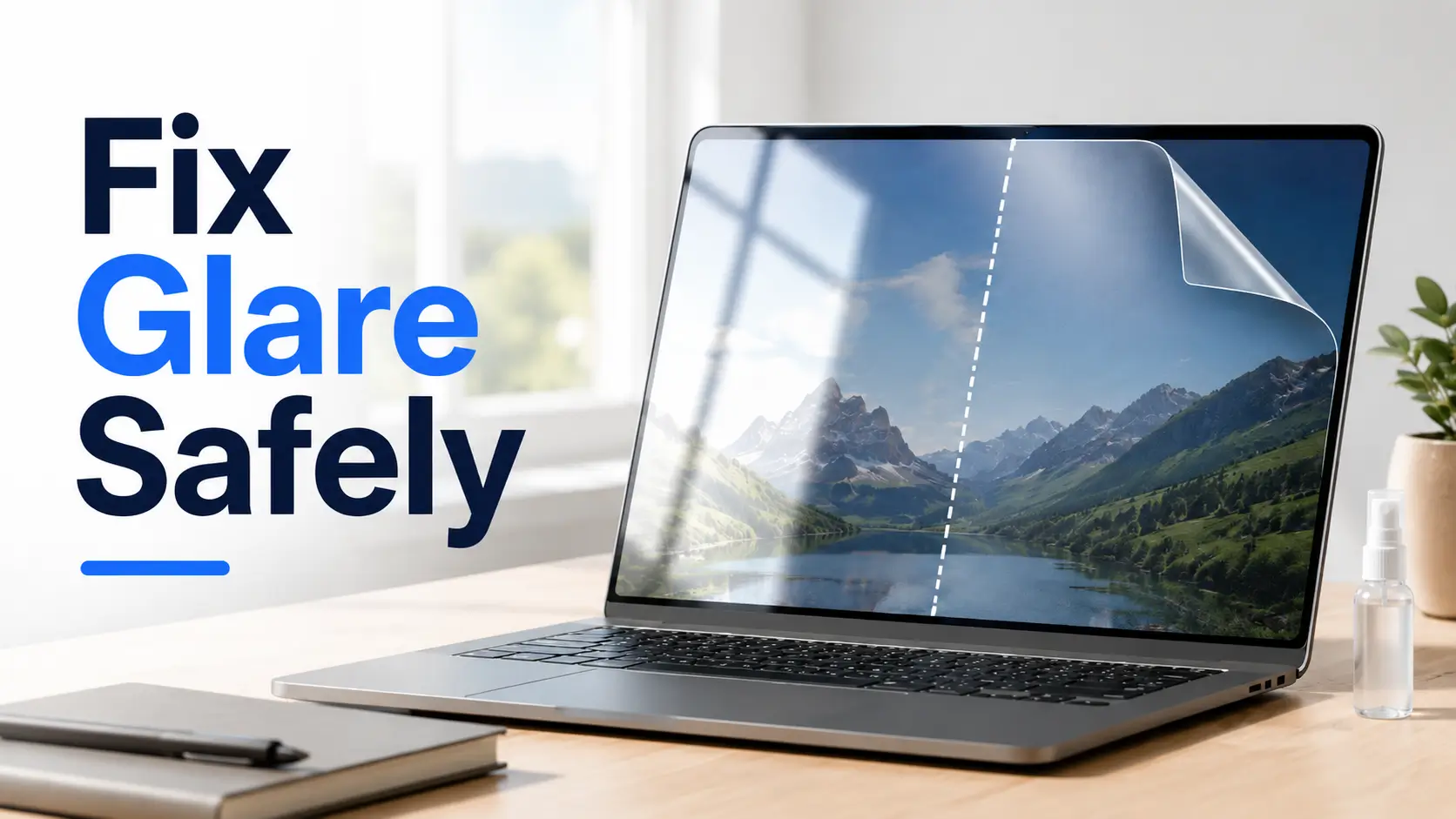
Solving the Glare: A Guide to Protecting Your Display and Your Sanity
Because the best glare fix is not the most dramatic one, it is the one you can undo.
Glare has a talent for arriving at the worst possible moment: the airport gate, the sunny desk, or the café table that turns your laptop into a mirror with Wi-Fi. The real problem isn’t just brightness; it’s the frustration of reflection, fingerprints, and image softness.
Guess wrong, and you may trade glare for haze, residue, edge bubbles, or a cleaning mistake that your warranty politely refuses to hug. This guide helps you choose the safer fix faster:
- ✔️ Matte Protectors: When a reversible layer makes sense.
- ⚠️ Anti-Glare Sprays: Why they are often too risky for expensive glass.
- 💡 Light Management: The cheapest answer that requires no screen contact.
Table of Contents
Safety / Disclaimer Block
This guide is general consumer education, not device-specific warranty advice. Before using any spray, film, cleaner, coating, wipe, polish, or mystery bottle with confident typography, check your device manufacturer’s cleaning instructions and warranty language.
Modern screens may include anti-reflective coatings, oleophobic coatings, specialty glass, plastic layers, touch digitizers, privacy layers, or factory-applied finishes. These surfaces do not all behave the same way under chemicals, pressure, heat, moisture, or repeated wiping.
Practical rule: if a cleaning or glare-reduction product does not clearly say it is compatible with your exact device category, treat it like a charming stranger holding a screwdriver near your laptop.
- Check manufacturer screen-care instructions first.
- Avoid direct spraying on electronics.
- Prefer reversible fixes for expensive displays.
Apply in 60 seconds: Search your device maker’s official cleaning page before buying any spray or film.
The Real Choice Isn’t “Matte vs Spray.” It’s Risk vs Reversibility
The real decision is not whether matte is cooler than spray. The real decision is whether your glare fix can be reversed if it looks bad, feels bad, or behaves badly after a week.
Why removable beats permanent-ish
A matte screen protector is a physical layer. You place it on the screen, live with it, judge it under normal light, and usually remove it if you hate the grain, haze, edge lift, or stylus feel. That reversibility is not glamorous. It is also the whole castle.
Anti-glare spray feels simpler because it skips installation. No bubbles. No dust ritual. No bathroom-steam trick. But spray has a different risk profile. It may leave residue, streak unevenly, or interact with whatever coating already lives on the glass or plastic surface.
I have watched one perfectly reasonable person turn a monitor into a foggy pond because the bottle said “screen safe” in letters that looked trustworthy. The monitor survived. The mood did not.
The hidden question: “Can I safely reverse this?”
Ask one question before you buy: Can I safely undo this? If the answer is yes, the risk goes down. If the answer is maybe, the product should earn more suspicion.
- Matte protector: usually removable, but may leave minor adhesive residue if low quality.
- Anti-glare spray: may be difficult to fully remove, especially if it bonds, dries unevenly, or affects a coating.
- Lighting changes: fully reversible and free, which is a rare consumer-tech unicorn.
- Manufacturer-approved cleaning: low risk when followed carefully.
Here’s what no one tells you…
Some people are not fighting screen glare. They are fighting their room.
A glossy screen can become impossible because a window sits behind your shoulder, an overhead light hits at the exact wrong angle, or a glossy black bezel reflects a lamp like it has been personally hired by chaos. In those cases, a $15 protector may help. Moving the lamp 18 inches may help more, especially if you are already dealing with low vision fatigue from glare and visual strain.
Glare Fix Risk Ladder
Lowest risk. Adjust lamps, blinds, angle, and seating.
Use microfiber and approved instructions. No screen soup.
Reversible, but may soften image quality.
Highest caution. Use only if clearly approved.
Matte Screen Protectors Work by Scattering Light, Not Making It Vanish
A matte screen protector does not swallow glare like a tiny black hole. It changes how light reflects. Instead of one sharp reflection, the surface scatters light in many directions. The bright window becomes less mirror-like, but the image can also look a little less crisp.
The glare trade: softer reflections, softer image
That trade is the heart of the matte screen protector vs anti-glare spray decision. Matte can make a screen easier to read under difficult light, especially with white backgrounds, documents, dashboards, and note apps. But the same texture can reduce perceived contrast, sharpness, and color depth.
People describe the side effects in different ways: grain, sparkle, haze, paper texture, soft focus, or “why does my expensive display now look like it had a long winter?” None of those reactions mean the product is fake. They mean the physics has a receipt.
Best fit: tablets, laptops, outdoor work, and stylus users
Matte protectors often shine, politely and with less shine, for:
- iPad and tablet note-taking
- Stylus drawing and annotation
- Laptops used near windows
- Field work, travel, classrooms, and cafés
- People who hate fingerprints more than they love perfect blacks
On tablets, the extra friction can feel more controlled with a stylus. On laptops, it can calm reflections enough to finish a spreadsheet without seeing your own forehead supervise the budget.
Not ideal for: color-critical editing and OLED drama lovers
If your screen is your color instrument, think carefully. Photographers, video editors, designers, gamers, and OLED devotees may notice the loss of snap more than the gain in reflection control.
There is no shame in choosing image quality. A glossy premium display is often glossy because the manufacturer wants sharper contrast, richer blacks, and cleaner color. Putting a matte layer over that is a bit like hanging linen over a concert hall speaker. Sometimes practical. Not always faithful.
Show me the nerdy details
Matte surfaces reduce specular reflection by creating microscopic surface irregularities that diffuse incoming light. This makes strong reflections less defined, but it can also scatter light from the display itself before it reaches your eyes. That is why glare may decrease while text edges, contrast, and fine visual detail can look slightly softer. More aggressive matte textures usually reduce reflections more, but they also increase the chance of visible grain or sparkle.
Anti-Glare Spray Sounds Easy, Which Is Exactly the Trap
Anti-glare spray has a seductive pitch: shake bottle, spray, wipe, glare gone. It is the skincare commercial version of screen maintenance. The trouble is that modern display surfaces are not blank glass waiting to be improved.
One bottle, many surfaces, too many assumptions
A spray that works on eyeglasses may not be right for a laptop. A product that is fine for acrylic may not be right for OLED TV panels. A cleaner that behaves on a car screen may not belong on a tablet with an oleophobic coating.
The label may say “screens,” but screens are a crowded family reunion. Phones, monitors, TVs, tablets, touchscreens, matte factory panels, glossy glass, plastic-coated displays, and anti-reflective surfaces can all respond differently.
The coating problem hiding under the shine
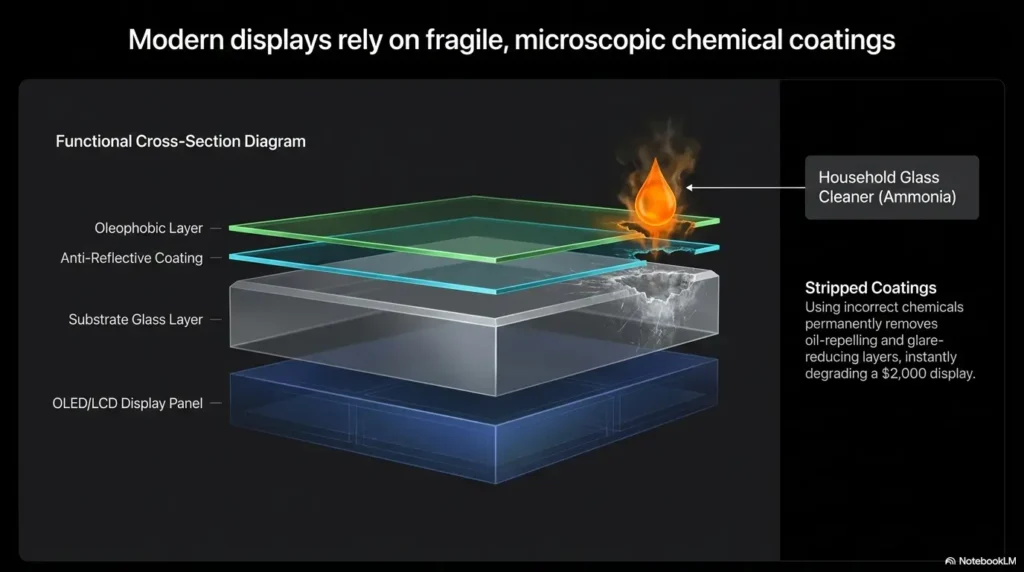
Many modern displays already have surface treatments. These can make touch smoother, reduce fingerprints, reduce reflections, improve durability, or tune the viewing experience. Applying an incompatible spray can cause streaks, haze, patchiness, or a greasy film that seems to reappear after every cleaning.
Apple, Microsoft, Samsung, LG, Dell, HP, Lenovo, ASUS, and other major device makers commonly publish screen-cleaning guidance for a reason: the surface is part of the product. Treating it like a kitchen window is how little disasters learn to tap dance.
Let’s be honest…
The appeal of spray is emotional. It promises a ten-second fix for a problem that usually asks for patience: adjust the light, clean the surface, test a removable layer, then decide.
I understand the temptation. I once tried to solve a glare problem with brightness alone and ended up with a laptop screen that looked like a lighthouse arguing with my retinas. The better fix was moving the desk six inches and closing one slat of a blind. Annoyingly simple. Extremely effective.
- Modern screens may already have coatings.
- “Lens safe” does not automatically mean “display safe.”
- Spray should never be the first glare fix.
Apply in 60 seconds: If the product label does not name electronic displays clearly, do not use it on your screen.
Device-by-Device Verdict: Phone, iPad, Laptop, Monitor, TV
The right answer changes by device. A matte protector on a student’s iPad may be brilliant. The same approach on a living-room OLED TV may feel like putting tracing paper over a museum painting.
Phones: matte protector if glare beats sharpness
For phones, matte protectors can help outdoors, in cars, and under harsh office lighting. They also tend to hide fingerprints better than glossy glass.
The cost is image crispness. Text may look softer. Photos may lose some punch. If you mostly read messages, maps, documents, and email, the trade may be worth it. If your phone is your mini cinema, you may resent the haze by dinner.
Tablets and iPads: the strongest case for matte
Tablets make the strongest argument for matte because they are often used for reading, handwriting, drawing, and schoolwork. A paper-feel protector can make stylus input feel more controlled and less slippery.
The catch: paper-feel films can wear stylus nibs faster, and heavy matte textures can dull the screen. For an iPad Pro, Galaxy Tab, or Surface used for art, consider a higher-quality protector and read the negative reviews first.
Laptops: good for travel, classrooms, and window-heavy offices
Laptops live in rude lighting. Airports, lecture halls, cafés, coworking spaces, kitchen tables, and rental apartments all have their own glare personalities.
A matte laptop protector can be useful if your screen constantly reflects windows or overhead light. But installation matters. Laptop protectors are larger than phone protectors, which means more chances for dust, alignment errors, and bubbles with the emotional range of opera.
Monitors: solve the room before touching the screen
For desktop monitors, start with the room. Move the monitor perpendicular to windows. Lower overhead lights. Add a side lamp. Tilt the monitor slightly. Change brightness and contrast. Clean the surface correctly. If your problem is more about a phone or tablet feeling painfully bright at night, compare that approach with Reduce White Point vs Night Shift for glare-sensitive eyes.
If glare remains, a monitor-specific anti-glare film may help. But a big film installation is less forgiving than a phone protector. Measure carefully, buy from a reputable seller, and avoid aggressive matte if you do text-heavy or color-sensitive work.
TVs: be extra cautious with sprays
TVs deserve special caution. Large screens can have delicate anti-reflective layers or manufacturer-specific surface treatments. A questionable spray can leave swirls, cloudy patches, or permanent-looking streaks across a very expensive rectangle.
For TVs, the first fix is almost always environmental: curtains, lamp position, screen angle, seating angle, and brightness settings. The second fix is manufacturer-approved cleaning. The third fix is reconsidering the room. The spray bottle should be somewhere near the bottom of the list, under “learn accordion” and “alphabetize spices.” For a deeper room-first approach, see this guide to TV glare reduction without risky screen experiments.
| Device | Best first move | Matte protector verdict | Spray verdict |
|---|---|---|---|
| Phone | Clean and test outdoors | Good if glare bothers you more than softness | Avoid unless clearly approved |
| Tablet / iPad | Decide reading vs color priority | Strong choice for stylus and reading | Usually not worth the risk |
| Laptop | Move desk or adjust angle | Useful for travel and bright rooms | High caution |
| Monitor | Fix lighting first | Consider only after room changes | Generally skip |
| TV | Curtains, lamp changes, seating angle | Rarely ideal | Avoid unless manufacturer-approved |
The “Looks Worse” Problem: Why Matte Can Feel Disappointing on Day One
The first day with a matte screen protector can feel emotionally complicated. You solved the glare. Wonderful. Then you notice text looks less crisp, whites look slightly textured, and your premium display has become a little more practical than poetic.
Grain, sparkle, haze, and rainbow texture
Matte protectors vary widely. Some are subtle. Some look like the screen has been lightly dusted with powdered sugar and regret.
Common visual artifacts include:
- Grain: a fine texture visible on white or bright backgrounds.
- Sparkle: tiny shimmering points, often noticeable on high-resolution screens.
- Haze: a softer, lower-contrast look.
- Rainbow effect: color shifting under certain angles or lighting.
- Edge lift: corners or borders that refuse to stay flat.
Why cheap matte films can make premium screens feel ordinary
High-resolution displays are unforgiving. A low-quality matte film can blur tiny text, flatten contrast, and make a $1,500 laptop feel like it borrowed a screen from a waiting-room kiosk.
This does not mean every matte protector is bad. It means quality, texture strength, adhesive, sizing, and installation matter. A moderate anti-glare finish often gives a better balance than the most aggressive matte option.
The 48-hour adjustment window
Give a new matte protector 48 hours under your normal lighting before making the final call. Your eyes may adjust, especially if the glare reduction helps you relax while reading.
Remove it sooner if you see obvious distortion, touch problems, sensor issues, eye discomfort, trapped grit, severe rainbowing, or edge lift. A protector should serve the screen. It should not become the main character.
- Expect some softness.
- Avoid the strongest matte finish unless you truly need it.
- Test reading, photos, video, and touch before the return window closes.
Apply in 60 seconds: Open a white document, a photo, and a dark video scene before deciding whether the matte finish works for you.
Common Mistakes That Turn a Glare Fix Into a Screen Problem
Most screen disasters begin with good intentions and one small shortcut. The screen is dirty. The sun is rude. The bottle is nearby. Suddenly, a cleaning session has plot development.
Mistake 1: Spraying directly onto the screen
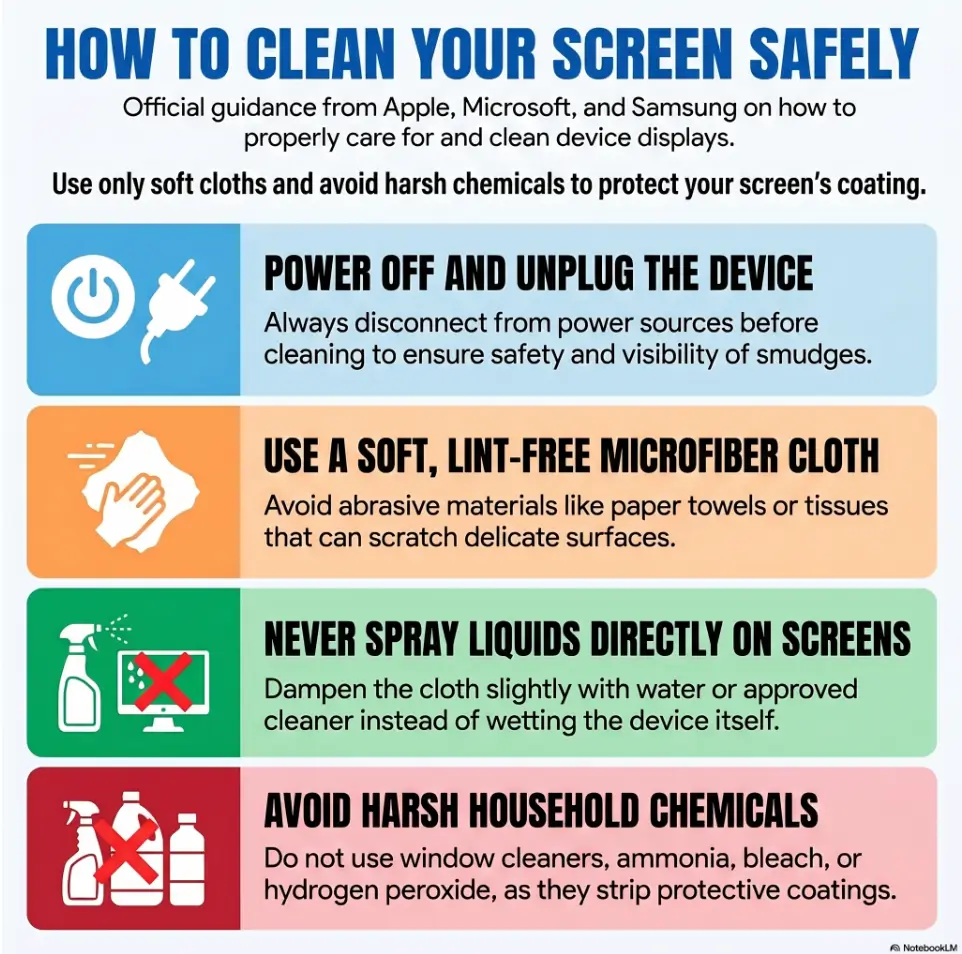
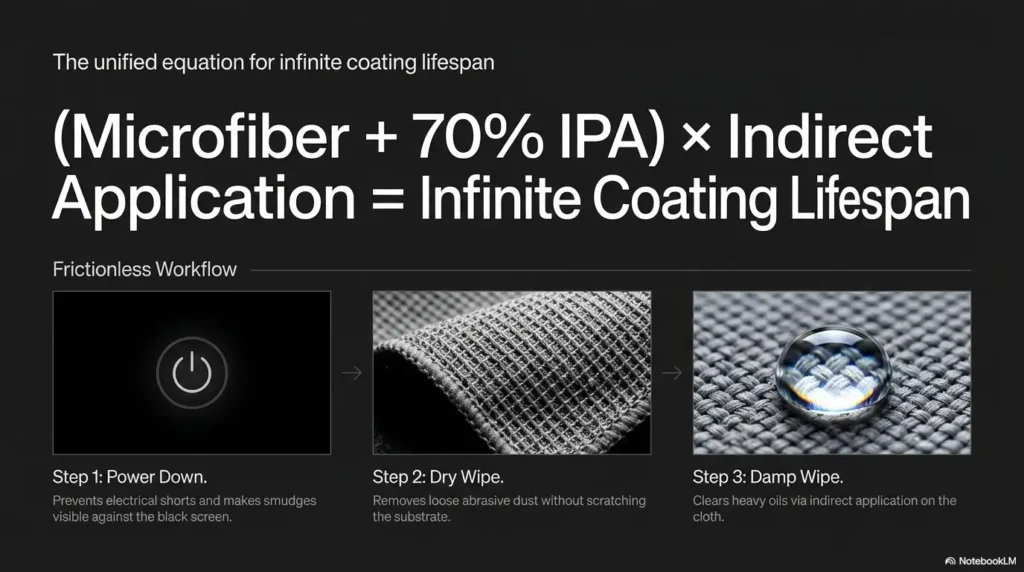
Never spray liquid directly onto a screen unless your device maker explicitly tells you to do so. Liquid can run into bezels, ports, speaker grills, seams, keyboards, and edges.
The safer method is usually to lightly dampen a microfiber cloth, then wipe gently. Not wet. Not dripping. Not “I have baptized the MacBook.”
Mistake 2: Assuming “lens safe” means “screen safe”
Eyeglasses, camera lenses, automotive displays, and electronic screens can have different coatings. A product that behaves on one surface may leave film or streaks on another.
This is especially important for touchscreens with oleophobic coatings. Harsh cleaners or abrasive wiping can reduce the smooth feel over time.
Mistake 3: Installing matte film in a dusty room
Dust under a screen protector creates bubbles, raised dots, and the tragic snow globe effect. The usual advice is to install in the cleanest room available, wash hands, use the dust stickers, and take your time.
I once installed a tablet protector near a sweater. A sweater. It contributed lint with the confidence of a silent business partner.
Mistake 4: Buying the most aggressive matte finish first
Maximum glare reduction can mean maximum image compromise. Start with moderate anti-glare unless you work outdoors, use a stylus heavily, or already know you prefer strong matte texture.
Eligibility Checklist: Should You Try Matte Film First?
- Yes / No: Is glare still bad after moving one light source?
- Yes / No: Can you accept slightly softer text or color?
- Yes / No: Is the protector made for your exact device size?
- Yes / No: Does it have a clear return policy?
- Yes / No: Are you avoiding sprays because the device is expensive or coated?
Neutral next step: If you answered yes to at least 4 items, test a removable matte protector before considering any chemical product.
Who This Is For / Not For
The best anti-glare choice depends less on the product and more on the person holding the device. A nursing student reading PDFs near a window has a different problem from a video editor grading color at midnight.
Choose a matte screen protector if…
A matte screen protector is a strong fit if you:
- Read outdoors or near windows.
- Use a tablet for notes, drawing, or PDFs.
- Travel with a laptop often.
- Work under overhead office lighting.
- Hate fingerprints and mirror-like reflections.
For these users, the slight softness may be less annoying than constant reflection. Sometimes comfort wins. Not every screen needs to perform Shakespeare in 4K.
Avoid matte if…
You may want to avoid matte if you do color-critical work, watch a lot of movies on the device, love OLED contrast, play visually rich games, or notice texture easily.
If you paid for a display because it looks deep, glossy, and precise, covering it with a textured layer may feel like buying a grand piano and then insisting it wear mittens.
Avoid anti-glare spray if…
Avoid spray if the device is expensive, new, under warranty, has specialty glass, uses OLED or mini-LED, has a factory matte or anti-reflective surface, or lacks clear manufacturer approval for that product type.
Spray is also a poor choice if you are trying to fix a lighting problem. Chemical courage is not a substitute for curtains.
Short Story: The Café Window Test
A freelance editor I know used to blame her laptop for every afternoon headache. Around 2 p.m., the café window behind her turned the screen into a mirror, and she would crank brightness until the laptop looked heroic and her eyes felt roasted. She bought a matte protector, installed it carefully, and liked it for documents. But the real breakthrough came later.
One day, she rotated the table slightly and moved from the window-facing seat to the side seat. The glare dropped before the screen protector even had a chance to be impressive. She kept the matte film because it helped on trains and in airports, but she stopped treating it as magic. The lesson was wonderfully boring: the best product worked better after the room stopped sabotaging it.
The Safer Glare-Reduction Ladder: Try These Before Spray
Before buying anything, use the safer ladder. It costs less, protects the screen, and often solves the actual problem. This is the unglamorous part of the guide, which is usually where the money hides.
First move: change the light, not the glass
Move the screen so windows are beside it, not behind you. Lower or reposition overhead lights. Close blinds halfway. Add a small side lamp. Tilt the monitor. Shift the couch. For a laptop, rotate 20 degrees and test again.
These changes can take under 5 minutes. They also avoid installation mistakes, chemical risk, and the mild existential crisis of peeling dust out from under a protector.
Second move: clean correctly
Glare gets worse when fingerprints, oil, and dust scatter light. Use a clean microfiber cloth. If needed, lightly dampen the cloth according to manufacturer guidance.
Avoid harsh household glass cleaners unless the device maker specifically allows them. Many electronics brands warn against abrasive cloths, excess moisture, and harsh chemicals because coatings can be sensitive.
Third move: test a removable film
If glare remains, choose a device-specific matte or anti-glare protector from a reputable brand. Look for clear compatibility, sensible return terms, and reviews that mention your exact device model.
For tablets, decide whether you want “paper-feel” friction or a lighter matte finish. For laptops and monitors, measure carefully and avoid films that require liquid installation unless the manufacturer clearly supports the method.
Last move: consider specialty products only with manufacturer approval
Spray belongs at the end of the ladder. If a product is not clearly approved for your device type, skip it. If your manufacturer warns against coatings, solvents, or certain cleaners, believe them. The screen maker knows more about that surface than a bottle shouting “universal.”
Mini Glare Score Calculator
Rate each item from 0 to 3, then add the numbers.
- Reflection severity: 0 none, 3 constant mirror effect
- Lighting flexibility: 0 easy to change, 3 impossible to change
- Image-quality tolerance: 0 cannot accept softness, 3 softness is fine
Result: 0–3 means fix the room first. 4–6 means consider a light matte protector. 7–9 means a stronger matte protector may be worth testing.
Neutral next step: Write your score down before shopping so product photos do not hypnotize you.
Buying Criteria: How to Choose a Matte Protector Without Regret
A good matte protector should feel boring in the best way: it fits, reduces reflection, does not wreck touch response, and does not make your display look like it is remembering an old sadness.
Check device-specific fit first
Device-specific fit matters more than a dramatic product page. Check camera cutouts, Face ID sensors, fingerprint readers, curved edges, webcam position, speaker openings, stylus support, and case compatibility.
For laptops and monitors, confirm the exact screen size and aspect ratio. A 13.3-inch display and a 14-inch display are not cousins close enough to share clothing.
Look for clarity language, not just “anti-glare”
Product terms can blur together. Here is the useful difference:
- Matte: textured surface that diffuses reflections.
- Paper-feel: stronger friction, often for stylus users.
- Anti-fingerprint: hides or resists smudges, not always glare.
- Anti-reflective: may refer to coatings that reduce reflected light without heavy texture.
- Privacy: narrows viewing angles and can darken the screen.
Read the bad reviews first
The bad reviews tell you where the bones are buried. Look for complaints about haze, sparkle, touch sensitivity, bubbles, edge lift, stylus nib wear, sensor interference, rainbow texture, adhesive residue, and poor sizing.
Do not panic over one angry review written like a thunderstorm in a keyboard. Look for patterns. If 20 people mention grain on your exact tablet model, believe the chorus.
Buy like you may remove it
Save the packaging. Keep proof of purchase. Install early in the return window. Test your normal tasks: reading, typing, drawing, video calls, movies, photos, maps, spreadsheets, and dark mode.
Quote-Prep List: What to Gather Before Comparing Protectors
- Exact device model and screen size
- Whether the display has curved edges or specialty coating
- Your top use: reading, stylus, video, design, gaming, travel
- Your glare setting: window, outdoors, overhead lights, TV room
- Your tolerance for haze, grain, and softer contrast
Neutral next step: Compare only products that match your exact device and your top use case.
Anti-Glare Spray Red Flags: Don’t Put This on Your Screen
If you are still considering anti-glare spray, slow down. A good product should be specific, transparent about compatible surfaces, and aligned with your device maker’s care instructions. Vague confidence is not a safety feature.
No clear electronics compatibility
If the product does not clearly name electronic displays, touchscreens, monitors, TVs, tablets, or your device category, skip it. “Glass safe” is not enough. “Lens safe” is not enough. “Works everywhere” is not a plan.
Big promises, vague chemistry
Be cautious with products claiming permanent glare removal, instant coating restoration, or universal anti-reflection without explaining compatible surfaces. If the promise sounds too smooth, read the label like a contract written by a raccoon lawyer.
Alcohol, ammonia, abrasives, or mystery solvents
Many screens are sensitive to harsh cleaners, repeated solvent exposure, and abrasive materials. Some manufacturer instructions allow limited use of certain disinfectants on specific products, but that does not mean every screen welcomes every chemical.
Do not improvise with household glass cleaner, kitchen degreaser, polishing compounds, or alcohol-heavy products unless your device maker’s guidance clearly allows it for your exact surface.
“Works on all screens” language
Universal claims should make careful buyers pause. Screens are not all one tribe. A phone, a laptop, and a premium OLED TV may all glow, but their surfaces can behave very differently.
- Skip products without clear electronics compatibility.
- Avoid mystery solvents and abrasive language.
- Trust manufacturer cleaning instructions over marketing copy.
Apply in 60 seconds: If the label says “all screens,” check whether your manufacturer says the same thing. If not, walk away.
Decision Matrix: Matte Protector vs Anti-Glare Spray
Here is the clean buying call. Not dramatic. Not sponsored. Just the kind of boring clarity that saves screens and keeps returns departments from learning your name.
Best for glare reduction
Matte screen protector. It physically diffuses reflections and is more predictable than spray. Choose a moderate finish first unless you need strong outdoor readability.
Best for reversibility
Matte screen protector. You can usually remove it. That matters. Reversibility is the quiet adult in the room.
Best for image sharpness
Neither, if your current glossy screen is already clear. Adjust lighting first. A matte layer can reduce crispness, and spray may add residue or haze.
Best for expensive displays
Environmental fixes first, then manufacturer-approved accessories. Premium monitors, OLED TVs, tablets, and laptops deserve a conservative approach.
Best for tablets with stylus use
Matte or paper-feel protector. The added friction can make writing and drawing feel more natural, though stylus nib wear may increase.
Best for TVs
Room-lighting changes, curtains, repositioning, or manufacturer-approved screen-care methods. TV sprays are risky unless the manufacturer clearly approves the product type.
| Priority | Choose this | Why | Trade-off |
|---|---|---|---|
| Lowest risk | Lighting changes | Free and reversible | May not work outdoors |
| Portable glare control | Matte protector | Works wherever the device goes | Softer image |
| Stylus feel | Paper-feel film | Adds friction and control | Possible nib wear |
| TV glare | Room changes | Protects specialty screen surfaces | May require curtains or layout changes |
| Chemical shortcut | Usually avoid spray | Coating risk can outweigh benefit | Only consider with clear approval |
Neutral next step: Pick your top priority before shopping, then choose the lowest-risk option that solves that one priority.
FAQ
Is a matte screen protector better than anti-glare spray?
For most consumer devices, yes. A matte screen protector is usually safer because it is a removable physical layer. Anti-glare spray may leave residue, streak, or affect existing screen coatings if it is not clearly approved for your device.
Does a matte screen protector make the screen blurry?
It can make the screen look slightly softer, especially on bright white backgrounds, fine text, detailed photos, and high-resolution displays. The effect varies by protector quality and matte strength.
Can anti-glare spray damage a laptop screen?
It can, especially if the spray contains harsh ingredients, is not designed for electronic displays, or conflicts with the screen’s existing coating. Spraying directly onto a laptop is also risky because liquid can enter seams, bezels, or the keyboard.
What is the safest way to reduce glare on a monitor?
Start with room lighting, monitor angle, window position, brightness settings, and proper cleaning with a microfiber cloth. If glare remains, consider a monitor-specific matte film from a reputable brand.
Are matte screen protectors good for iPads and tablets?
They can be excellent for reading, note-taking, drawing, and stylus work. The trade-off is that the screen may look less vivid, and paper-feel protectors may wear stylus nibs faster.
Should I use anti-glare spray on a TV?
Usually, no. TV screens can have delicate surface treatments, especially premium OLED or anti-reflective models. Use room-lighting changes and manufacturer-approved cleaning methods first.
Do matte protectors reduce fingerprints?
Often, yes. Matte surfaces tend to hide fingerprints better than glossy glass, though they still collect oil and dust. You still need gentle cleaning.
Can I remove a matte screen protector later?
Usually, yes. That reversibility is one of the main advantages of a matte screen protector over sprays or coatings. Remove it slowly and follow the protector maker’s instructions.
Will a matte protector affect touchscreen sensitivity?
A good protector should not noticeably hurt touch response, but thick, poorly fitted, or low-quality protectors can cause issues. Read reviews for your exact device model.
Is anti-reflective the same as anti-glare?
Not always. Anti-glare often means diffusing reflections with a matte texture. Anti-reflective can refer to coatings that reduce reflection while preserving more clarity. Product terms are not always used consistently, so read the details carefully.
Next Step: Do the Five-Minute Glare Test Before Buying Anything
This is the promised curiosity loop from the beginning: the best glare fix may not be a product. It may be proof. Spend 5 minutes testing the actual glare before buying a protector, spray, film, wipe, or tiny bottle of optimism.
Step 1: Use the screen where glare annoys you most
Test the real setting: couch, desk, car passenger seat, patio, classroom, airport, café, office, or TV room. Do not test in perfect lighting unless you live inside a showroom.
Step 2: Move one light source
Shift a lamp. Close blinds halfway. Rotate the laptop. Tilt the monitor. Move your chair. Try one change at a time so you know what actually helped. In some rooms, window film for glare control may solve more than any screen accessory can.
Step 3: Decide what matters more: clarity or reflection control
If glare remains worse than a slight loss of crispness, choose a device-specific matte protector. If image quality matters more, skip matte and fix the room. If spray still seems tempting, check official device guidance first and proceed only if compatibility is clear.
Coverage Tier Map: From Free Fixes to Higher-Risk Fixes
- Tier 1: Move the screen or light source.
- Tier 2: Clean with microfiber and approved guidance.
- Tier 3: Adjust brightness, contrast, dark mode, or reading mode.
- Tier 4: Test a removable matte protector.
- Tier 5: Consider specialty spray only with clear manufacturer approval.
Neutral next step: Start at Tier 1 today and move up only when the lower tier fails.
- Test in the actual problem location.
- Move one light source before buying anything.
- Choose matte only if reflection control matters more than perfect clarity.
Apply in 60 seconds: Rotate your screen 20 degrees and watch whether the reflection moves away from your eyes.
Conclusion: Fix the Light First, Then Choose the Least-Regrettable Layer
Matte screen protector vs anti-glare spray is not a contest between two equal magic tricks. It is a risk decision. A matte screen protector is usually the safer choice because it is removable, predictable, and designed to sit on the screen as a physical overlay. It can reduce glare, fingerprints, and stylus slipperiness, but it may soften sharpness, contrast, and color.
Anti-glare spray is the riskier character. It sounds easy, but modern screens may already have coatings that do not appreciate chemical improvisation. On phones, tablets, laptops, monitors, and especially TVs, spray should be a last-resort option only when manufacturer guidance and product compatibility are clear.
Your best next step is beautifully plain: do the five-minute glare test today. Move one light source, clean correctly, test your normal viewing angle, and decide whether you need a removable matte layer. The goal is not to make the screen perfect. The goal is to make it usable without turning a reflection problem into a coating problem. If glare shows up beyond screens, such as glossy paper, mail, floors, or kitchen surfaces, the same “change the light first” principle also applies to reading glossy mail without glare and other everyday low-vision tasks.
Last reviewed: 2026-05.
Tags: matte screen protector, anti-glare spray, screen glare, laptop screen care, tablet accessories
Meta description: Matte screen protector vs anti-glare spray: compare glare reduction, coating risks, device fit, and safer screen-care choices.