

The week I parked my desk under an HVAC vent, 3 PM didn’t feel like “fatigue.” It felt like my eyeballs were being quietly blow-dried.
Same workload, same coffee, twice the sting.
If you get 3 PM burning eyes from WFH digital eye strain, you’re not failing at breaks. You’re stacking tiny losses: blink quality drops, your tear film evaporates faster in indoor air, and your focus gets “stuck” at near distance—then glare and brightness finish the job.
Keep guessing and you lose the rest of the afternoon: slower reading, more squinting, more headaches, and the temptation to reach for the wrong fix (hello, reboundy redness drops).
No heroics. Just repeatable physics.
This post gives you a simple, flow-safe sequence to unload the stack: a quick “lane check” (dry eye vs allergy vs overfocus), a 5-minute reset, and a few screen + airflow tweaks that actually hold beyond the next meeting.
Start here if you want a reset you can run between calls:
- Sort the cause in 60 seconds
- Reset in 5 minutes (without leaving your desk)
- Lock it in with the 7-day 2:55 PM experiment
Read on if you want the why to feel obvious.
Read on if you want 3 PM to stop being personal.
Table of Contents
Safety / Disclaimer (read this once)
This article covers low-risk, general comfort strategies for screen-related eye strain and dryness. It does not diagnose or treat medical conditions. If you have sudden vision changes, severe eye pain, light sensitivity, an eye injury, chemical exposure, a new severe headache with eye symptoms, or signs of infection (thick discharge, swelling, fever), seek urgent medical care.
Also: if you’re recovering from eye surgery, have a known eye condition, or use prescription eye medications, treat any “new or worse” symptoms as a reason to check in with a clinician—especially if the burn arrives with sharp pain or one-sided vision changes. If “recovery dryness” is part of your story, you may also want a practical reference point like preservative-free tears after cataract surgery (and, if relevant, a longer-term comfort angle such as diet for dry eyes after LASIK).
3 PM burn: the “afternoon stack” (not a mystery)
3 PM is when your body cashes checks your morning brain happily wrote. You’ve been staring at a screen for hours, blinking less than you think, and living in air that might be comfortable for your skin but not for your eyes. The result is a stack that looks like this:
- Blink debt builds quietly (especially half-blinks).
- Evaporation ramps up (HVAC, fans, dry indoor air).
- Focus lock hits (near work fatigue makes your eyes feel “stuck zoomed-in”).
- Glare & contrast strain adds friction (your eyes work harder to stay sharp).
I used to think my own 3 PM burn was “just fatigue.” Then I moved my desk under a vent for one week. Same schedule, same coffee. Twice the burn. That was my humbling lesson: sometimes your eyes aren’t failing. Your environment is just quietly winning.
- Fix what dries first (airflow + blink quality).
- Then fix what strains next (focus + screen settings).
- Only then decide if you need drops or new eyewear.
Apply in 60 seconds: Turn your face away from any vent or fan stream (even slightly) and do 5 slow, complete blinks.
Open loop, answered: “Why don’t breaks fix this?” Because breaks are often random. You stand up, you scroll your phone (more near work), and you return to the same vent + glare + half-blink setup. The stack rebuilds. What you need is a break that changes the stack.
Quick eligibility checklist: is this “3 PM reset” likely to help you?
- Yes if your burning starts after hours of screen work and improves on weekends.
- Yes if your eyes feel dry/gritty, or you get blur that clears after blinking.
- Yes if a vent/fan is aimed near your face or your room feels dry.
- No / get checked if symptoms are sudden, severe, one-sided, or include major vision changes.
Neutral next step: If you’re in the “Yes” zone, run the 5-minute reset once today and note your burn score before/after.
Quick sort: dry eye vs allergy vs “overfocused”
If you want fast relief, the fastest win is not “more tips.” It’s picking the right lane. Burning eyes can come from dryness, allergies, focus fatigue, or a prescription mismatch—and the wrong fix can backfire.
Dry-eye pattern: the “stinging + screen” combo
Dry-eye burn often feels like stinging, gritty heat that gets worse with screens, air conditioning, or long meetings where you’re not blinking. Sometimes your eyes water too—because irritated eyes can “overflow” tears while still having an unstable tear film. The National Eye Institute describes dry eye as a condition that can cause burning or stinging sensations, especially when the tear film isn’t doing its job.
Allergy pattern: itching is the tell
Allergies can burn, but they usually bring friends: itching, sneezing, seasonal timing, or a “both eyes, both itchy” vibe. If you’re mostly burning (not itching), don’t assume allergies. Also: treating dry eye like allergies can leave you drier, and treating allergies like dry eye can leave you itchy and miserable. If antihistamines are on your radar, it helps to understand the trade-offs in Claritin vs Zyrtec vs Allegra for dry-eye-prone people.
Prescription mismatch: the sneaky “3 PM blur” clue
If your eyes burn and you also notice blur at intermediate distance (laptop to monitor, monitor to phone), your focusing system may be doing extra work. This is common as we get older (hello, 40s), but it also happens if your setup forces you into awkward viewing distances. If you find yourself leaning forward, squinting, or getting a little forehead tension, file this under “worth discussing with an eye care professional.” (If age is part of your context, you may also relate to digital eye strain in seniors—many of the patterns rhyme, even if the triggers differ.)
Micro-test: 20 seconds + 10 full blinks
Try this right now:
- Look at something far away (across the room or out a window) for 20 seconds.
- Do 10 slow, complete blinks (lids touch gently, no squeezing).
- Notice: does burn drop? does blur clear? does tension soften?
If this helps even a little, your issue is likely in the blink + focus + environment zone—exactly what the reset targets.
5-minute reset: the exact order (flow-safe)
This is designed for the real world: back-to-back calls, Slack pings, and that one coworker who somehow schedules meetings for the exact moment you planned to breathe.
Important: no rubbing. Rubbing feels good for 3 seconds and then your eyes spend the next hour being offended.
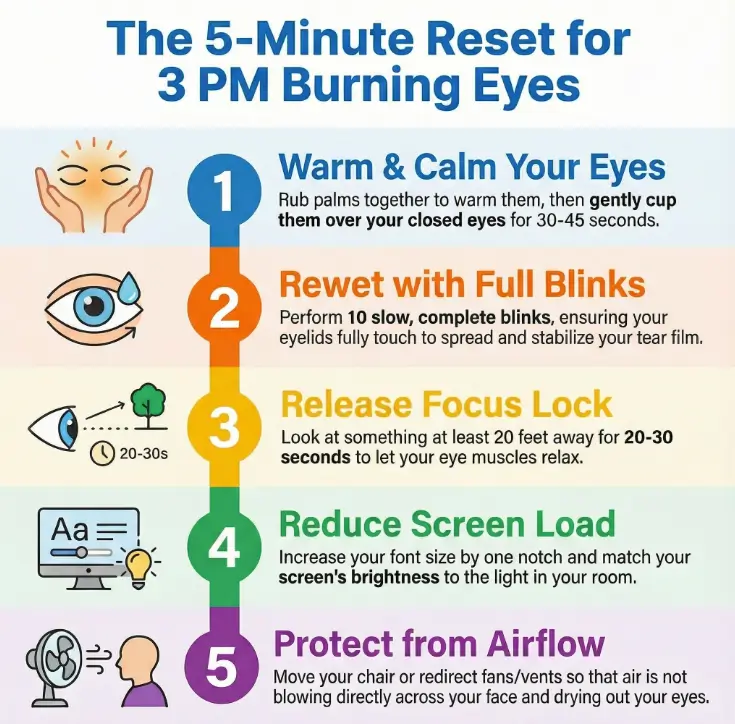
Minute 1: warm palms + soft lid closure
Rub your palms together for 5–10 seconds to warm them. Cup them lightly over closed eyes (no pressure) for 30–45 seconds. Breathe slowly. You’re not “meditating,” you’re rebooting your nervous system and giving your eyes a break from constant visual input.
Minute 2: 10 full blinks (slow, complete, gentle)
Do 10 slow blinks where your upper and lower lids fully meet. Many of us do half-blinks on screens, leaving the surface exposed. Full blinks help spread and stabilize the tear film.
Minute 3: distance refocus (20 feet, relaxed eyes)
Look at something at least 20 feet away for 20–30 seconds. Let your eyes soften. No squinting. This tells your focusing system it can stop “gripping” up close.
Minute 4: screen micro-tune (font first, then contrast)
Make two tiny adjustments:
- Font size up one notch (yes, even if you think you’re “fine”).
- Brightness match your room (avoid a glowing rectangle in a dim cave).
Minute 5: airflow move (one change that stops re-drying)
Turn your chair 10–20 degrees, redirect a vent, or move a fan so air is not crossing your face. If you can’t change the vent, change you. It’s boring. It works.
- Warm + close first (reduce sensory load).
- Full blinks next (rewet the surface).
- Then distance (release focus lock).
Apply in 60 seconds: Do 5 full blinks + 20 seconds distance gaze. It’s the “mini reset” inside the reset.
Let’s be honest… most of us “take breaks” by switching to our phone. That’s not a break. That’s a different screen with smaller text. Your eyes would like to file a complaint.
Breaks that stick: beyond 20-20-20
The 20-20-20 rule is popular for a reason: it’s simple and it helps many people. Mayo Clinic advice for computer work often includes taking breaks, blinking, and reducing glare—because those are reliable levers. The problem is not the rule. The problem is compliance (we forget) and durability (we stop and symptoms creep back).
20-20-20, tested: why it helps (and why it may not “hold”)
Research published in a contact lens and anterior eye journal tested break reminders and found that structured breaks can reduce symptoms in the short term—yet benefits may fade when the reminders stop. Translation: breaks work, but habits need support systems.
Show me the nerdy details
In studies that test break strategies, researchers often measure symptoms (dryness, eye strain), tear stability, and binocular vision metrics. The recurring theme: reminders can change behavior in the moment, but once the cue disappears, people drift back to default patterns—less blinking, more near work, more strain. That’s why “set it and forget it” strategies often fail, and why the reset is built around short sequences you can attach to an existing daily trigger (like 2:55 PM).
WFH upgrade: “20-20-20-2”
Keep the classic structure, but add 2 seconds of deliberate full blinking at the end. It’s tiny, but it targets the part people miss: tear film stability.
Meeting-safe microbreaks: 3 invisible moves you can do on Zoom
- Camera-off blink set: 5 slow full blinks during a transition.
- Distance gaze: look past your screen when someone shares a slide you already read.
- Shoulders down: one exhale + relax your brow (your eyes follow your face).
Open loop: the one trigger that makes breaks automatic
Most people tie breaks to “when I remember.” That’s a trap. Tie breaks to something that already happens: every time you send an email, every time you refill water, or every time a meeting ends. Your day already has rails—use them.
Decision card: 20-20-20 vs the 5-minute reset
- You can do frequent tiny breaks.
- You feel “focus lock” and mild blur.
- Your main issue is near-work fatigue.
Time cost: 20 seconds.
- Your eyes burn at a predictable time (hello, 3 PM).
- Airflow/dryness is part of the stack.
- You need a deeper reboot without leaving your desk.
Time cost: 5 minutes.
Neutral next step: Pick one approach for today’s afternoon and commit to it once—then reassess.
Screen setup: two tweaks that cut strain fast
Most “screen tips” online are technically correct and practically useless. You don’t need a PhD in settings. You need two changes you can feel within the hour.
Brightness matching: stop fighting your room lighting
If your screen is much brighter than your room, your eyes work harder. If your room is bright and your screen is dim, your eyes strain to see details. Aim for “same universe” brightness. Then eliminate glare. That alone can turn 3 PM from “burning” into “mildly annoyed.”
Text-first clarity: increase font size before you increase effort
One notch bigger font is the easiest ergonomic upgrade available. It reduces squinting, forehead tension, and “micro strain” that accumulates. I resisted this for years because my ego wanted to be 22 forever. Your eyes do not care about your ego.
Glare audit: the window/white wall that’s quietly cooking your eyes
Stand up and look at your monitor from different angles. If you see a bright window, a lamp, or a glossy reflection, you’re paying a tax on every minute. Fix it with a blind, a lamp reposition, or simply rotating the desk.
The “helpful” setting that often backfires
Dark mode can feel soothing for some people, but it’s not universal. If you notice more blur, halos, or squinting, try a light background with comfortable brightness instead. The best setting is the one that makes your eyes stop gripping.
Quick win: If you change only one thing today, change font size. Your eyes will notice faster than your brain admits.
Air + desk: the invisible dryness you can’t out-focus
WFH has a signature enemy: invisible wind. A vent stream doesn’t feel “strong,” but over hours it can evaporate your tear film like a slow hair dryer aimed at your face.
Vent path: don’t let airflow cross your face
If air hits your eyes directly, you will dry out faster. Redirect the vent, move the fan, or rotate your chair. If you want a simple rule: air can hit your body, not your eyes.
Humidity target: “comfortable” air can still dry eyes out
Indoor air in winter (or aggressive AC in summer) can be dry enough to irritate eyes even if your skin feels fine. If your lips get dry easily, your eyes may be living in the same climate. A small humidifier can help some people—but start with airflow first because it’s free. (And if you wake up with dryness or burning that feels “mysteriously worse,” it’s worth checking whether a CPAP mask leak is blowing air into your eyes overnight.)
Monitor geometry: eye level + distance
Place your monitor so the top is at or slightly below eye level, and sit about an arm’s length away. If you’re craning your neck or leaning forward, you’re doing extra muscular work that often shows up as eye fatigue.
- Airflow across your face is a dryness accelerator.
- Monitor height and distance reduce “focus friction.”
- Small changes compound over hours.
Apply in 60 seconds: Turn 15 degrees away from airflow and raise your laptop/monitor by one book.
Quote-prep list (for a future eye appointment or device purchase)
If you end up comparing options (drops, glasses, humidifier, exam), gather these first so decisions get easier:
- Your typical screen hours per day (rough estimate is fine).
- Your 3 PM burn score (0–10) before/after the reset for 7 days.
- Whether a vent/fan points toward your face (yes/no).
- Whether blur clears after blinking (yes/no).
- Contact lens use (type + hours worn).
Neutral next step: Save these notes in one place before you compare solutions.
Blink quality: the lever competitors underplay
If you take nothing else from this article, take this: you can “blink more” and still dry out if your blinks aren’t complete.
Half-blinks: why the surface stays exposed
On screens, we often do partial blinks that don’t fully spread tears across the surface. Over hours, the exposed area dries, gets irritated, and starts burning. Full blinks are the unglamorous hero of comfortable eyes.
Watery-but-dry: why your eyes can tear and still burn
It feels unfair, but it’s common: irritated eyes can trigger watering, yet the tear film may still be unstable. The result is watery eyes and burning. If you’ve ever dabbed tears while thinking, “Why are you doing this?”—you’re not alone.
Contacts at 3 PM: when to pause lenses and reset
Contact lenses can amplify dryness for some people, especially late afternoon. If your burn spikes with contacts, try a lens-free afternoon once or twice and compare. If symptoms dramatically improve, that’s useful data for your eye doctor. If you’re specifically troubleshooting lens-related end-of-day burn, you might also want to compare options like Miebo for evaporative dry eye in contact lens wearers.
Here’s what no one tells you…
“More drops” won’t fix a bad blink. Drops can help, but if you go right back to half-blinking into a vent stream, you’re pouring water into a bucket with holes.
Drops & glasses: what helps (and what rebounds)
This is the part where people either get relief… or accidentally create a rebound loop.
Artificial tears basics: timing and common sense
Artificial tears can help with dryness and irritation. If you need them frequently, consider preservative-free options and talk to a clinician about what’s appropriate for you. Use them as support, not as permission to ignore airflow and blinking. If you’re comparing gentler options (especially for older eyes), preservative-free eye drops for seniors can help you think clearly about what to try and when to escalate.
Redness-relief trap: why it can backfire
Some “get the red out” drops are designed to constrict blood vessels. They can be tempting. But if dryness is your real issue, that approach can sometimes lead to rebound redness or irritation. If you’re not sure what you’re using, check the label or ask a pharmacist/clinician.
Computer glasses: when they help
If your work is mostly at intermediate distance (monitor range), computer glasses can reduce focusing effort for some people—especially if you’re noticing late-day blur or headaches. This is where a basic conversation with an optometrist (American Optometric Association guidance is often practical here) can save you a lot of trial and error.
Blue light reality: comfort vs hype
Blue-light filtering can feel more comfortable for some people, especially at night, but it’s not a universal fix for burning eyes. The core drivers of 3 PM burn are usually blink + air + glare + focus. Keep blue light as an optional comfort layer, not the main plan.
Mini calculator: what’s your most likely “3 PM driver” today?
No diagnosis—just a practical pointer for which lever to pull first.
Neutral next step: Use the suggestion once, then re-check your burn score in 5 minutes.
Common mistakes: the fastest ways to make tomorrow worse
This is the “loss-prevention” section. Not because you’re doing anything wrong—because the human brain is good at short-term relief and bad at long-term comfort.
Mistake #1: rubbing your eyes
Rubbing can irritate the surface and lids. If your eyes are burning, treat them like a sunburn: gentle care, not friction. If you need a substitute: warm palms + soft lid closure from the reset.
Mistake #2: cranking brightness + squinting through glare
This is the productivity version of trying to drive with the sun in your eyes. You’ll arrive, but you’ll be tense and tired. Brightness matching and glare control are boring fixes—but they remove strain hour after hour.
Mistake #3: sitting in a vent stream “because it feels fresh”
I’ve done this. It feels great… until it doesn’t. Airflow across your eyes can dry the tear film. Move your chair. Redirect the vent. Your eyes will forgive you quickly.
Mistake #4: treating allergy burn like dry eye (and vice versa)
If you’re guessing, you’ll often pick the wrong lane. Use the quick sort: itching leans allergy; screen-linked stinging leans dryness/focus. If you’re unsure or symptoms persist, get professional guidance.
Mini rule: If a “fix” helps for 2 minutes and then you feel worse, it’s not a fix. It’s a loop.
Safety first: who this is for / not for + when to seek help
Most people reading this are in the “annoying but fixable” category. Still, eye symptoms deserve respect.
Who this is for
- WFH or screen-heavy workers with predictable afternoon burning.
- People whose symptoms improve when they’re off screens or in more humid environments.
- Anyone who wants a simple routine before buying solutions.
Who this is not for
- Sudden severe pain or a sudden “curtain” over vision.
- Eye injury, chemical exposure, or foreign body sensation that won’t go away.
- Marked light sensitivity, thick discharge, swelling, fever, or severe headache with eye symptoms.
When to seek help
Seek clinical advice if symptoms are severe, sudden, or worsening; if you have consistent burning despite changes; if you have notable vision changes; or if you’re using drops frequently and still struggling. An eye exam can check your vision, evaluate dryness, and identify other causes that a blog cannot safely rule out. If you want a practical “don’t-forget-this” list before you book, an annual eye exam checklist can help you show up with clearer notes and better questions.
What an eye exam may include
Typically: vision testing, a look at the surface of the eye, and questions about your environment and habits. If you wear contact lenses, bring details about your lens type and wear schedule. If you can, bring your 7-day notes—it turns your appointment into a focused conversation instead of a vague “my eyes hurt sometimes” shrug.
FAQ
Why do my eyes burn at 3 PM every day?
Because a few small things accumulate: blink quality drops on screens, dryness increases in indoor air, and your focusing system gets tired from hours of near work. By mid-afternoon the stack hits a tipping point. The fix is usually changing the stack (blink + air + focus + glare), not adding willpower.
Is 3 PM burning eyes a sign of dry eye or just digital eye strain?
It can be both. Digital eye strain often involves dryness and focusing fatigue. If your burning is worse with screens and improves with full blinking or humid air, dryness is likely a big part. If you have itching or seasonal triggers, allergies may be involved. If you have major or sudden vision changes, get checked.
What’s the fastest fix for burning eyes while working from home?
Run the mini reset: 5 full blinks + 20 seconds distance gaze + brightness match. If you can spare 5 minutes, do the full reset (warm palms, full blinks, distance, screen tweaks, airflow change). It’s quick and doesn’t require leaving your desk.
Does the 20-20-20 rule really work?
For many people, yes—because it interrupts constant near work and reminds you to relax your focus. The catch is consistency: if you stop, symptoms may return. That’s why attaching microbreaks to existing triggers (meeting ends, email sent) can be more durable than relying on reminders alone.
Do blue light glasses actually help digital eye strain?
They may help comfort for some people, especially later in the day, but they’re not the main lever for burning eyes. Most 3 PM burning comes from dryness, reduced blinking, glare, and near-work fatigue. Try free fixes first (font, glare, airflow, blink quality). Then consider glasses if blur or headaches persist.
How often should I use artificial tears for screen-related dryness?
It depends on the product and your situation. If you find yourself needing drops frequently, consider preservative-free options and talk to a clinician about what’s appropriate. If drops help briefly but symptoms return fast, fix airflow and blink quality too—otherwise you’re treating the symptom without removing the cause.
Why do my eyes water when they feel “dry”?
Irritation can trigger reflex tearing, so you can have watery eyes while still having an unstable tear film. It’s common with screen-related dryness. If watery tearing is constant or paired with itching, allergies may also be involved.
Is dark mode better for eye strain during long workdays?
Sometimes, but not always. Dark mode can feel soothing, but it can also increase blur or halos for some people. Use the setting that reduces squinting and makes text effortless to read at your normal viewing distance.
Can HVAC or dry indoor air cause burning eyes at my desk?
Yes. Airflow across your face (vents, fans) can speed evaporation, and dry indoor air can worsen irritation over hours. A small airflow change—like rotating your chair—can be a surprisingly big win.
When should I see an eye doctor for burning eyes?
If symptoms are severe, sudden, worsening, or paired with significant vision changes, seek care promptly. If symptoms persist despite environmental and habit changes, an eye exam can identify dry eye, prescription issues, or other causes that require targeted treatment.
Next step: run the 7-day 2:55 PM experiment
If you want to make this real (and not just “interesting”), do a short experiment. Not forever. Just seven workdays.
7-day plan (takes < 2 minutes to set up)
- Set a daily reminder at 2:55 PM.
- At 2:55, write your burn score (0–10).
- Run the 5-minute reset.
- At 3:05, write your burn score again.
- Note one context clue: vent/fan on? extra meetings? contacts worn?
Neutral next step: Commit to the experiment once, then decide based on your own data. If you want an easy way to track patterns without overthinking, you can borrow a simple template like a printable symptom diary and adapt it to “3 PM eyes.”
Short Story: The day I realized “my eyes” weren’t the problem (120–180 words) …
Short Story: I used to hit 3 PM and assume I was just mentally weak. You know the script: “Drink water. Push through. Maybe you’re just tired.” Then one week I rearranged my office because I wanted “fresh air” while working. I put my chair right under an HVAC vent. The first day was fine. The second day my eyes burned so much I started blinking like a malfunctioning robot.
By day three, I was convinced something was medically wrong. The plot twist: nothing changed except the airflow. I rotated my desk 20 degrees, pointed the vent away, and within an hour the burn eased. That was the moment I stopped taking 3 PM symptoms personally. Sometimes your body is not being dramatic. Sometimes your environment is just quietly doing physics to your eyeballs. (120–180 words) …
- If burn drops reliably after the reset, your stack is behavior/environment-driven.
- If burn doesn’t change, you may need a prescription or clinical check.
- Either way, you stop guessing.
Apply in 60 seconds: Create a note titled “3 PM Eyes” and record today’s before/after once.
Tier map: choose the lightest intervention that works
Think of this as an “effort ladder.” Start low, climb only if needed.
| Tier | What you do | When it fits |
|---|---|---|
| Tier 1 | Mini reset: 5 full blinks + 20-second distance gaze | Mild burn, occasional blur |
| Tier 2 | Screen tweaks: font up + brightness match + glare fix | Daily strain, squinting, tension |
| Tier 3 | Airflow control + desk geometry changes | WFH vent/fan dryness, predictable 3 PM burn |
| Tier 4 | Support tools: appropriate tears, lens adjustments, humidity support | Dryness persists despite Tier 1–3 |
| Tier 5 | Clinical visit: evaluate dryness, prescription, other causes | Persistent symptoms, major blur, pain, or red flags |
Neutral next step: Start at Tier 1 today. Move up one tier only if needed.
Conclusion: make 3 PM boring again
Here’s the loop we opened at the start: why 3 PM? Because your day quietly stacks blink debt, dry air, focus fatigue, and screen friction until your eyes finally speak up. The fix isn’t heroic. It’s repeatable.
If you want the highest-return move in the next 15 minutes: set the 2:55 PM reminder, run the reset once, and record your before/after burn score. If it helps, you’ve found your lever. If it doesn’t, you’ve learned something equally valuable: it’s time to move up a tier and get more targeted help.
Last reviewed: 2025-12-24