
Give the Instruction a Voice
A written note can be perfectly clear and still disappear when the lighting is poor, the print is tiny, or the morning has already turned into a small parade of pill bottles and “What did the doctor say again?”
For many families, a voice recorder for low vision seniors is about making daily instructions easier to hear, repeat, and trust. It bridges the gap when eyes, memory, and energy are not always on the same schedule.
The risk is not just inconvenience; it’s about preventing the stress and silent humiliation of small mix-ups with medication, appliances, or therapy steps.
By using one-button playback and short recordings, we support safer routines and caregiver communication without turning the home into a tech showroom.
Table of Contents
Safety / Disclaimer Block
A voice recorder is a memory aid, not a medical device, emergency system, fall detector, caregiver replacement, or clinical decision tool. It can make daily instructions easier to repeat, but it cannot judge whether an instruction is still correct.
For medication timing, wound care, oxygen equipment, insulin, anticoagulants, fall risk, new confusion, or sudden vision changes, families should confirm instructions with a doctor, pharmacist, low vision specialist, occupational therapist, or qualified caregiver. The FDA advises older adults to take medicine as prescribed and to ask health professionals about questions, side effects, and interactions. That is the sturdy fence around this entire idea.
- Record stable instructions only after a qualified person explains them.
- Review medication-related recordings whenever prescriptions change.
- Use human confirmation for high-risk routines.
Apply in 60 seconds: Write down one routine where an audio cue would reduce confusion without replacing professional advice.
The Real Problem: Instructions Disappear When Vision Gets Tired
Why “just write it down” stops working for many low vision seniors
“Just write it down” sounds tidy until the note is on the fridge, the print is pale, the light is wrong, and the reader is holding a mug in one hand while trying not to bump the counter with the other. Low vision does not simply make letters smaller. It can make contrast weaker, glare louder, depth less trustworthy, and clutter harder to decode.
The National Institute on Aging explains that aging eyes can develop problems such as cataracts, glaucoma, macular degeneration, and diabetic eye disease. In real life, that can mean the written instruction is technically available but practically missing. It is there in the same way a violin is “there” in the attic. Helpful, but not during breakfast.
The tiny daily gaps that create big frustration
The trouble often lives in ordinary minutes. Which microwave button? Was the eye drop before or after breakfast? Did the therapist say 5 repetitions or 15? Is the thermostat set to heat or auto? These are not grand emergencies. They are pebble-in-the-shoe problems, and by noon the shoe is full of gravel.
- Small print makes written notes tiring.
- Similar buttons make appliances feel unreliable.
- Caregiver instructions fade after appointments.
- Stress makes recall worse at the exact wrong moment.
Here’s what no one tells you: memory often fails at the exact moment hands are busy
I once watched a caregiver repeat the same coffee-maker steps 4 times before lunch. Nobody was lazy. Nobody was careless. The senior could remember the big picture, but the sequence vanished when the filter, scoop, lid, and water reservoir formed their tiny morning orchestra.
A voice recorder helps because it turns a brittle instruction into a repeatable cue. Press, hear, do. No squinting. No hunting for the right paper. No emotional tax from asking the same question again.
Voice Recorder Fit: Who This Is For and Not For
Best fit: seniors who can press one or two familiar buttons
A voice recorder works best for a senior who can learn one simple action: press this button to hear the instruction. That is the whole kingdom. The device should not require scrolling folders, naming files, pairing Bluetooth, updating firmware, or entering a passcode that behaves like a tiny locked dragon.
Good candidates usually have enough hearing to understand the playback, enough hand control to press a large button, and enough routine awareness to connect the recording with the task. The best setup is boring in the most beautiful way.
Good caregiver use case: recording short notes after appointments
Caregivers can use a recorder immediately after appointments, while the details are still warm. A 20-second note can preserve what the physical therapist said about a safe exercise, what the eye doctor said about lighting, or what the pharmacist clarified about when to call with side effects. For families who leave visits with too many details and too little breathing room, a doctor appointment note-taking system can pair well with short audio summaries.
This is especially useful after medical visits, when everyone nods politely and then gets to the parking lot with a brain full of confetti.
Not ideal: urgent medical decisions, wandering risk, or severe confusion
A recorder is not the right primary tool when the risk is urgent or the person cannot reliably interpret the instruction. Wandering risk, repeated stove safety issues, severe confusion, missed critical medication, or sudden behavior changes need human support and professional assessment.
A better alternative when replaying audio becomes stressful
If audio replay creates agitation, switch tools. A large-print checklist, talking medication organizer, smart speaker routine, caregiver call, pharmacy blister packaging, or occupational therapy home assessment may fit better. The goal is not to win a gadget loyalty badge. The goal is safer follow-through.
One-button playback, stable routines, non-urgent instructions, familiar rooms.
Medication prompts, therapy steps, appliance reminders, appointment notes.
Sudden confusion, falls, missed high-risk medication, stove danger, wandering.
The “One Button” Rule: Why Simpler Usually Wins
Large buttons beat fancy screens almost every time
For low vision seniors, the easiest voice recorder is usually not the one with the longest feature list. It is the one with the fewest decisions. Large tactile buttons, loud playback, physical volume control, and obvious record/play functions matter more than 400 hours of storage and a screen smaller than a postage stamp’s shy cousin.
Think of the device as a kitchen tool, not a computer. A good spoon does not need a dashboard.
Tactile controls matter more than menu features
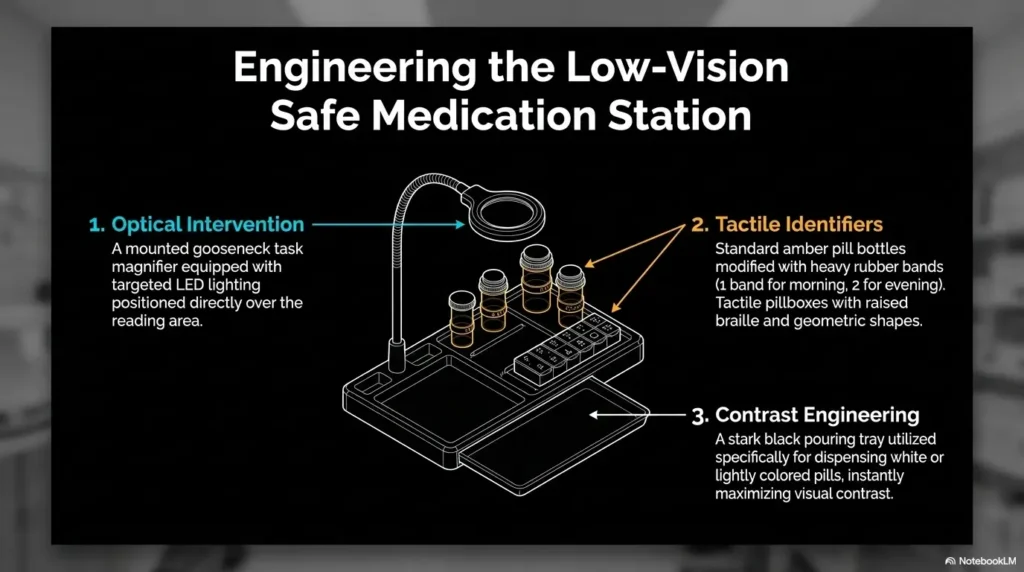
Touch matters. A raised play button, a sliding lock, a textured sticker, or a rubber band placed near the correct edge can tell the hand what the eye cannot. Many low vision specialists and occupational therapists teach environmental cues because consistency reduces mental load. The same idea shows up in practical home fixes such as tactile dots for microwave buttons and other button-marking routines.
That principle is the heart of this tool: make the right action easy to feel.
Let’s be honest: tiny icons are where good intentions go to trip
A sleek app may look better in a product photo, but daily life is not a product photo. It has soup steam, dim lamps, dry hands, misplaced glasses, and a phone that decides to hide behind a newspaper like a Victorian child.
- Choose physical buttons over touch-only screens.
- Test playback volume before relying on it.
- Mark the correct button with a tactile cue.
Apply in 60 seconds: Put a raised dot or textured sticker on the play button and ask the senior to find it without looking.
What to Record First: The 7 Instructions That Actually Help
Morning routine prompts that reduce repeated questions
Start with the moment that causes the most repeated questions. For many homes, that is morning. The house is quiet, the light is changing, and every object seems to ask for a password. A recorder can gently cue the first 2 or 3 steps without turning breakfast into a staff meeting.
Useful morning prompts might sound like this: “Good morning. First, turn on the kitchen light. Then make coffee. Your blue folder is by the phone for today’s appointment.” Calm. Specific. No lecture tucked inside the oatmeal.
Appliance steps: microwave, coffee maker, thermostat, TV remote
Appliances are famous for pretending to be simple. A microwave has 12 buttons and somehow all of them look like they are judging you. Record only the steps needed for the most common use.
- Microwave: “Press 2, then Start. Use the red mitt.”
- Coffee maker: “Add water to the raised line. Scoop once. Press the large button.”
- Thermostat: “Use the top arrow for warmer, bottom arrow for cooler.” A simple tactile thermostat labeling setup can make that cue easier to follow.
- TV remote: “Power is the top-left button. Volume is the long button on the right.”
Appointment notes before they dissolve in the car ride home
After appointments, record the plain-language takeaway before leaving the parking lot. “The eye doctor said the new drops are for dryness, not infection. Use them as the label says. Call if pain or sudden vision changes happen.”
This is not a replacement for the visit summary. It is the bridge between the clinic and the kitchen table.
Physical therapy reminders, without turning the living room into a command center
Therapy routines can be helpful, but only if the senior understands what is safe. A voice note might say, “Do the seated ankle pumps 10 times. Stop if dizzy. Use the chair with arms.” For low vision seniors, pairing the instruction with the exact chair or mat location makes it far more usable.
Money Block: 7-recording starter list
| Recording | Best Length | Safety Note |
|---|---|---|
| Morning routine | 15–25 seconds | Keep it friendly and predictable. |
| Coffee maker | 20 seconds | Mention hot surfaces. |
| Microwave | 15 seconds | Mention mitts and steam. |
| Therapy exercise | 20–30 seconds | Record only clinician-approved steps. |
| Appointment summary | 30 seconds | Keep written paperwork too. |
| Remote control | 15 seconds | Use tactile button markers. |
| Leaving-home checklist | 20 seconds | Include keys, phone, cane, glasses. |
Neutral action: Choose one recording from the table and test it twice before adding another.
Don’t Record Everything: The Clutter Trap Families Miss
Why too many recordings can feel like an audio junk drawer
The first week with a recorder can be exciting. Everyone discovers things to record. Then, suddenly, the device contains 37 tiny messages, half of them old, and finding the useful one feels like searching for a teaspoon in a drawer full of holiday batteries.
Audio clutter is still clutter. Low vision users may not be able to skim filenames or screens, so the number of recordings matters. More is not kinder. Often, more is just louder.
The 30-second limit that keeps instructions usable
A good voice note should usually be under 30 seconds. That is long enough for a simple sequence and short enough to replay without irritation. If the instruction needs 2 minutes, it may need a caregiver walkthrough, a printed large-type sheet, or a different tool.
Use this structure: task, steps, safety warning, stop point. For example: “To warm soup, use the white bowl. Press 2, then Start. Use the mitt. Let it sit 1 minute before carrying.” That little pause at the end can save a wrist, a sleeve, and possibly the soup’s dignity.
Old instructions can become dangerous if nobody deletes them
The most dangerous recording may be the one that used to be correct. A medication dose changes. A therapist updates an exercise. A caregiver moves the coffee supplies. If the recorder still says the old version, trust starts leaking out of the system.
Show me the nerdy details
Audio reminders work best when they reduce working-memory load. Working memory is the mental scratchpad used to hold steps while doing a task. Low vision can increase that load because the person must spend more attention identifying objects, reading labels, and avoiding obstacles. A short audio cue helps by externalizing the sequence. But if there are too many recordings, the search task becomes the new burden. That is why fewer recordings, consistent placement, and routine review matter more than storage capacity.
Money Block: Recording cleanup checklist
- Yes/No: Is this instruction still current?
- Yes/No: Can the senior find it without help?
- Yes/No: Is it under 30 seconds?
- Yes/No: Does it avoid private details?
- Yes/No: Does it include a clear stop or safety cue?
Neutral action: Review recordings every Sunday or after any medication, therapy, appliance, or room-layout change.
Medication Memory: Use Audio Carefully, Not Casually
When a voice recorder can support medication routines
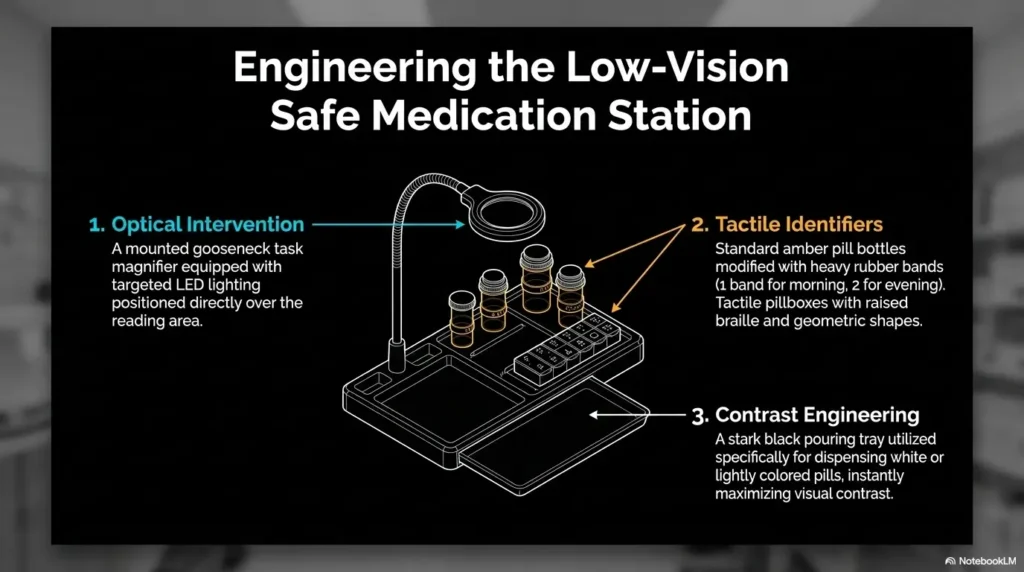
A voice recorder can support medication routines when the instruction is stable, simple, and already verified. It can remind someone to check the pill organizer, read the large-print label, or call a caregiver before taking an as-needed medicine. The key word is support.
For example: “After breakfast, check the Monday morning slot in the pill organizer. If it is empty or looks different, call Linda before taking anything.” That is a safer prompt than trying to recite complex drug instructions from memory. A printable low vision medication tracker can also give the voice note something concrete to point toward.
When it should never be the only reminder system
Do not make a casual audio note the only reminder for high-risk medication. Insulin, blood thinners, heart medication, opioid pain medicine, oxygen-related routines, and medications with changing doses deserve stronger systems. Use pharmacy labels, pill organizers, medication lists, caregiver checks, and professional guidance.
The FDA’s medication safety guidance for older adults emphasizes taking medicine as prescribed and talking with health professionals about side effects and questions. That is especially important when a senior sees multiple clinicians or uses several pharmacies.
Build a three-layer check: label, organizer, human confirmation
The safest home systems usually stack supports. A voice note says what to do. A large-print label confirms what the medicine is. A pill organizer shows whether the dose was already taken. A caregiver or pharmacist helps when something looks off.
- Layer 1: Large-print label or medication list.
- Layer 2: Pill organizer or pharmacy-prepared packaging.
- Layer 3: Human confirmation for changes or uncertainty.
When to call the pharmacist before recording a medication note
Call the pharmacist before recording a note if a medication is new, the dose changed, pills look different, side effects appeared, instructions conflict, or the senior missed doses. Pharmacists are often the unsung translators of medical life. They turn “take as directed” into words humans can actually use. A prepared low vision pharmacy help script can make that call less intimidating.
- Record reminders to check labels and organizers.
- Delete old medication recordings immediately after changes.
- Call the pharmacist when anything looks different.
Apply in 60 seconds: Record one safe medication-support phrase: “Check the organizer first. If anything looks different, call before taking.”
Setup That Sticks: Make the Recorder Easy to Find, Hear, and Trust
Put it where the task happens, not where it looks neat
The recorder belongs where the instruction is needed. Coffee note? Put it near the coffee maker. Remote-control note? Near the chair. Leaving-home checklist? Near the door. A device stored in a drawer is technically organized and functionally invisible, the home-care version of burying treasure without drawing a map.
For low vision seniors, consistent location is part of the interface. The table, counter, hook, or tray becomes the search system. The same principle helps with low vision bedside organization, where the “right spot” often matters more than the “prettiest spot.”
Add raised dots, rubber bands, or tactile markers for orientation
A tactile marker can change everything. Add a raised dot to the play button, a rubber band around the top edge, or a textured sticker on the side that faces the user. Make sure the marker does not block the microphone or speaker.
Test it with eyes closed. If the caregiver cannot identify the correct button by touch, the senior probably should not be expected to do it under stress.
Test volume in the real room, with the real background noise
Volume testing should happen where life happens. Run the dishwasher. Turn on the fan. Let the TV murmur in the other room. Then play the message. Many devices sound fine in a quiet bedroom and disappear in a kitchen with a microwave humming like a small spaceship. If the microwave itself is part of the problem, a guide to a microwave beep that is too quiet can help you separate device volume from appliance feedback.
The kitchen-counter test: can they use it while tired?
Ask the senior to use the recorder during a normal routine, not during a cheerful demonstration when everyone is focused. Can they find it? Press play? Understand the message? Stop it? Repeat it? If yes, you may have a working tool. If not, simplify before buying anything else.
Money Block: Quick setup scorecard
| Setup Check | Pass Standard | Next Step If It Fails |
|---|---|---|
| Location | Found in under 10 seconds | Move it to the task area. |
| Button feel | Play button identifiable by touch | Add tactile marker. |
| Volume | Clear in the real room | Raise volume or change device. |
| Message length | Under 30 seconds | Rewrite as fewer steps. |
Neutral action: Run the scorecard with one recording before setting up a full routine.
Common Mistakes: Don’t Turn a Helpful Tool Into Homework
Mistake 1: buying the most feature-packed device
Feature-heavy devices often look comforting to the buyer and exhausting to the user. A recorder with folders, menus, apps, screen icons, voice activation, and file transfers may be excellent for journalists. It may be dreadful for a senior who needs one instruction at breakfast.
Buy for the weakest moment of the day, not the brightest moment in the store.
Mistake 2: recording long lectures instead of short cues
A voice note should not sound like a podcast trapped in a drawer. Long recordings create fatigue and invite skipping. Keep the tone close to a kind person standing nearby: “Do this. Then this. Stop here.”
Mistake 3: forgetting to label recordings in a low vision-friendly way
If the device uses multiple physical buttons or cards, label them with tactile cues. If a smartphone is involved, use voice labels, large text, high contrast, and a simple home-screen shortcut. The American Academy of Ophthalmology notes that low vision rehabilitation can assess how a person accomplishes tasks and what goals they have. That personalized angle matters here.
Mistake 4: using one recorder for too many categories
One device for every category can become confusing. Consider one recorder for the kitchen and one for the living room, or one set of recordings for appointments and one for appliance steps. Separation can reduce searching.
Mistake 5: skipping practice until the stressful moment arrives
Practice when nothing is burning, beeping, late, missing, or emotionally loaded. A calm practice run teaches the fingers where to go. A stressful first attempt teaches everyone new vocabulary, most of it unprintable.
- Start with one use case.
- Keep recordings short.
- Practice in calm conditions first.
Apply in 60 seconds: Delete or ignore every recording except the one that solves today’s most repeated question.
Privacy Matters: Seniors Deserve Control Over Their Own Voice Notes
Ask before recording personal care instructions
Memory support should not quietly become surveillance. Ask before recording personal care instructions, health details, family notes, or anything that could feel embarrassing if played aloud. A senior may welcome help and still want dignity. Those two things can share a chair.
Try: “Would it help if we recorded this in your words so you can replay it later?” That one sentence gives control back to the person using the tool.
Avoid sensitive financial, password, or medical details in casual audio notes
Do not record passwords, bank account details, Social Security numbers, full medication lists with sensitive diagnoses, door codes, or private family information on a casual recorder. If the device is lost, borrowed, donated, or played by accident, the recording travels with it.
Use audio for prompts, not secrets. “Call Mark before paying bills” is safer than “Your bank login is…” which should never get a microphone and a marching band.
Cloud apps versus offline recorders: the quiet privacy difference
Smartphone apps and smart speakers can be convenient, but they may involve accounts, cloud storage, microphones, notifications, or shared devices. Offline recorders can be simpler because the files stay on the device unless someone transfers them. Simpler does not automatically mean safer, but fewer moving parts can reduce privacy confusion.
Money Block: Privacy decision card
- The senior wants simple buttons and no account setup.
- The recordings are household instructions.
- Privacy worries are higher than sharing convenience.
- The senior already uses it comfortably.
- Caregivers need remote updates.
- Voice commands are easier than physical buttons.
Neutral action: Choose the tool that the senior can control most confidently, not the one the family finds most impressive.
Caregiver Scripts: What to Say So the Reminder Feels Respectful
Record instructions in the senior’s own words when possible
The best reminder may not be the caregiver’s voice. It may be the senior’s own voice. “I put the blue folder by the phone” can feel more natural than “Mom, remember your folder,” which may land with the thud of correction.
When possible, let the senior choose the wording. Voice notes are more likely to stick when they sound like partnership, not supervision. For families unsure how to begin, guidance on offering help to someone with low vision can keep the tone respectful instead of managerial.
Use calm, specific prompts instead of correction-heavy language
A good reminder says what to do next. It does not scold the past. Replace “You keep forgetting the microwave” with “Use the white bowl, press 2, then Start.” Replace “Don’t mess up the pills” with “Check the organizer first. If unsure, call.”
“You already asked me” is not a system
Families say this when tired, and tired is real. Caregiving can wear grooves into the day. But “You already asked me” usually increases shame without improving memory. A recorder can absorb some repetition so the relationship does not have to carry all of it.
Tiny dignity upgrades that make daily help easier to accept
Use adult language. Keep humor gentle. Ask permission. Avoid baby talk, command voice, or recording in front of visitors unless the senior agrees. Dignity is not decoration. It is part of whether the system gets used.
Short Story: The Blue Tape Button
Marian’s daughter bought three reminder gadgets before anything worked. One had an app. One had a charging dock. One had a screen so small it seemed designed for ants with graduate degrees. Marian, who had low vision from macular degeneration, politely hated all of them.
Then her grandson put a strip of blue textured tape beside the play button on a plain recorder and asked Marian to record her own coffee steps. Her voice came out cheerful and slightly bossy: “Cup first. One scoop. Big button. Wait for the click.” The next morning, she played it twice, made coffee, and called nobody. It was not independence in a heroic movie sense. It was smaller and better: one quiet routine returned to its owner.
- Ask permission before recording.
- Use the senior’s own voice when possible.
- Record next steps, not criticism.
Apply in 60 seconds: Rewrite one reminder so it begins with an action, not a correction.
When to Seek Help: Audio Notes Are Not Enough Sometimes
Sudden confusion, missed medication, falls, or new vision changes
Some moments are too serious for a household workaround. Sudden confusion, a fall, missed critical medication, new weakness, severe dizziness, new vision loss, eye pain, or trouble completing basic routines should trigger professional help. Call the appropriate clinician, pharmacist, eye doctor, urgent care, or emergency services depending on severity. A guide to senior vision changes warning signs can help families know when “wait and see” is not the safest plan.
The National Institute on Aging encourages older adults to protect vision and get eye problems checked. Sudden changes deserve attention, not a new sticky note with better handwriting.
Repeatedly replaying instructions without completing the task
If a senior plays the recording again and again but cannot start or finish the task, the problem may not be access to the instruction. It may be pain, fear, hearing difficulty, cognitive change, depression, medication side effects, or an unsafe environment. The recorder is giving you information: this setup is not enough.
Memory changes that disrupt meals, hygiene, bills, or safety
When memory changes disrupt meals, hygiene, money management, medication safety, stove use, or getting home safely, families should seek evaluation. The goal is not to label the person. The goal is to find the right support before stress becomes crisis.
Who can help: primary care, eye doctor, pharmacist, occupational therapist, low vision clinic
A primary care clinician can review sudden changes, medication side effects, and cognitive concerns. An eye doctor can evaluate vision changes. A pharmacist can simplify medication routines. An occupational therapist can assess the home task itself. A low vision clinic can recommend lighting, contrast, labeling, magnification, and assistive technology. Before that visit, consider preparing low vision OT questions so the appointment focuses on real household tasks, not vague gadget hopes.
FAQ
What is the easiest voice recorder for low vision seniors to use?
The easiest voice recorder for low vision seniors is usually one with large physical buttons, loud playback, simple recording, simple replay, and minimal menus. Look for tactile controls that can be identified by touch. A basic offline recorder often works better than a feature-heavy device if the goal is one short daily reminder.
Is a voice recorder better than a smartphone for seniors with low vision?
It depends on the senior. A voice recorder may be better when the person struggles with touchscreens, passcodes, app updates, or tiny icons. A smartphone may be better if the senior already uses voice assistants, reminders, and accessibility features comfortably. For phone-based routines, hands-free texting for low vision may be a useful companion skill. The right tool is the one that works on a tired Tuesday, not just during setup.
Can a voice recorder help seniors remember medication instructions?
Yes, but carefully. A voice recorder can remind a senior to check a pill organizer, read a large-print label, or call a caregiver when unsure. It should not be the only system for high-risk medication, changing doses, missed doses, or confusing instructions. Confirm medication guidance with a pharmacist or clinician.
How long should each recorded reminder be?
Keep most recorded reminders under 30 seconds. A good reminder names the task, gives 2 or 3 steps, includes a safety cue if needed, and stops. Long recordings are harder to replay and easier to ignore.
Where should caregivers keep the recorder at home?
Keep the recorder where the task happens. Put kitchen instructions near the appliance, TV instructions near the favorite chair, and leaving-home reminders near the door. Consistent placement is especially important for low vision seniors because the location itself becomes part of the memory system.
What should not be recorded on a senior’s voice recorder?
Avoid passwords, bank information, Social Security numbers, door codes, sensitive diagnoses, private family details, or complicated medical instructions that may change. Use the recorder for prompts, not secrets.
Can voice recorders help after eye surgery or vision loss?
They can help with stable, clinician-approved routines such as appointment notes, eye-drop prompts, light household steps, and caregiver reminders. But after eye surgery or sudden vision loss, follow the surgeon’s or eye doctor’s instructions first. Audio notes should support the care plan, not reinterpret it.
What if my parent keeps forgetting how to use the recorder?
First, simplify. Use one recording, one location, one tactile marker, and one button. Practice calmly. If the senior still cannot use it or repeatedly replays instructions without completing tasks, consider a different support system and ask a clinician, occupational therapist, or low vision specialist for guidance.
Next Step: Make One Recording Before Buying Anything Else
Pick one daily friction point: medication question, appliance step, or appointment note
The fastest way to know whether a voice recorder for remembering instructions for low vision seniors will help is not to shop for 2 hours. It is to test one real instruction. Choose the moment that currently steals the most peace: the coffee maker, the remote, the appointment folder, the morning routine, or the medication-check question.
Record a 20-second instruction in plain language
Use plain words. Put the action first. Keep the voice calm. Try: “To make coffee, place the mug under the spout. Add one scoop. Press the big button. Wait for the click before moving the mug.” That is enough. No preface. No sermon. No family documentary. If the task involves bottles, dates, or small labels, learning how to read labels aloud can make the recording safer and clearer.
Test it twice in the real setting before adding more
Now close the loop from the beginning: the note no longer has to be seen to be useful. It can be heard, replayed, and trusted because it lives where the task happens. Test it twice in the real room, with real noise, at the real time of day. If it works, add one more. If it fails, simplify the message, improve the tactile marker, or consider another support.
- Start with the most repeated daily question.
- Keep the message under 30 seconds.
- Test before expanding the system.
Apply in 60 seconds: Record one instruction now, place the recorder at the task spot, and replay it once with the senior present.
A voice recorder is not magic. It is more modest and, in many homes, more valuable. It gives a tired instruction a handle. It lets a senior ask the device instead of asking a person every time. It gives caregivers a little room to breathe. Most of all, it can turn one small daily stumble into a routine that feels calmer, clearer, and more owned.
Your 15-minute next step: choose one task, record one 20-second cue, add one tactile marker, and test it in the real room. If that one note helps, you have not just bought a gadget. You have built a tiny bridge back to confidence.
Last reviewed: 2026-05
Tags: low vision, senior safety, caregiver tools, medication reminders, assistive technology
Meta description: Learn how to use a voice recorder for low vision seniors to remember daily instructions safely, simply, and respectfully.