


Digital Eye Health & Relief
Digital eye strain in seniors is rarely drama; it’s mechanics.
Forty-five minutes of “just reading” can turn a calm tablet into a tiny bonfire—especially when your body’s reflex is to lean closer and stare harder. It’s a predictable mix of close-focus fatigue, reduced blinking, and a dry-eye flare.
Keep guessing and you risk the same loop: burn → squint → headache → earlier quit time. Relief starts when you stop improvising.
This post gives you a simple 7-day reset built around the 20-20-20 rule, full blinks, and smarter screen distance. No heroics. Just leverage.
Here’s the part that actually works:
- ✔ Calm the burn fast
- ✔ Fix the setup
- ✔ Lock habits that survive Day 3
Safety / Disclaimer: Educational only—not medical advice. Eye pain, redness, discharge, light sensitivity, or sudden vision changes can be signs of problems that shouldn’t be DIY. If symptoms are severe, sudden, one-sided, or worsening, get evaluated by an eye professional.
- Use 20-20-20 consistently (not perfectly).
- Increase text size before you move your face closer.
- Know the red flags that require care.
Apply in 60 seconds: Set a repeating 20-minute timer on your phone right now.
Table of Contents
Digital eye strain triage: “screen sore” or something else?
Before we talk hacks, we need one small act of respect: your eyes get to be taken seriously. “Digital eye strain” is common, but it’s not the only reason eyes hurt after 60. This quick triage helps you decide whether to run the 7-day plan or pause and get checked.
Two-minute symptom map (burning, gritty, watery-but-dry, headaches)
- Burning / stinging after screens: often dryness + reduced blinking.
- Gritty / sandy feeling: classic dry-eye flare pattern.
- Watery eyes that still feel dry: irritation can trigger reflex tearing, which feels confusing on purpose.
- Headaches after reading: can be focus fatigue or a prescription mismatch.
Quick self-check: If your discomfort reliably ramps up during close-up screen work and eases with breaks, you’re likely in “screen strain territory.” If symptoms are random, severe, or one-sided, keep reading—but stay cautious.
The “screen signature” test (worse after screens, better after rest)
Try this today: do one normal screen session (20–40 minutes). Then do a true break: stand up, look across the room or out a window, and do 10 slow full blinks. If you feel relief within a couple minutes, your symptoms have a strong “screen signature.”
Operator note: A “break” where you keep your phone in your hand does not count. I tried. My eyes filed a complaint.
One-eye rule: why one-sided pain changes the story
If one eye is dramatically worse than the other—or you develop sudden light sensitivity, thick discharge, or a sharp “something is in my eye” pain—don’t try to out-stubborn it with more tips. That’s a “get evaluated” pattern. If you’re anxious about the process, it can help to read what happens during a glaucoma test ahead of time so the appointment feels less mysterious.
Quick decision tree (60 seconds)
- Mostly screen-linked + improves with breaks → start the 7-day reset.
- Persistent blur/headaches despite breaks → consider eye exam sooner.
- Severe pain, light sensitivity, discharge, sudden vision change → seek care now.
- One eye much worse than the other → be cautious; get guidance.
Neutral next action: Pick one branch above and follow it for the next step—don’t overthink it.
- Both eyes affected similarly is common for strain.
- One-eye “spikes” deserve more caution.
- If symptoms escalate fast, don’t self-treat.
Apply in 60 seconds: Write down your top 2 symptoms and when they happen (morning vs evening, screens vs outdoors) using a printable symptom diary for seniors.
Digital eye strain after 60: the 3 forces nobody connects
Here’s the truth I wish someone had said earlier: for many seniors, screen pain isn’t a moral failure. It’s mechanics—focus demand, blink changes, and dryness—stacking up like small fees you didn’t agree to pay.
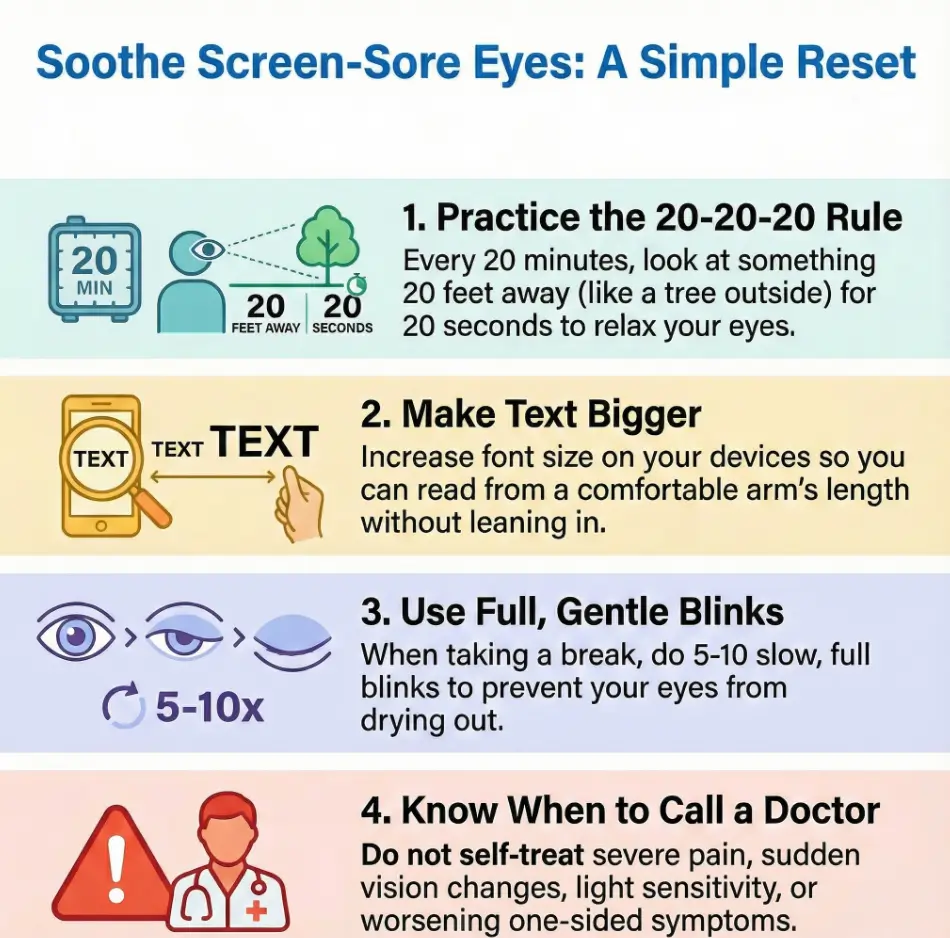
Focus fatigue (near work + presbyopia)
As we age, the eye’s ability to shift focus up close changes. That means close work can demand more effort—especially if you’re reading small text, bouncing between devices, or trying to “make do” with old glasses. The result can be fatigue, blur, or a low-grade headache that arrives right on schedule.
Personal note: I once spent 45 minutes squinting at subtitles because I refused to find my reading glasses. I “saved” 10 seconds and paid with two hours of soreness. Not my best trade.
Blink drop + tear-film breakup (why dryness spikes on screens)
When you concentrate, blinking often becomes less frequent and less complete. Less blinking means the surface of the eye gets less refresh, and dryness can flare—especially if you already run dry (which becomes more common as we get older). This is why “I’m just reading” can turn into “why do my eyes feel like hot gravel?”
Show me the nerdy details
Your tear film has multiple layers (including oils that slow evaporation). Incomplete blinking can leave parts of the surface less protected, and dry air speeds evaporation. The goal of our plan isn’t perfection; it’s restoring enough blink quality and break frequency to stabilize the surface again.
The hidden amplifiers: meds, fans/heaters, low humidity
Dry indoor air is a quiet saboteur. Ceiling fans, car vents, space heaters, winter HVAC—these can magnify symptoms. Some medications can also contribute to dryness. You don’t need to diagnose yourself; you just need to notice patterns and reduce obvious irritants where you can.
Caregiver-friendly version (simple and kind)
- Put the timer on the device they use most.
- Increase text size one step, then one more.
- Point vents away from the face (car + chair + bed).
- Use the same short cue every time: “Look far. Blink slow.”
Neutral next action: Try this for two screen sessions and see if the end-of-day burn drops.
Money Block: Eligibility checklist (does this 7-day reset fit you?)
- Yes if your discomfort reliably worsens with screens and eases with breaks.
- Yes if you catch yourself leaning closer because text feels small.
- Yes if indoor air (vents/fans/heaters) makes symptoms worse.
- No / pause if you have sudden vision changes, severe light sensitivity, thick discharge, or sharp one-eye pain.
Neutral next action: If you checked “Yes” at least twice, start Day 1 today. If you hit a “No/pause,” schedule evaluation.
One more thing that matters: this isn’t just “eyes.” When your eyes hurt, your shoulders creep up, your brow tightens, and your whole system braces. Our plan is designed to break that loop before it becomes your new normal.
20-20-20 rule mechanics: how to do it so it actually works
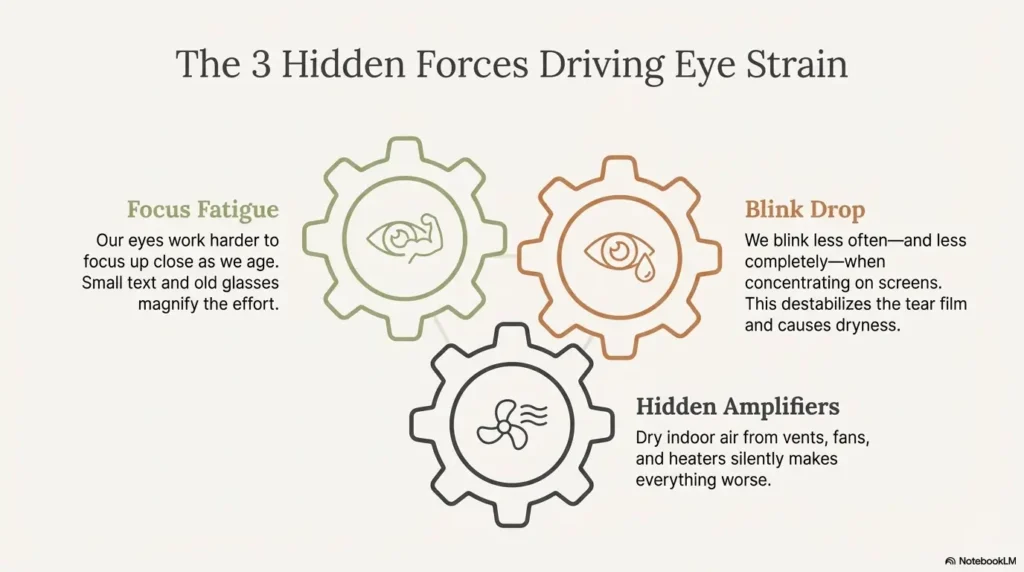
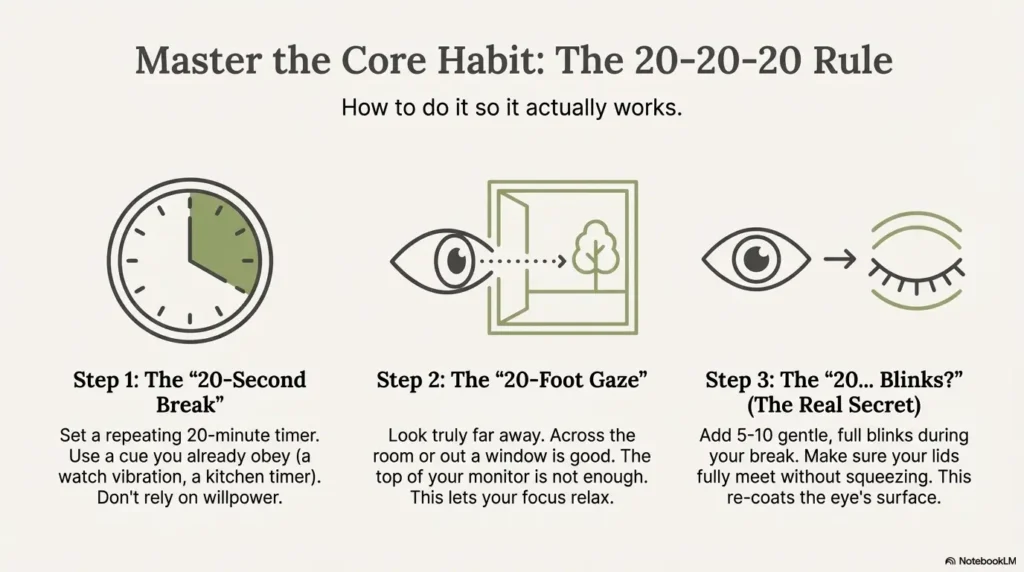
The 20-20-20 rule is famous for a reason: it’s simple, memorable, and practical. But it only works if you stop treating it like a motivational quote and start treating it like a protocol.
Distance matters: what “20 feet away” should feel like
“20 feet” isn’t magic. It’s a cue to let your focusing system relax. Practically, that means looking across a room, down a hallway, or out a window—at something that is clearly “farther than arm’s length.”
- Good target: the far wall clock, a tree outside, a building across the street.
- Not enough: staring at the top of your monitor or the next tab.
Full-blink reps (gentle seal, no squeezing)
Here’s the tiny move that changes everything: full blinks. Not dramatic, not forced, not “I’m trying to wink at the universe.” Just a gentle close that actually meets, then open.
- Close your eyes gently for 1 second.
- Make sure lids fully meet (no squeezing).
- Open and relax your forehead and jaw.
Do 5–10 full blinks during your 20-second break. It’s awkward at first. That’s normal.
Let’s be honest… your timer fails unless you pick a trigger you already obey
If you rely on willpower, you’ll lose on Day 3 (usually right after you say, “I’ll just finish this one thing”). Instead, pick a trigger you already respect:
- A smartwatch vibration you never ignore.
- A kitchen timer you can hear.
- A browser/phone timer that interrupts gently (not a jump scare).
My confession: I tried “I’ll remember.” I did not remember. The timer is not weakness. It’s infrastructure.
- Look truly far, not “slightly less near.”
- Add 5–10 full blinks during the break.
- Use a cue you already obey.
Apply in 60 seconds: Choose your trigger and set it to repeat every 20 minutes for the next 2 hours.
7-day reset plan: what to do each day (and what you should notice)
This is the heart of it. The goal isn’t to become a break-taking saint. The goal is to calm irritation, rebuild habits, and stop the “screen → pain → squint → more pain” spiral.
Promise: If your symptoms are primarily screen-linked strain + dryness, you should notice at least one meaningful change by the end of the week—often earlier. If you don’t, that’s information, not failure.
Days 1–2: stop the irritation spiral (reduce flare triggers first)
- Do 20-20-20 for your first 2 hours of screen use each day.
- Increase text size on your primary device (one step bigger than you think you need).
- Turn vents away from your face (car + desk + bed fans).
What you might notice: less burning at the end of the day, fewer “hot” moments, and slightly less squinting.
Days 3–4: stabilize comfort (fewer hot moments, less squinting)
- Keep the timer going for all screen sessions longer than 20 minutes.
- Add 10 full blinks at the start of each session (a “warm-up set”).
- Do one glare audit (5 minutes; details below).
What you might notice: your eyes feel less “tired” after reading, and the discomfort rebounds less aggressively.
Days 5–7: lock the habit (make breaks automatic, not motivational)
- Choose one permanent rule (example: “No reading tiny text.”)
- Put a “blink card” by the screen.
- Do a quick end-of-day check: “Did I lean in today?” If yes, fix the text size.
What you might notice: fewer headaches tied to reading and fewer days where your eyes feel “done” by mid-afternoon.
Quick 7-day tracker (print or copy)
| Day | 20-20-20 used? | Bigger text? | Dry air reduced? | Notes (1 line) |
|---|---|---|---|---|
| 1 | □ | □ | □ | __________ |
| 2 | □ | □ | □ | __________ |
| 3 | □ | □ | □ | __________ |
| 4 | □ | □ | □ | __________ |
| 5 | □ | □ | □ | __________ |
| 6 | □ | □ | □ | __________ |
| 7 | □ | □ | □ | __________ |
Neutral next action: Track just 1 line per day. The pattern will show itself.
Short Story: On Day 2 of my own reset, I broke the rule in the most predictable way: I got absorbed. One email turned into three, then a “quick” article, then a comment thread I didn’t even like. My eyes started to sting, and I did what I always do when I’m annoyed—I leaned closer, as if proximity could negotiate comfort.
That’s when I caught the pattern: pain was the signal, and leaning in was my reflex. I stood up, looked out the window at a tree across the street, and did ten slow blinks. The sting didn’t vanish like magic, but it softened. More importantly, the spell broke. I went back, increased the font size, and felt a little ridiculous… and then I felt relief. That’s the whole week in miniature.
Money Block: Mini calculator (your “screen strain load” estimate)
This is not a diagnosis. It’s a quick way to pick the highest-leverage next move.
Neutral next action: Use your “Best next move” for the next 48 hours, then reassess.
Screen setup for seniors: bigger text beats willpower
If you only do one thing from this entire article, let it be this: make text bigger before you move your face closer. This single change reduces focusing demand, squinting, and the “I’m bracing my whole skull” posture that sneaks in during reading.
The “arm’s length + larger font” rule of thumb
Try this as your baseline: place your screen at a comfortable distance, then increase text until you can read without leaning forward. Your goal is neutral posture: shoulders down, jaw unclenched, forehead not doing extra work.
- Phone/tablet: increase font size and use reading view when available.
- Computer: zoom in your browser before you “scoot in.”
Personal note: I resisted bigger text because it felt like admitting something. Meanwhile, my eyes didn’t care about my pride. They cared about pixels and distance.
Glare audit in 90 seconds (windows, overheads, glossy protectors)
Glare is sneaky because it doesn’t always look “bright.” It just forces your eyes to work harder. Here’s a quick audit:
- Turn your screen off. Do you see a window reflection? Overhead lights?
- Angle the screen slightly or move the lamp so reflections disappear.
- If you use a glossy screen protector, consider whether it’s worth the glare cost.
Night viewing: brightness matching (avoid “flashlight screen” in a dark room)
At night, a bright screen in a dark room is like shining a tiny spotlight into your face. The fix is simple: either lower screen brightness or raise room lighting so the contrast isn’t extreme. Your eyes want balance, not drama.
Before/After: the setup shift that usually helps fast
| If your day looks like… | Try this instead… |
|---|---|
| Small text + leaning in | Increase font + zoom, then sit back |
| Bright screen in dark room | Lower brightness or add a lamp |
| Window reflection on screen | Rotate setup or change lighting angle |
| Vents blowing toward face | Redirect airflow; consider humidity support |
- Bigger text reduces focus load.
- Glare reduction lowers strain quietly.
- Night balance beats night mode alone.
Apply in 60 seconds: Increase your font size one step and set browser zoom to 110–125% for today.
Dry-eye support stack: drops + air + lids (without making it worse)
When eyes are irritated, it’s tempting to throw solutions at them like confetti. I’ve done it. I’ve also accidentally made things worse with “helpful” products. This section is about calm support—no heroics, no mystery liquids, no bravado.
Artificial tears rules (when, how often, and why PF can matter)
General medical guidance on eyestrain commonly includes breaks, lighting changes, and lubricating drops when dryness is part of the picture. If you’re using drops frequently or your eyes feel especially sensitive, preservative-free eye drops for seniors are often discussed as a gentler default. What’s right for you depends on your health history, symptoms, and any recent procedures.
- Use drops when symptoms start—not after you’re already miserable.
- If you need them very frequently, ask an eye professional what’s appropriate for your situation.
- If a drop burns intensely every time, don’t force it; switch approach and ask for guidance.
Mistake-proofing: avoid redness removers for dry-eye flares
Some “get the red out” drops target redness by constricting blood vessels. That’s not the same as fixing dryness. If you’re not sure what you’re using, bring the bottle to your next appointment and ask. This is one of those “small choice, big outcome” moments.
Air fixes that actually move the needle (humidifier, vent direction, smoke)
Dry air can be the difference between “I’m fine” and “I’m blinking like a startled owl.” These are the high-leverage fixes:
- Point vents away from your face (car vents are a major offender).
- If your home air is very dry, consider a humidifier in your primary room.
- Avoid smoke exposure when possible; it’s brutal for irritation.
My tiny habit: I keep a rule: “If I can feel air on my eyeballs, I’m going to pay for it later.” Dramatic, yes. Accurate, also yes.
If you travel, the logistics matter too—especially if you’re packing liquids. Here’s a practical guide to TSA carry-on rules for glaucoma eye drops (the same packing mindset helps for lubricating drops as well).
Glasses check: when eye strain means “your prescription is the problem”
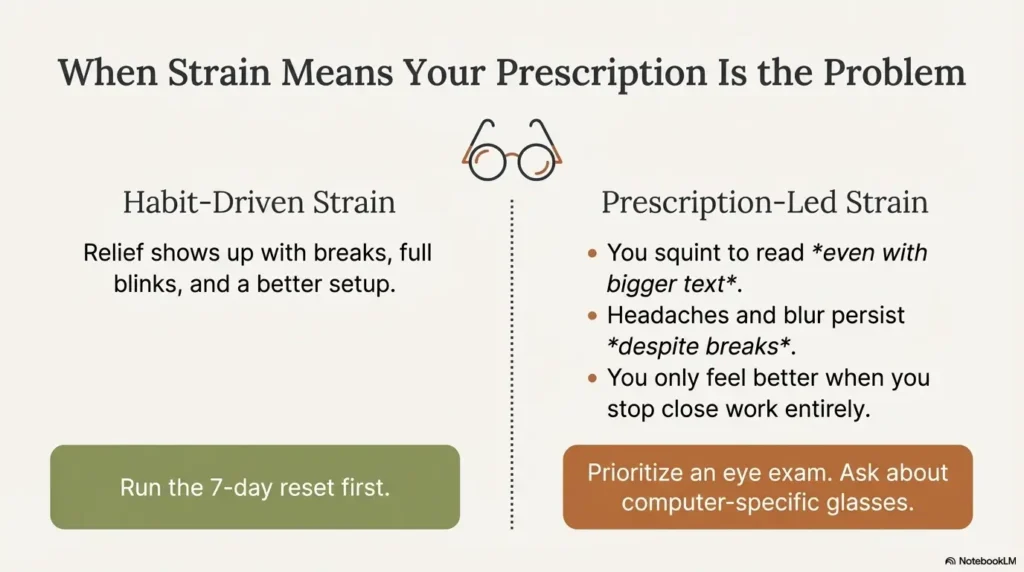
Sometimes the most adult solution is the simplest: your eyes aren’t failing. They’re asking for the right optical support. Eye doctors often point out that eye strain can be linked to uncorrected vision or a prescription mismatch—especially with lots of close work.
Clues it’s prescription-led (squinting, headaches, blur that persists)
- You squint to read even with bigger text.
- Headaches show up predictably after reading tasks.
- Blur persists even after breaks and full blinks.
- You feel better only when you stop close work entirely—not just when you take breaks.
Computer glasses vs reading glasses: what to ask at the exam
If you do long sessions on a desktop monitor, the “sweet spot” distance can differ from a book or phone. Ask about:
- Whether your current prescription matches your primary screen distance.
- Whether a computer-specific solution makes sense for your routine.
- Whether dry-eye signs are present and what supportive options are safe for you.
Blue-light lenses: where they may help (and where they don’t)
Blue-light lenses get marketed like a magic shield. In reality, their value depends on what you mean by “help.” If your main issue is dryness and reduced blinking, lenses alone won’t solve it. If your main issue is late-night bright screens and sleep disruption, brightness and timing changes may matter more than any lens. Think of lenses as a possible accessory, not the core fix.
Money Block: Decision card (habit reset vs glasses check)
Choose A: Run the 7-day reset first
- Symptoms spike mainly during screens
- Relief shows up with breaks + full blinks
- Dry air clearly worsens symptoms
Trade-off: Requires habit consistency for 7 days.
Choose B: Prioritize an eye exam now
- Persistent blur or headaches despite breaks
- Squinting is constant, even with big text
- New symptoms or rapid worsening
Trade-off: Requires scheduling and follow-through.
Neutral next action: Pick A or B—then commit for 7 days (A) or book the appointment today (B) using an annual eye exam checklist for seniors.
Common mistakes that keep eyes burning: the “quiet inflammers” list
This is the section where we save you time—and pain—by naming the common traps. None of these mean you’re doing life wrong. They just mean you’re human in a world designed by people with very young eyeballs.
Mistake #1: tiny text → closer face → more strain
When text is small, you lean in. When you lean in, focus demand rises and blinking often drops. The fix is comically simple: increase text size early, before discomfort starts.
Mistake #2: powering through discomfort (micro-breaks prevent macro-flares)
Eye discomfort is like a smoke alarm. If you ignore it, you don’t become tougher—you just build a bigger fire. Micro-breaks keep you out of the end-of-day crash.
Mistake #3: rubbing eyes (short relief, longer irritation)
Rubbing feels good because it changes sensation. But it can irritate the surface. If you’re tempted to rub, do a “blink set” instead: 10 gentle full blinks, then look far for 20 seconds.
Here’s what no one tells you… the goal isn’t “less screen time”—it’s less screen strain
Some people reduce screen time and still feel awful because the setup stays the same. The win isn’t abstinence. It’s a comfortable routine that lets you live without paying for it with pain.
Small, true sentence: Comfort is a system, not a mood.
When to seek help for painful dry eyes: don’t DIY these patterns
If you only skim one section, skim this. The point of a practical plan is not to prove you can handle everything alone. It’s to help you choose the right next step—fast.
Urgent today: severe pain, light sensitivity, trauma, sudden vision change
- Sudden vision loss or major vision change
- Severe eye pain (especially with light sensitivity)
- Eye injury, foreign body sensation that won’t resolve
- Sudden one-sided worsening with redness and pain
Same-week visit: thick discharge, persistent redness, one-eye worsening
- Thick discharge or crusting with worsening symptoms
- Persistent redness that doesn’t improve with basic care
- One eye clearly worsening compared to the other
Post-op caution: don’t assume it’s “just screens” after eye surgery
If you’ve had recent eye surgery (like cataract surgery), new or worsening pain deserves a quick check-in with your surgical team or eye doctor. Don’t treat that as “normal screen fatigue.” If dryness is part of your post-op story, preservative-free tears after cataract surgery can be a safer conversation starter than experimenting randomly, and it’s also worth knowing the warning signs of cataract surgery complications in seniors.
- Severe pain or sudden vision change = urgent evaluation.
- One-eye worsening is a caution pattern.
- Recent surgery changes the rules.
Apply in 60 seconds: If you have any red-flag symptoms, stop DIY and call for guidance today.
FAQ
Does the 20-20-20 rule really work for seniors with dry eyes?
It often helps because it reduces focus fatigue and restores break frequency. For seniors, it works best when you pair it with full blinks and bigger text so you’re not leaning in and staring.
Why do my eyes water if they’re “dry”?
Irritation can trigger reflex tearing—your eyes respond like, “Emergency! Send water!” The catch is that reflex tears don’t always stabilize the surface the way a healthy tear film does, so you can feel watery and dry at the same time.
How far should my monitor or tablet be from my eyes?
Far enough that you don’t lean forward, close enough that you don’t squint. A practical rule is arm’s length with text scaled up until it’s comfortable.
Are preservative-free drops safer if I use tears multiple times a day?
Many clinicians discuss preservative-free options as a gentler choice for frequent use, especially for sensitive eyes. What’s right depends on your health history and symptoms—so if you’re needing drops often, ask an eye professional for personalized guidance.
What screen brightness is best at night for eye pain?
Avoid a bright screen in a dark room. Lower screen brightness or raise room lighting so the contrast isn’t extreme. Balanced lighting usually feels better than relying on a single “night mode” setting.
Can eye strain cause headaches—or is it my glasses prescription?
Both are possible. If headaches show up predictably after close work, and you’re squinting or seeing persistent blur, an updated prescription or a computer-distance solution may matter. If headaches improve mainly with breaks and bigger text, strain is more likely the driver.
How long should eye strain last if I fix my setup?
Mild strain often improves within days when you adjust habits and environment, but duration varies. If symptoms persist, worsen, or include red flags (severe pain, light sensitivity, sudden vision changes), get evaluated.
Do blue-light glasses help—or is it mostly marketing?
They may help some people in specific scenarios, but they won’t fix the core drivers of dryness-based strain (blink drop, tiny text, glare, and contrast). Start with the higher-leverage fixes first.
What if the 7-day plan helps only a little?
That’s still useful data. It may mean dryness is only part of the story (prescription, lid health, inflammation, medication side effects, or other causes). If you improved 20–30% but plateaued, bring your notes to an eye professional.
Next step: one concrete action in 5 minutes
Let’s end with something you can do before you forget this tab existed.
Set a repeating 20-minute cue (phone, watch, or browser)
Pick one method and commit for the next 2 hours. That’s it. Two hours is enough to prove to your brain that this isn’t “a whole new lifestyle.” It’s a small lever.
Place a “blink card” at screen level (one sentence, big font)
Write: “Bigger text. Look far. Full blinks.” Put it where your eyes naturally land. Yes, it feels a little silly. It works anyway.
If you haven’t had an eye exam in 12–24 months, schedule one
If headaches, blur, or persistent discomfort are part of your story, an eye exam can help you separate “habit-driven strain” from “optical support needed.” Both are solvable. The trick is choosing the right first step. If you want guardrails, start with how often seniors should get dilated eye exams and bring an eye exam checklist to your appointment.
Money Block: Comfort tier map (Tier 1 → Tier 5)
Use this to scale your effort without turning your life into a wellness project.
- Tier 1: 20-20-20 for your longest session each day.
- Tier 2: Add full blinks during breaks + increase text size.
- Tier 3: Fix glare + night contrast (screen/room balance).
- Tier 4: Reduce dry air exposure (vents, fans, humidity).
- Tier 5: Eye exam + ask about prescription fit and dry-eye support.
Neutral next action: Start at Tier 2 for 7 days, then add one tier only if needed.
Infographic: Your 7-Day Reset Map
Days 1–2: Calm the surface
20-20-20 for first 2 hours + bigger text + vents away from face.
Days 3–4: Stabilize comfort
Timer for sessions > 20 minutes + blink “warm-up set” + glare audit.
Days 5–7: Make it automatic
One permanent rule (no tiny text) + blink card + daily “did I lean in?” check.
Close the loop: your 15-minute finish line
Back to the hook—burning eyes after “just a little screen time.” Here’s the answer you deserved from the start: your eyes aren’t fragile. They’re signaling that your current setup and blink pattern are asking too much. When you fix the system—breaks, full blinks, bigger text, calmer air—your eyes often calm down in a way that feels almost suspiciously normal.
If you want a clean 15-minute finish line, do this:
- Set the repeating 20-minute timer.
- Increase text size on your main device one notch.
- Redirect vents away from your face.
- Write the blink card and place it at screen level.
Then run it for 48 hours. Not forever. Just long enough to feel the difference. If you get meaningful relief, keep going for the full 7 days. If you don’t—or if you see red flags—treat that as useful information and get evaluated. If you’re wondering whether something is “normal aging” or something that deserves attention, glaucoma vs normal aging is a helpful reality-check read before you spiral.
Last reviewed: 2025-12.