


Make the Page Behave: Why New Lenses Aren’t Enough for Macular Degeneration
The prescription is new. The lenses are expensive. And the page still collapses after the first few lines—letters fade, the middle of words goes missing, glare blooms, and your place slips like it’s on ice.
When that happens with macular degeneration, the problem is often not “stronger glasses.” It’s the reading system: central vision function, contrast sensitivity, glare tolerance, lighting, and the skills your eyes use to stay on a line.
A low vision specialist for macular degeneration is a clinician who evaluates how you actually use vision for real tasks (mail, labels, screens), then builds a plan using lighting and contrast fixes, magnification (optical or electronic), and training so reading becomes usable again—not perfect.
Keep guessing, and the quiet losses stack up: unopened bills, misread medication labels, shrinking independence.
This post helps you stop shopping by “strongest magnifier,” set up a reading station that works at 7 p.m. (not just noon), and choose a true low vision rehabilitation clinic without getting trapped in device-only sales.
Let’s make the page behave.
If you have macular degeneration and “new glasses” didn’t bring reading back, the issue is often not the prescription—it’s central vision function, contrast sensitivity, glare, lighting, or visual skills that routine exams don’t fully test for daily tasks. A low-vision specialist measures how you actually use vision and matches you with a targeted plan (lighting, contrast, magnification, e-readers/CCTV, and training). The goal isn’t perfect vision—it’s usable reading again.
Table of Contents
New glasses, same struggle: what this usually means (and what it doesn’t)
If you’re dealing with age-related macular degeneration (AMD), it’s common to feel whiplash after a new prescription: the world can look “clearer,” yet reading is still a negotiation. That disconnect usually points to one of three bottlenecks: central vision function, contrast/glare, or how the task is set up (distance, lighting, endurance).
The National Eye Institute explains AMD as damage to the macula that can blur central vision. That matters because reading is a central-vision sport. You can have a respectable acuity number on a chart and still feel like letters “vanish” in the middle of words.
The “sharp but not readable” paradox: why letters still won’t stay put
Glasses correct focus. But AMD often affects what happens after focus: the ability to detect faint edges, tolerate glare, hold your place on a line, and keep speed without fatigue. The result is the classic complaint: “I can read the first few words… then it falls apart.”
- Missing letters in the center of words
- Washed-out print unless lighting is perfect
- Jumping lines or losing your place
- Fast fatigue (neck, eyes, headaches) after 2–5 minutes
Curiosity gap: the one “hidden” vision skill most glasses don’t fix
If you only remember one phrase from this article, make it this: contrast sensitivity. Reading isn’t just “can you see black ink?” It’s “can you see subtle edges quickly, repeatedly, under imperfect light?” AMD can lower contrast sensitivity early, even before acuity looks dramatically different.
Quick self-check at home (2 minutes, no apps)
Try this with a newspaper, a bill, or a recipe:
- Read for 30 seconds under your usual lighting. Notice speed and effort.
- Move a bright lamp over your shoulder (not in your eyes). Read again.
- Now increase contrast: place the page on a dark mat, or switch to bold, large text on a device.
If the difference is dramatic, you’re not “being picky.” You’re seeing a setup problem a low-vision plan can address.
- Notice if lighting changes everything.
- Track fatigue and line-skipping (they’re clues, not quirks).
- Focus on function: speed, comfort, accuracy.
Apply in 60 seconds: Try a lamp behind your shoulder and bold/high-contrast text—then write down what improves.
Low-vision specialist vs regular eye doctor: different job, different outcome
Here’s the part that surprises people: you can have an excellent ophthalmologist or retina specialist and still need a different type of care for daily function. This isn’t a criticism. It’s division of labor.
Who does what (optometrist/ophthalmologist/retina vs low-vision care)
Think of it like this: retina care focuses on protecting and treating the eye. Low-vision care focuses on helping you live well with the vision you have today.
- Ophthalmologist / retina specialist: diagnosis, monitoring, treatment decisions, medical management.
- General optometrist: refraction (glasses), routine functional checks, referrals.
- Low-vision specialist: functional testing for tasks + device fitting + training plan.
- Occupational therapy (vision rehab): skill-building in real-life tasks at home/community.
The American Academy of Ophthalmology describes low vision as vision loss not fully corrected by conventional glasses, contacts, medicine, or surgery—exactly the zone many AMD readers land in.
What “low vision rehab” actually includes (beyond devices)
Most people picture a magnifier and call it a day. Real low-vision rehab is closer to a system:
- Lighting + glare control (so your tools actually work)
- Contrast and reading strategies (so you keep your place)
- Device matching (optical vs electronic for your tasks)
- Training (so the device doesn’t live in a drawer)
In plain terms: it’s less “buy this” and more “build a setup that works on your worst day, not your best day.”
Curiosity gap: why your retina visit can be excellent… and reading still fails
A retina visit is often focused (rightly) on disease status and treatment. Reading, meanwhile, is a messy mix of contrast, attention, lighting, and endurance. The appointment can be “perfect” and still not answer the question you came in with: “How do I read my mail without crying in the kitchen?” (If you’re navigating treatment logistics too, it can help to understand a typical wet AMD injection schedule so your rehab plan and clinic visits don’t collide.)
The missing tests: what a low-vision evaluation measures for reading
A low-vision evaluation is less about “what’s your prescription” and more about “what’s your real-world performance.” That shift is why it can feel like the first time someone actually listened to your reading problem.
Functional reading baseline: speed, endurance, and working distance
Reading isn’t binary. It’s a blend of speed and stamina. A good evaluation often looks at:
- Speed: can you read fast enough to make the task worth doing?
- Endurance: can you keep it up for 5–10 minutes without your brain tapping out?
- Working distance: how close do you need to be, and is that realistic?
Contrast sensitivity + glare: the “washed-out page” culprit
This is where a lot of “new glasses didn’t help” stories live. Under bright overhead lighting, glossy paper can bloom into glare. Under dim lighting, gray-on-white print can fade into nothing. Measuring contrast sensitivity and glare tolerance helps explain why you read better at noon than at 7 p.m.
Central scotoma mapping + preferred retinal locus (PRL) basics (plain English)
If your central vision has a blurry or missing patch (a scotoma), your brain often learns to “look beside” the target so you can still see it—using a spot of healthier retina. That spot is sometimes called a preferred retinal locus. Understanding where your “best seeing” area is can make reading training and device choice much more effective.
Let’s be honest… “20/40” can still be miserable for reading
Numbers can be misleading. A chart measures recognizing isolated letters in controlled conditions. Reading is continuous, high-repetition, high-fatigue work. If your eyes are doing gymnastics to keep the line stable, “good acuity” won’t save you from exhaustion.
Show me the nerdy details
Reading performance can be limited by more than acuity: contrast sensitivity, fixation stability, scotoma location, and the ability to maintain a steady “landing spot” on text. Many low-vision plans aim to improve function by adjusting the environment (lighting/contrast), increasing effective letter size (optical/electronic magnification), and teaching strategies that reduce line loss and re-reading.
- Ask about contrast sensitivity and glare.
- Track endurance (how long before you quit).
- Bring a real-world reading example (bill, label, recipe).
Apply in 60 seconds: Write down “My reading breaks after ___ minutes” and “I lose my place when ___.”
The reading toolbox for AMD: what works when glasses don’t
If you’re time-poor (and most people are), you want a plan that avoids expensive dead ends. The trick is to think in order: scene → tool → training. If you buy tools before you fix the scene, you’ll keep blaming the device for what lighting did.
Step 1: Fix the scene (lighting, contrast, distance) before buying anything
The cheapest “device” is often a better setup. One bright, adjustable lamp can outperform a $60 magnifier used in dim light.
- Lighting: aim it at the page, not at your eyes.
- Contrast: bold fonts, high-contrast modes, matte paper when possible.
- Distance: closer often helps, but needs comfort and stability.
Step 2: Choose magnification type (handheld, stand, spectacle, electronic)
Each type solves a different problem:
- Handheld magnifiers: quick labels and receipts; harder for long reading.
- Stand magnifiers: more stable; better for longer tasks if lighting is good.
- Spectacle magnifiers / high-add readers: hands-free; can require very close working distance.
- Electronic magnifiers (portable or desktop/CCTV): adjustable size + contrast; often best for endurance.
A low-vision specialist helps match the tool to the task so you’re not forcing a label-tool to do a novel’s job.
Step 3: When electronic wins (e-readers, tablets, CCTV/desktop video magnifiers)
Electronics often win when contrast is the enemy. Being able to flip to white-on-black, increase boldness, and control brightness can be life-changing. Many readers with AMD do better on an e-reader or tablet than on glossy paper—even with the same text size. (For screens that still feel too harsh, even after “dark mode,” you may need to make your iPhone screen dimmer than minimum to reduce glare-triggered fatigue.)
Curiosity gap: the tool most people buy first… and later regret
The most common regret purchase is the “strongest handheld magnifier” bought online without trying it. Stronger magnification often means a smaller field of view and a harder time keeping your place. It feels powerful for one word and unbearable for a paragraph.
Decision Card: Optical vs Electronic for AMD Reading
Choose optical first if…
- You mainly read labels and short receipts
- Glare/contrast isn’t the main issue
- You need simple, no-charging tools
Choose electronic if…
- You need high contrast or inverted colors
- You read for 10+ minutes (mail, books, Bible)
- You want adjustable size + brightness + bold
Neutral action: Pick one task (mail, recipes, meds labels) and choose the tool type that fits that task first.
Set up your “reading station” at home: tiny changes, big dividends
A reading station sounds dramatic, but it’s just a repeatable setup that removes friction. The goal is to stop doing “DIY vision rehab” at random places around your house. Your brain loves consistency. AMD reading gets easier when the environment stops changing every five seconds.
Task lighting that doesn’t fight glare (placement, color tone, angle)
Use one adjustable lamp with a shade. Place it behind and to the side of your reading shoulder so light lands on the page without reflecting into your eyes. If glossy paper is a glare monster, tilt the page slightly and move the lamp—small angle changes can cut glare fast. (If you’re optimizing the whole kitchen zone, a glare-free under-cabinet lighting setup can help reduce the “bloom” that makes print disappear.)
High-contrast hacks (paper, pens, overlays, bold settings)
- Switch to matte paper when you can (gloss is a trap).
- Use bold fonts and increased line spacing on devices.
- Try white-on-black or yellow-on-black display modes if glare is the issue.
- For handwriting: thick, dark pens and lined paper with bold lines.
Reading posture + fatigue: the overlooked limiter
If you must lean in, you’ll quit early. Use a book stand or a simple document holder to bring text upright. Your eyes can work hard. Your neck shouldn’t have to.
Here’s what no one tells you… endurance matters more than “can you read one line”
Many people can “prove” they can read for 10 seconds. The real win is reading for 10 minutes without anger, headache, or losing your place. Build for endurance, not hero moments.
Short Story: The kitchen-table trap (120–180 words) …
It usually starts at the kitchen table. The mail pile leans against a fruit bowl. A lamp sits nearby, but it’s the wrong lamp—the bright bulb throws a glossy glare straight into your eyes. You try anyway. You squint, then you inch closer, then closer. The words look sharper for a second, but your place slides off the line like it’s on ice. After two minutes, you’re not just tired—you’re irritated. You tell yourself you’ll “do it later,” which becomes tomorrow, which becomes a week.
Nothing is wrong with your effort. The setup is quietly sabotaging you. The first real breakthrough isn’t a fancy device. It’s a predictable scene: the lamp behind your shoulder, the page at an angle, the text in high contrast, and a plan that doesn’t demand perfect vision to be successful.
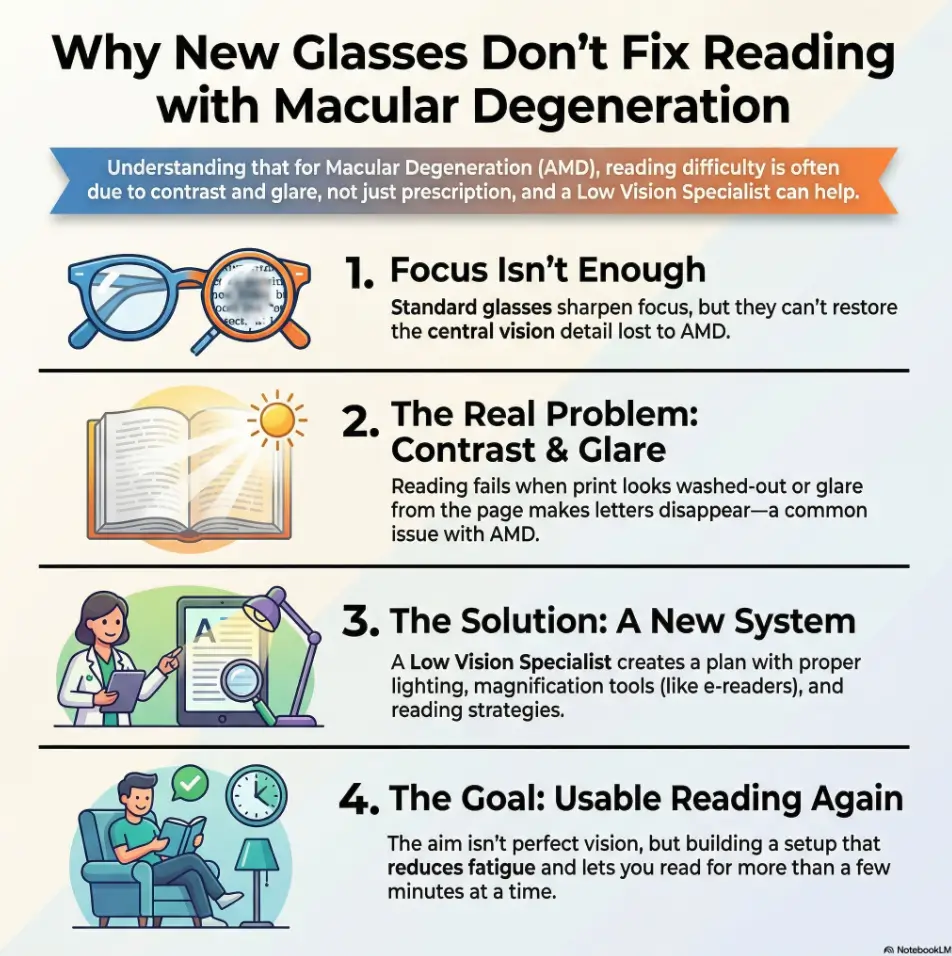
Infographic: Why “New Glasses” Can’t Fix AMD Reading by Itself
1) Focus (glasses)
Sharpens the image… but doesn’t restore missing central detail.
2) Contrast & glare
Washed-out print, glare bloom, low-contrast text.
3) Letter size
Magnification raises “effective size” so your better retina can work.
4) Skill & endurance
Training + setup reduces line loss and fatigue.
Accessibility note: This infographic shows a four-step pipeline—focus, contrast/glare, letter size, and skill/endurance—explaining why prescriptions alone may not restore reading.
Mini Calculator: “How much bigger text do I actually need?”
This isn’t a medical measurement—just a practical sizing shortcut for device settings.
- Pick a sentence you can read (even slowly) and note its size (e.g., “small print,” “body text,” “large print”).
- Now increase text size until you can read for 60 seconds without losing your place.
- Estimate your “size multiplier”: if you went from roughly 12pt to 24pt, that’s about 2×.
Output: Your starting point for e-reader/tablet settings is your multiplier (often 1.5×–3× for comfort, depending on contrast and scotoma effects).
Neutral action: Set one device (phone, Kindle, iPad) to your “60-second comfort” size and keep it there for a week.

Finding the right clinic in the US: how to choose without guessing
Searching “low vision specialist near me” can feel like stepping into a fog of ads and unclear job titles. You want a clinic that is task-first (reading, screens, labels) and offers training, not just a showroom of devices.
Search terms that actually work (what to type, what to avoid)
- Try: “low vision rehabilitation”, “vision rehab clinic”, “low vision optometrist”, “occupational therapy low vision”
- Add: “macular degeneration” + your city/state
- Avoid relying on: “best magnifier store” (shopping isn’t rehab)
Also consider reputable organizations that train in low-vision care (for example, Lighthouse Guild programs and large academic eye centers), then work outward from there.
Credentials + services checklist (devices, training, OT referrals, follow-ups)
You don’t need perfection. You need the basics:
- Functional testing for reading and screens (not only acuity)
- Multiple device types to trial (optical + electronic)
- Training or referral pathways (often OT/vision rehab)
- Follow-up plan (because the first setup is rarely the final setup)
What to bring to your first visit (med list, current glasses, “reading fails” examples)
- Your current glasses (all of them, even the “bad idea” pair)
- A printed example of what you can’t read (bill, label, recipe)
- List of your top 3 tasks (mail, phone, recipes, Bible, work forms)
- Notes on lighting: “I read best at ___ time of day”
The 3 questions that reveal if a clinic is truly reading-focused
- “Do you measure contrast sensitivity or glare for reading problems?”
- “Will I get to try optical and electronic options during the visit?”
- “What does follow-up look like if the first device doesn’t fit my life?”
- Look for functional testing, not only acuity.
- Choose places that offer training or referral pathways.
- Bring real-world reading examples so the visit stays practical.
Apply in 60 seconds: Copy the “3 questions” above into your notes app and use them on your next call.
Who this is for / not for
For: “I can’t read comfortably anymore” (mail, Bible, recipes, labels, phone)
If reading has become a daily tax—mail piling up, recipes avoided, labels guessed at—low-vision care is not “giving up.” It’s building a method. (If your goal is books again—especially the kind you love and return to—start with the most forgiving format you can; many people do well with a giant print Bible for macular degeneration when print fatigue is the main barrier.)
For: “My Rx changed, but my page didn’t” (blur, missing letters, waviness)
This is the classic “new glasses didn’t fix reading” pattern. It often means you need functional testing, better contrast control, and a magnification strategy you can tolerate for more than a minute. (If you’re doing this in your later decades, you may relate to the very specific hurdles of low-vision reading for 80+ with AMD—fatigue, lighting sensitivity, and device tolerance become more decisive.)
Not for: sudden vision change or new severe distortion (treat as urgent)
If something changes suddenly—new severe distortion, a sudden drop, a curtain-like shadow—don’t try to “optimize your setup” first. Treat that as urgent medical territory.
Not for: hoping a single device replaces all tasks (reading ≠ cooking ≠ screens)
One tool rarely handles everything. Most people do best with a small “kit”: one quick label solution, one endurance reading solution, and one screen solution. (For TV specifically, readability often comes down to settings and contrast—smart TV subtitles for AMD can be a surprisingly high-impact fix.)
Eligibility Checklist: Should you book a low-vision evaluation this month?
- Yes if you can read for less than 5 minutes before fatigue or line loss.
- Yes if lighting changes your ability dramatically.
- Yes if you avoid mail, bills, or medication management.
- Yes if you’ve bought devices and they ended up unused.
- No (for now) if you have a sudden vision change—seek urgent evaluation first.
Neutral action: If you checked two “Yes” boxes, schedule a functional low-vision visit and bring one reading example.
Common mistakes: the money-wasters and time-traps
This is where dollars leak. Not because you’re careless—because the internet makes it seem like magnification is a single-number problem. With AMD, the “wrong” purchase isn’t just wasted money; it can also convince you nothing will help. That’s the real loss.
Mistake #1: chasing stronger glasses when the bottleneck is contrast
If you read better with bold text or certain lighting, that’s not a “need stronger Rx” signal. It’s a contrast/glare signal.
Mistake #2: buying magnifiers by diopter alone (and hating them at home)
Stronger magnification narrows your field of view. If you lose your place easily, a narrow window can turn reading into a treadmill. Trying devices in person—under realistic light—matters.
Mistake #3: “bigger print” without glare control (why it still fails)
Bigger print on glossy paper can still wash out. Bigger print on a device with high contrast and adjustable brightness often works better. Size helps, but it’s not the only lever.
Mistake #4: waiting until you’ve stopped reading entirely
The earlier you build a workable system, the easier it is to keep the habit of reading. It’s much harder to restart after months of avoidance.
Don’t do this: building a drawer of devices with no training plan
If you’ve ever thought, “I guess it didn’t work,” you’re not alone. Many tools fail because the setup (light/contrast) wasn’t fixed and training never happened. A low-vision plan treats that as normal—and designs around it.
- Fix lighting and glare before judging devices.
- Don’t shop by “strongest number.” Shop by task and endurance.
- Plan for follow-up and training.
Apply in 60 seconds: Choose one task (med label, mail, recipes) and commit to solving only that task first.
When to seek help (and a short safety note)
Safety/Disclaimer (short): educational only, not medical advice; confirm with your eye-care team
This article is educational and meant to support conversations with your eye-care professionals. It can’t diagnose, treat, or replace medical care. When in doubt—especially with new symptoms—contact your clinician promptly. (If you want a simple way to track changes without spiraling, a printable symptom diary for seniors can make your next visit more specific and useful.)
Seek urgent care if: sudden vision drop, curtain/shadow, new flashes/floaters, severe new distortion
If you notice a sudden, significant change—new severe distortion, a dark curtain, sudden vision loss, or new flashes/floaters—treat that as urgent. Don’t wait for a “reading tools” appointment to handle an abrupt shift. (If you’re also worrying about what the future holds, it can help to read a grounded overview of blindness risk after 70 so fear doesn’t become your only plan.)
Seek timely low-vision help if: reading speed collapses, headaches/fatigue spike, you’re avoiding bills/med labels
If reading has turned into avoidance (bills, mail, medication labels), that’s not just inconvenient—it can affect safety and independence. Timely low-vision care is about building workarounds before frustration becomes your default setting.
If you drive: what “reading okay” does not imply about driving safety
Being able to read with a magnifier or in perfect lighting doesn’t automatically translate to safe driving vision. Driving decisions should be made with your eye-care team and according to your state’s requirements and your real-world safety.
Insurance, Medicare, and costs: how to ask the right way (US framing)
Cost is a real barrier, and the rules can be confusing. In the US, coverage often differs between the evaluation (the visit) and the devices (magnifiers, electronic systems). Private insurance varies, and Medicare coverage can be limited for many assistive devices. Your best move is to ask precise questions and get the answers in writing when possible.
What may be covered vs often out-of-pocket (typical patterns, plan-dependent)
- May be covered: parts of an evaluation (depending on coding, provider type, and plan rules).
- Often out-of-pocket: many optical and electronic low-vision devices.
- Sometimes available via programs: state services, nonprofits, veterans resources, device loan libraries.
The exact words to use when calling your insurer (so you don’t get bounced)
Try this script (and yes, read it like a robot—robot gets results):
“I’m looking for coverage details for a low-vision evaluation related to macular degeneration. Is a functional low-vision exam covered, and are there specific provider types required (optometrist, ophthalmologist)? If devices aren’t covered, do you cover occupational therapy for vision rehabilitation when prescribed?”
Receipts, HCPCS codes, and documentation: what clinics can provide
Ask the clinic for itemized receipts and any documentation that supports medical necessity or functional need. Even when insurance won’t pay, documentation can help with flexible spending accounts, disability services, or program eligibility.
If cost is the barrier: low-cost alternatives and lending libraries (what to ask about)
Not every solution requires buying new equipment. Many communities have device loan programs or nonprofit resources. Also: the National Library Service (NLS) through the Library of Congress provides free talking books and braille services for eligible patrons—an option that can keep reading in your life while you optimize print reading. (If you’re also budgeting around medical care, it helps to understand common AMD treatment cost patterns—and when questions about Medicare coverage for Eylea injections matter for planning.)
- Separate visit coverage from device coverage.
- Request itemized documentation.
- Use community resources to bridge gaps.
Apply in 60 seconds: Save the insurer script above and use it on your next phone call.

FAQ
Do low-vision specialists treat macular degeneration—or just help me function?
They usually focus on function: reading, screens, labels, mobility, and daily tasks. Your retina specialist treats the eye disease; low-vision care helps you get more life out of your remaining vision with tools, training, and environment changes. (If you’re in the middle of treatment decisions, it can be calming to learn what to expect from AMD injections—and what “normal” feels like for many patients.)
If my eye doctor says my prescription is “fine,” why can’t I read?
Glasses correct focus. AMD can reduce central detail, contrast sensitivity, and line stability—things that can make reading hard even when acuity looks decent on a chart. A functional low-vision evaluation targets those gaps.
What’s the difference between a low-vision optometrist and occupational therapy for vision?
Low-vision optometry commonly focuses on assessment and device selection/fitting. Occupational therapy (vision rehab) often focuses on training—how to use devices and strategies in real life: cooking, mail, meds, phone use, and home setup.
Are electronic magnifiers (CCTV) worth it for AMD reading?
For many people with AMD, yes—especially when contrast and glare are major issues or when endurance matters. Electronic options can increase size, improve contrast, and reduce strain. The best choice depends on your tasks and whether you can trial devices first. (If screens fatigue you quickly, it may be less about “willpower” and more about settings and pacing—especially for digital eye strain in seniors.)
How do I find a reputable low-vision clinic near me in the US?
Search “low vision rehabilitation” plus your city/state, and look for clinics that offer functional testing, multiple device trials, and training or OT referrals. Use the “3 questions” from the clinic section to screen quickly.
Will Medicare cover a low-vision exam or magnifiers?
Coverage varies and can be limited, especially for many assistive devices. Some evaluations or therapy services may be covered depending on provider type and documentation, but many devices are often out-of-pocket. Call your plan with specific questions about the evaluation and therapy, separately from devices.
What should I bring to a low-vision appointment to get better results?
Bring your current glasses, a real reading example you struggle with (bill/label), and a short list of your top three tasks. Include notes about lighting and fatigue (when reading collapses and why).
Can low-vision rehab help with using an iPhone/Kindle and reading mail?
Yes. Device settings (bold, contrast, brightness, text size) plus strategies for keeping your place can make screens and mail dramatically easier. Many people do best with a combination: one solution for labels, one for endurance reading, and one for screens.
Next step: one concrete action you can do today
If you want a result within 15 minutes, do this: make a one-page “Reading Fail List,” then use it to book a low-vision evaluation. It’s the fastest way to turn a vague complaint (“I can’t read”) into a solvable problem (“I can’t read bills at night without glare and line loss”).
Quote-Prep List: Your one-page “Reading Fail List”
- Task 1: (Example: medication labels) — what’s hard, and when?
- Task 2: (Example: mail/bills) — what print type fails?
- Task 3: (Example: books/Bible) — how long before fatigue?
- Lighting note: best time of day / worst time of day
- Tools tried: magnifier, readers, phone settings (what helped, what didn’t)
Neutral action: Bring this list plus one real reading sample to your appointment.
One last loop to close: when “new glasses” don’t fix reading with AMD, it’s not a moral failure and it’s rarely “you’re not trying hard enough.” It’s a mismatch between what standard refraction solves and what reading actually demands. A low-vision specialist bridges that gap—testing function, shaping the environment, matching the right tools, and teaching you how to use them without burning out. (And if safety is part of your day—stairs, bathrooms, night navigation—pair your reading plan with practical low-vision nighttime bathroom safety steps so the wins carry beyond paper.)
If you do only one thing today, do the Reading Fail List and make the call. The goal is simple and quietly radical: put reading back in your life—mail, recipes, books, and all. (If you’re living with wet AMD, don’t ignore the home environment either—a wet AMD home safety checklist can reduce the “little hazards” that multiply when vision is unpredictable.)
Last reviewed: 2026-01.