
Accessible Entry: Keypad Lock Solutions for Seniors with Presbyopia
The front door should not feel like a tiny eye exam with a deadbolt attached. Yet that is exactly what happens when a senior with presbyopia tries to use a keypad lock at dusk, in the rain, while holding mail, groceries, a cane, or the last thread of patience.
Door lock keypad tips for seniors with presbyopia are not just about buying a smarter lock. They are about making entry visible, reachable, calm, and backed up before the wrong-code chorus begins. Presbyopia makes close-up focus harder with age. Add small numbers, glossy buttons, weak porch lighting, and a rushed moment on steps, and a simple entry code can become a fall-risk scene nobody meant to create.
Most keypad problems are setup problems. Better light helps. Bigger buttons help. A saner routine helps. A backup plan helps most of all.
- ✔ Choose keypad features that support older eyes and hands.
- ✔ Set up the doorway so the user does not lean, squint, or hurry.
- ✔ Create a simple entry routine that works on cold, tired evenings.
- ✔ Build a backup plan for batteries, lockouts, and emergencies.
Safer Entry Starts Before the Code
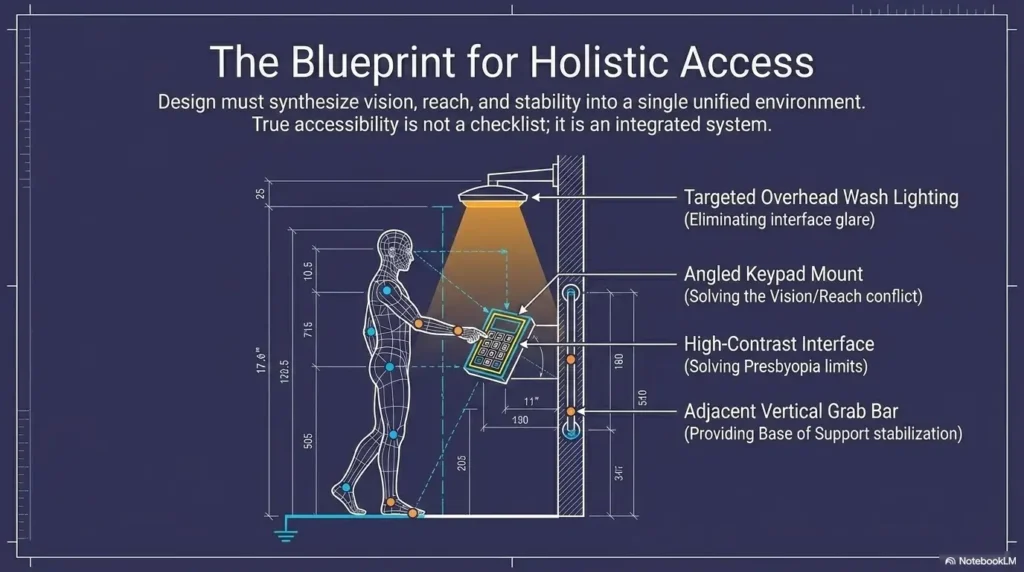
A senior-friendly keypad is not one magic gadget. It is a small system: visible numbers, steady footing, good lighting, a reachable height, a memorable code, and a boringly reliable backup.
When those pieces work together, the door stops acting like a pop quiz and starts acting like a door again.
Table of Contents
Safety / Disclaimer Block
This guide is general home safety and accessibility education. It is not medical, locksmith, legal, fire-code, rental, or ADA compliance advice.
Presbyopia is a common age-related vision change that makes close-up focus harder. The American Academy of Ophthalmology describes it as a normal part of aging, but sudden vision changes, double vision, new headaches, eye pain, or rapid loss of clarity should be discussed with an eye care professional.
Falls are also a serious concern for adults 65 and older. The CDC has long emphasized that falls are common, costly, and often preventable. A keypad lock that causes leaning, rushing, or standing too long on steps deserves practical attention, not a shrug.
For apartments, condos, assisted living, rentals, shared entrances, and homes with fire-safety requirements, check the lease, building rules, local code, and emergency access needs before changing locks.
Who This Is For, And Who Should Skip the DIY Route
For seniors who can use a keypad but struggle to see it clearly
This guide is for the person who can manage a code but finds the numbers too small, too dim, or too close. That is not a character flaw. It is design meeting biology in poor lighting.
There is a difference between “I cannot use technology” and “this keypad was designed for raccoon paws and perfect lighting.” Many older adults do fine with digital entry once the setup respects real hands, real eyes, and real weather.
If the senior already uses tools such as a magnifier, large-print clock, or simplified phone layout, the same principle applies at the door: reduce friction before blaming memory or confidence. A home that already uses practical strategies for senior near-vision problems can extend those strategies to the front entry.
For caregivers setting up safer entry
This is also for adult children, spouses, home aides, neighbors, and family members who want safer access without turning the entryway into a checkpoint.
The goal is not to make the senior feel managed. The goal is to make the door easier to use on an ordinary Tuesday when the mail is damp, the porch bulb is moody, and someone is thinking about soup.
Not for every door, every diagnosis, or every home
A keypad may not be enough if the senior has advanced memory issues, frequent wandering, severe low vision, tremor, repeated falls, unsafe steps, unreliable battery habits, or high-security needs.
In those cases, the safer answer may be a locksmith consultation, occupational therapy home assessment, better exterior lighting, railings, a monitored access plan, or a different lock type. Technology can help, but it should not be asked to do ballet on a broken stage.
- Match the keypad to vision, reach, hand comfort, and memory.
- Check whether the door area itself is safe enough for keypad use.
- Use professional help when falls, severe vision loss, or building rules complicate the setup.
Apply in 60 seconds: Ask, “What part of unlocking the door feels hardest: seeing, reaching, remembering, waiting, or balancing?”
Start With the Real Problem: The Keypad Is Too Close, Too Dim, Too Rushed
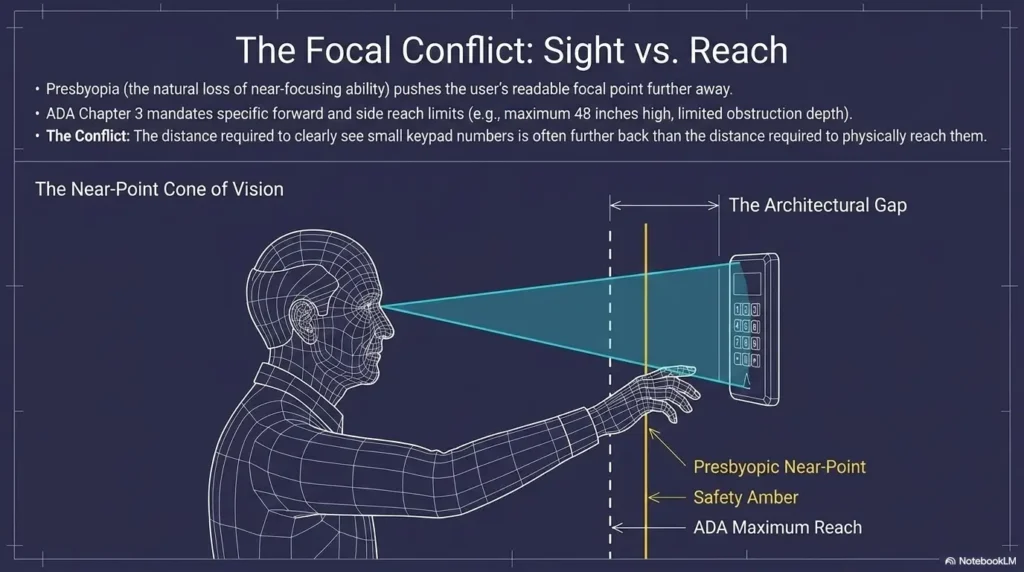
Presbyopia turns the front door into a near-vision test
Presbyopia makes close work harder because the eye’s focusing ability changes with age. Reading a book, seeing a medication label, checking a phone, and pressing small keypad numbers all live in the same near-vision neighborhood.
At the door, the problem gets sneaky. The keypad may sit inches from the face, but not at a comfortable reading distance. Numbers may be small. Buttons may be glossy. A storm door may reflect porch light. The user may be wearing distance glasses but not readers.
That is how a four-digit code becomes opera.
If near tasks are becoming harder across the home, a broader setup such as bedroom safety for seniors with poor vision can support the same visibility-and-routine mindset beyond the entryway.
The danger is not only the wrong code
A wrong code is annoying. The bigger concern is what happens around it.
The person leans closer. One foot shifts on the step. A bag slides down the wrist. A cane gets tucked under an elbow. The user turns to check whether someone is watching. The door remains locked, the weather keeps happening, and frustration starts pressing buttons too.
That is the moment to fix the system.
Here’s what no one tells you
The “smart” lock is often less important than the doorway around it. A modest keypad with large numbers, good lighting, and a calm routine may outperform a sleek app-connected lock mounted too high under glare.
Think of the keypad as the final note in a small piece of music. If the lighting, footing, reach, and backup plan are out of tune, the lock cannot carry the whole song.
Choose Bigger Numbers Before You Choose More Features
Large, high-contrast keys beat fancy touchscreens
For presbyopia, the best keypad is usually the one that can be read without negotiation.
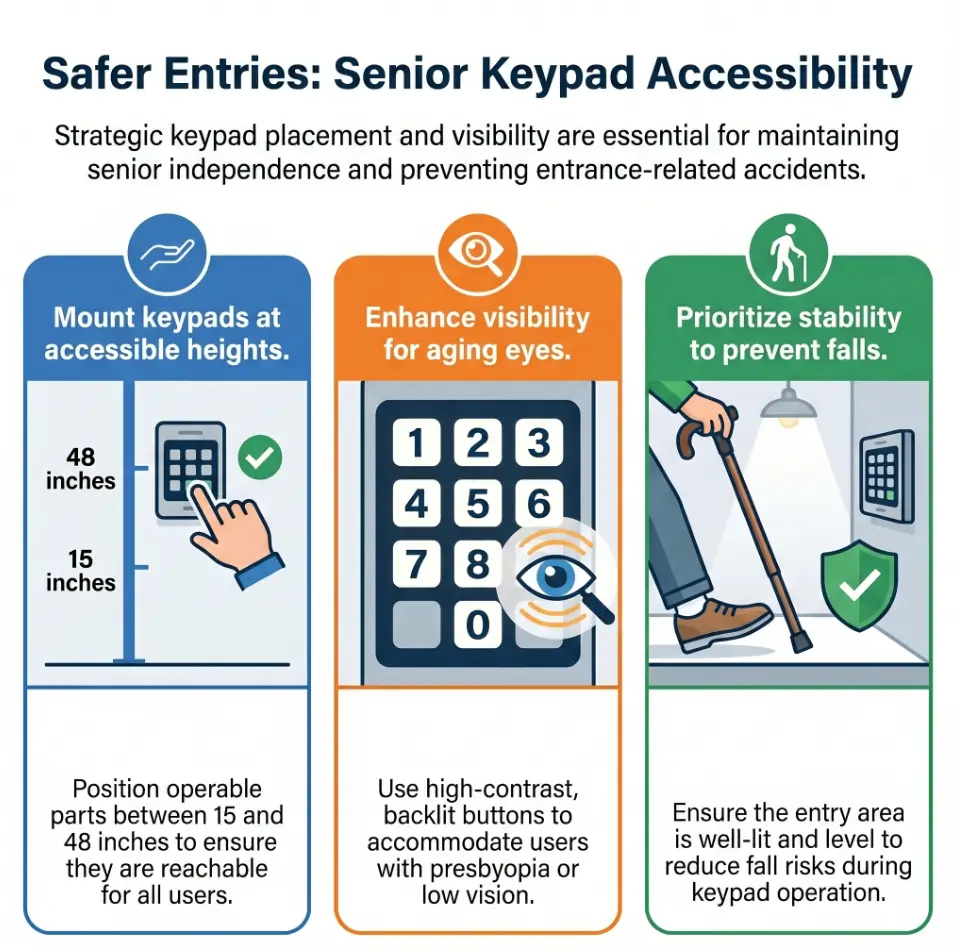
Look for large numerals, high contrast between numbers and background, physical buttons, simple symbols, and a layout that does not require guessing. Matte surfaces often work better than shiny black glass because they reflect less light.
Touchscreens can look elegant in product photos. At night, with fingerprints, rain, glare, and no tactile landmarks, elegance sometimes turns into a tiny black mirror with opinions.
Backlighting should help, not blind
Backlighting is useful only when it improves visibility from the user’s real standing position. A keypad that glows too sharply may create glare. A keypad that wakes only after a hidden touch may confuse a senior who expects the numbers to be visible right away.
Pair keypad lighting with porch lighting. Warm, even light is often more comfortable than harsh overhead glare. If the user is glare-sensitive, related home adjustments such as choosing 2700K vs 3000K lighting for glare-sensitive eyes may help make the entryway calmer.
Tactile feedback matters after sunset
Raised buttons, click feedback, audible beeps, or vibration can help users confirm each press without staring at every number. This is especially useful when the user cannot comfortably focus close up in low light.
Some people love beeps. Some people would rather invite a trumpet into the foyer. Choose a lock with adjustable sound when possible.
- Prioritize large physical buttons over glossy touchscreens.
- Test backlighting at night, not only in a bright store photo.
- Choose feedback the senior can notice without becoming startled.
Apply in 60 seconds: Stand at the door after sunset and check whether the numbers are readable without leaning forward.
Mounting Height: The Quiet Detail That Saves the Most Friction
Put the keypad where the hand naturally lands
A keypad can have perfect buttons and still fail if it is mounted in the wrong place.
The user should not have to stoop, tiptoe, reach across a planter, bend around a storm-door frame, or lean over a package pile. The best height is where the hand naturally lands while the person stands squarely, balanced, and close enough to open the door safely.
Watch the user from the side. Do they lean in? Raise a shoulder? Stretch the wrist? Shuffle closer to the step edge? The body gives reviews before the mouth does.
Borrow accessibility thinking, even at home
Private homes are not always bound by public accessibility rules, and local requirements vary. Still, accessibility thinking is useful. The US Access Board’s ADA guidance commonly uses a 48-inch maximum high reach for many operable parts in accessible settings.
That number is not a magic home-installation command. It is a helpful reminder: controls should be reachable without awkward stretching.
For a senior who uses a walker or wheelchair, height and approach angle matter even more. A related entryway and mobility routine, such as low-vision walking guidance, can help caregivers notice balance and navigation problems before they become door problems.
Test it with groceries in one hand
A good keypad setup should work while the user holds mail, a purse, a cane, or the emotional weight of a dentist appointment.
Do a one-hand test. Then do a bad-weather test. Then do a tired-evening test, which is the most honest test because homes are used by humans, not showroom mannequins.
Money Block: 5-Point Keypad Placement Check
| Question | Yes / No | Next Step |
|---|---|---|
| Can the senior reach it without leaning? | Yes / No | If no, consider remounting or choosing another lock style. |
| Can the numbers be read at normal standing distance? | Yes / No | If no, improve lighting or choose larger buttons. |
| Is the footing flat and clear? | Yes / No | If no, clear clutter and address mats, steps, or slick areas. |
| Can it be used with one hand occupied? | Yes / No | If no, adjust storage, lighting, railing, or routine. |
| Is there a backup access plan? | Yes / No | If no, create one before relying on the keypad daily. |
Neutral action line: Fix every “No” before calling the setup senior-friendly.
Code Design: Make It Memorable, Not Obvious
Avoid birthdays, addresses, and “1234”
A senior-friendly code should be easy to enter but not easy for outsiders to guess. Avoid birthdays, street numbers, phone endings, anniversary years, and the famous security masterpiece known as 1234.
Also avoid writing the code on a visible sticky note near the door. That is not a backup plan. That is a tiny welcome mat for bad judgment.
Use a pattern the senior can repeat calmly
The best code has a private logic. It may come from a phrase, a family association, or a keypad pattern that is easy to practice but not obvious from public information.
For example, a phrase-based code might use the first letter of a short family saying mapped to phone numbers. A pattern code might use a shape that feels easy under the fingers. Keep the explanation simple, and keep it private.
Don’t make the code too long
Many homes do well with a memorable 4- to 6-digit code, depending on lock rules and security needs. Longer is not always better if it increases failed attempts, stress, or lockouts.
A 12-digit code may look responsible on paper and become a sidewalk opera in January.
Money Block: Code Design Decision Card
| Choice | Best When | Trade-Off |
|---|---|---|
| 4 digits | The senior needs fast, calm entry and the lock allows code changes. | Must avoid obvious numbers and shared public clues. |
| 5 to 6 digits | The user can remember a slightly longer private pattern. | More secure feeling, but more chances for input errors. |
| Individual codes | Family, aides, cleaners, or neighbors need separate access. | Requires someone to manage updates and remove old codes. |
Neutral action line: Pick the shortest non-obvious code the senior can enter correctly three times in a row.
Common Mistakes That Turn Keypads Into Tiny Trouble Machines
Mistake 1: Buying the prettiest touchscreen
Smooth black-glass locks can look beautiful online. But for presbyopia, they often bring four problems: glare, fingerprints, no tactile landmarks, and poor visibility in shifting light.
If the senior must look closely to find where the numbers appear, the lock is already asking too much.
Mistake 2: Ignoring porch lighting
A great keypad under poor lighting becomes a guessing game with hinges.
Porch lights should illuminate both the keypad and the standing area. If overhead light creates shadows over the keypad, add side lighting or adjust fixture direction. Motion lights can help, but they should not startle the user or shut off too quickly. If brightness is a problem indoors or outdoors, the same thinking behind a motion sensor light that feels too bright can guide a calmer entry setup.
Mistake 3: Placing the keypad behind a storm door
Storm doors can create awkward wrist angles, reflections, condensation, and extra steps. The user may have to hold one door open while entering a code on another. That is not convenience. That is choreography with consequences.
If a storm door is involved, test the full motion: unlock storm door, hold or prop it, see keypad, enter code, open main door, step through safely.
Mistake 4: Forgetting battery routines
A dead battery at 8:40 p.m. is not a “minor inconvenience.” It is a tiny domestic thriller.
Most keypad locks warn before batteries fail, but warnings only help if someone notices them and acts. Choose a battery routine and write it down.
Mistake 5: Sharing one code with everyone
One shared code is simple until it is not. If an aide changes, a neighbor no longer helps, or a cleaner stops coming, the whole household code may need to change.
Individual codes can improve accountability and reduce confusion. Just keep the management system simple enough that it actually gets used.
Show me the nerdy details
Keypad usability depends on more than numeral size. Contrast sensitivity, viewing angle, glare, tactile discrimination, feedback timing, and input tolerance all matter. Physical buttons give the finger a landmark, while flat touchscreens require more visual confirmation. Backlighting works best when the light source improves figure-ground separation without reflecting off glossy trim, wet surfaces, or storm-door glass. For older adults, the setup should reduce cognitive load: fewer steps, consistent order, clear confirmation, and a backup path when the main method fails.
The Senior-Friendly Keypad System
Large numbers, high contrast, low glare, steady lighting.
Flat landing, clear mat, no leaning over clutter.
Physical buttons, tactile feedback, calm code length.
Beep, click, light, or lock movement the user understands.
Battery plan, key override, trusted contact, support card.
Build the 10-Second Entry Routine
Stop, light, glasses, code, confirm
A routine reduces panic because it tells the body what comes next.
Try this sequence:
- Stop with both feet stable.
- Turn on or wait for the light.
- Use reading glasses if needed.
- Press the code slowly.
- Listen or look for confirmation.
- Open the door fully before stepping through.
Short. Repeatable. Unheroic in the best possible way.
Practice during daylight first
Practice when the senior is calm, rested, and not juggling groceries. Daylight practice lets the person learn the buttons, feedback, and door motion before the evening version adds shadows and weather.
Three successful repetitions are a good start. Then test at dusk. Then test with one hand carrying something light.
Let’s be honest
The best routine is the one someone will actually use when tired, cold, annoyed, and holding a pharmacy bag with one finger.
Do not build a routine that requires perfect attention. Build one that survives ordinary human weather.
Short Story: The Porch Light That Solved the Lock
Margaret’s son was ready to replace her new keypad after two weeks of wrong codes. She called it “that little piano of humiliation.” The lock had large buttons, a decent battery, and a simple code. On paper, it looked fine. Then he visited at 7:15 p.m. and watched from the walkway. The porch bulb sat behind her shoulder, throwing her own shadow across the keypad.
To see the numbers, she leaned forward, shifted her weight onto the top step, and pressed faster because she felt watched by the street. They changed one bulb, added a small side light, moved a planter, and practiced the code three times after dinner. The lock stayed. The drama left. The lesson was almost embarrassingly practical: sometimes the problem is not the senior, the code, or the gadget. Sometimes the door is simply lit like a mystery film.
Backup Access: Plan for Batteries, Brain Fog, and Bad Weather
Keep one non-digital backup
Every keypad setup needs a backup that does not depend on the keypad working perfectly.
Options may include a mechanical key override, a secured lockbox, trusted neighbor access, a family-held spare, or an emergency contact plan. Hidden keys under mats, fake rocks, and flowerpots are risky because they are also familiar to people with less charming intentions.
For low-vision households, a related low-vision key identification system can make backup keys easier to recognize without turning the key ring into a metal octopus.
Create a battery-change calendar
Follow the lock manufacturer’s battery guidance. Then make the routine easier to remember by tying it to something already on the household calendar.
Common choices include the first day of each quarter, the start of a new season, daylight saving time changes where applicable, or the same day smoke alarm batteries are checked.
Keep the correct battery type written down. “It takes those little rectangle ones” is not a plan. It is a scavenger hunt wearing slippers.
Save support info where it helps
Create a printed card inside the home with the lock brand, model, battery type, family contact, locksmith number, and basic reset note. Use large print.
Do not place the code itself where visitors can see it. If memory is a concern, ask a trusted family member, clinician, or occupational therapist for a safer approach.
Money Block: Backup Access Checklist
- Mechanical backup: Is there a key override or reliable non-digital entry method?
- Trusted person: Does one nearby person know how to help without guessing?
- Battery supply: Are the correct batteries stored inside the home?
- Support card: Is lock information printed in large type?
- Emergency plan: Does the senior know who to call if locked out?
Neutral action line: Write the backup plan before the keypad becomes the only plan.
Door Area Setup: Make the Keypad Safer Before the Finger Touches It
Clear the landing zone
Before discussing lock features, look at the standing area.
Remove loose mats, curled rugs, cords, wet leaves, packages, uneven planters, and anything that makes feet negotiate while fingers enter a code. A keypad can be easy to read and still unsafe if the user stands on a slippery little welcome-trap.
For seniors with poor vision, doorway safety connects to the same fall-prevention thinking used in aging vision fall prevention at home. The entryway is not separate from the home safety system. It is the first chapter.
Add light from both directions
Overhead-only light can cast shadows over the keypad, especially when the user stands between the fixture and the lock. Add side lighting when possible, or choose a fixture that lights the keypad face and the landing area.
If glare is the issue, reduce shiny surfaces nearby. Glossy paint, glass, wet trim, and polished hardware can bounce light into the eyes. If glare is a theme throughout the house, practical adjustments from matte vs glossy paint for low-vision comfort may help around the door as well.
Give the hand somewhere stable to pause
Many people steady themselves while unlocking a door. That does not mean the lock should become the balance aid.
Consider railings, sturdy door pulls, well-placed handles, and a clear spot to set packages. If the user has a walker, cane, or balance difficulty, the “where does the hand go?” question becomes central.
- Clear the place where the senior stands.
- Light the keypad and the feet.
- Provide a stable hand option that is not the keypad itself.
Apply in 60 seconds: Remove one loose mat, planter, or package habit from the entry path today.
Caregiver Setup: Help Without Taking Over
Make the senior the test pilot
Let the senior try the keypad while the caregiver watches quietly. The door will reveal the truth faster than any product review.
Notice where the user pauses. Watch whether they lean, squint, press too fast, miss the confirm signal, or become embarrassed. Do not narrate every mistake. That turns a setup session into a driving test, and nobody asked for clipboards on the porch.
Write instructions in human language
Use large print, short steps, and plain words. Keep the troubleshooting card inside the home near a logical place, not taped beside the lock.
A useful card might say:
- Stand close and turn on porch light.
- Press code slowly.
- Wait for beep and green light.
- If it does not open, wait 10 seconds and try once more.
- If still locked, call the listed contact.
For families already simplifying everyday technology, simplifying an older parent’s phone often pairs well with simplifying door access routines.
Avoid shame-based teaching
Frame mistakes as design feedback, not personal failure.
Say, “This button is hard to see,” not “You keep missing it.” Say, “The light is casting a shadow,” not “You’re doing it wrong.” The door setup should preserve dignity. Good design lowers the emotional temperature.
Product Features Worth Paying For, And Features That Can Wait
Worth paying for
For seniors with presbyopia, the most useful features are usually practical and boring:
- Large physical buttons
- High-contrast numerals
- Adjustable or clear backlighting
- Weather resistance suitable for the entry location
- Low-battery alerts
- Individual user codes
- Auto-lock delay control
- Mechanical key override
- Helpful customer support
Auto-lock timing deserves special attention. Too fast can create confusion if the user needs extra time. Too slow may leave the door unsecured. Choose a setting that matches the person’s real pace.
Nice but not essential
Wi-Fi controls, app history, voice assistant integration, temporary guest passes, and fingerprint access can be helpful for some families. They can also add setup complexity.
If the senior dislikes apps, do not make an app the daily entry method. Let caregivers use smart features in the background if useful, while the senior uses a simple visible keypad.
Skip or reconsider
Be careful with tiny touchscreens, app-only setup, unclear battery warnings, hard-to-read icons, or locks that require fast multi-step input.
Also reconsider locks with confusing lockout behavior after wrong attempts. Security features matter, but the user needs to understand what happens after mistakes. A lock that silently refuses cooperation can turn a doorway into a courtroom.
Money Block: Feature Tier Map
| Tier | Feature Type | Why It Matters |
|---|---|---|
| Tier 1 | Large physical buttons | Improves visibility and finger placement. |
| Tier 2 | Backlight and contrast | Reduces evening guessing and glare problems. |
| Tier 3 | Battery alert and key override | Prevents lockout surprises. |
| Tier 4 | Individual codes | Helps families manage access safely. |
| Tier 5 | App and smart-home extras | Useful only if they do not complicate daily entry. |
Neutral action line: Buy Tier 1 through Tier 3 before paying extra for features the senior may never touch.
When to Seek Help
Call an eye care professional
Get eye care guidance if near vision changes suddenly, reading glasses stop helping, headaches increase, double vision appears, eye pain occurs, or the senior starts avoiding close-up tasks.
Presbyopia is common, but not every vision complaint should be filed under “just aging.” If the person has glaucoma, macular degeneration, cataracts, diabetes, stroke history, or new visual symptoms, professional evaluation matters.
Families tracking warning signs may also find senior vision changes warning signs useful for deciding when “wait and see” is not the right plan.
Call a locksmith or accessibility-minded installer
Use professional help if the door frame is old, the lock sticks, the strike plate is misaligned, the keypad sits too high, or installation affects a rental, condo, assisted living unit, or shared building.
A sticky door can make any keypad seem broken. If the user enters the code correctly but must shoulder the door like a detective in a raincoat, fix the hardware.
Call a clinician or fall-prevention specialist
Ask for medical or occupational therapy guidance after recent falls, dizziness, new weakness, medication changes, fear of entering or exiting the home, or difficulty using stairs.
If the senior uses a walker, cane, or wheelchair, the lock may be only one part of the entry problem. The safer solution may include railings, ramps, lighting, door swing adjustments, or a different access method.
FAQ
Are keypad door locks good for seniors with presbyopia?
Yes, they can be good if the keypad has large visible numbers, good contrast, steady lighting, tactile feedback, a simple code, and a backup access plan. The lock should reduce fumbling, not add a new doorway puzzle.
What type of keypad is easiest for older adults to read?
Physical buttons with high-contrast numbers and clear backlighting are usually easier than glossy touchscreens. Raised buttons also help the user find numbers by touch when lighting is imperfect.
Should seniors use smart locks or regular keypad locks?
A simple keypad lock may be better if the senior dislikes apps or does not use a smartphone confidently. Smart locks can help caregivers manage access, but daily entry should stay simple for the person using the door most.
How can I make a door keypad easier to see at night?
Improve porch lighting, reduce glare, choose backlit buttons, clean the keypad surface, and test visibility from the user’s normal standing position. Do not judge the setup only in daylight.
What is the best code length for a senior-friendly keypad?
Many homes do well with a memorable 4- to 6-digit code, depending on lock rules and security needs. Avoid obvious numbers such as birthdays, addresses, or 1234. The code should be secure enough and calm enough to enter correctly.
What should caregivers do if a parent keeps entering the wrong code?
Check lighting, button size, glare, code complexity, battery status, mounting height, and whether the senior is leaning or rushing. If mistakes are new or paired with confusion, vision changes, dizziness, or memory concerns, seek professional guidance.
Are fingerprint locks better for seniors?
Sometimes, but not always. Dry skin, cold weather, arthritis, sensor placement, and backup needs can make fingerprint locks less reliable than expected. A visible physical keypad may be more predictable for many seniors.
How often should keypad lock batteries be changed?
Follow the manufacturer’s guidance. Many families create a quarterly or twice-yearly check so battery replacement happens before the warning becomes urgent. Keep the correct battery type written in large print inside the home.
Is it safe to give a neighbor a keypad code?
It can be, if the neighbor is trusted and the lock allows individual codes. Avoid one shared code for everyone. Remove or change codes when helpers change, and do not leave codes visible near the door.
Next Step: Do a Two-Minute Door Test Tonight
The porch-light audit
Stand where the senior normally stands after sunset. Can the numbers be read without leaning in? Is the keypad in shadow? Does glare bounce off glass, glossy paint, or wet trim?
If the answer is no, improve light before replacing the lock. The cheapest fix may be a bulb, angle, or side light.
The one-hand test
Try entering the code while holding a bag, cane, or stack of mail. Notice whether balance changes. Notice whether the user needs to twist, reach, or set things on the ground.
If this test feels awkward, the doorway is asking for too much coordination.
The backup check
Confirm where the backup key, lockbox, battery, support card, or trusted-contact plan lives. A backup plan should be boring. Boring is beautiful here.
- Test at night from the real standing position.
- Use one hand to mimic groceries, mail, or a cane.
- Confirm the backup plan before the first battery scare.
Apply in 60 seconds: Tonight, read the keypad from normal distance before touching it.
Conclusion: Make the Door Boring Again
The front door does not need to become a family technology project with passwords, panic, and porch theatrics.
For seniors with presbyopia, safer keypad entry usually comes from simple upgrades working together: large high-contrast buttons, gentle backlighting, reachable mounting, a memorable code, clear footing, better porch light, and one reliable backup method. The lock matters. The setup around the lock matters more.
That is the quiet win: turning the door from a nightly near-vision test back into a normal threshold.
Your next step within 15 minutes: stand at the door after sunset, enter the code with one hand occupied, and write down the first three friction points. Fix the easiest one first. Small hinges move large doors.
Last reviewed: 2026-05.